


Krydos
-
Posts
26593 -
Joined
-
Last visited
-
Days Won
952
Everything posted by Krydos
-
It should already be white listed. Are you getting an error trying to connect?
-
Mail service has been re-enabled on your account. Try to keep your sent emails below 50 per day, or if you need to send more than 50 emails per day we will need justification and some additional information from you about the emails you send.
-

[Solved] Request to unsuspend my account open0
Krydos replied to open0's topic in Escalated Requests
Unsuspended, and your eu.org domain has been added to your open0 account. If you need any of the files from bca you can download the full backup from https://heliohost.org/backup/ -
Your rebuild has been started and you should have just gotten an email about it being ready. If you want we can install the control panel for you.
-
Remote access enabled. Use host 65.19.141.67 and port 5432.
-
Try it now.
-
Keep in mind you can monitor your own load at https://heliohost.org/dashboard/load/ so it won't come as a surprise if you get suspended.
- 4 replies
-
- 1
-

-
- suspended
- unsuspend account
- (and 1 more)
-
Does it work now?
-
According to this https://forum.hestiacp.com/t/pop3-connection-failure/3688/3 Hestia should use POP3 with SSL/TLS on port 995 if you have enabled mail. The more good emails you send from an IP the more Gmail trusts the IP. Any IP which has sent very few good emails, such as every VPS IP will have less trust. Keep sending good emails, and keep getting your Gmail friends to click "not spam" and it should get better. I've seen Gmail block an email I sent myself from an Outlook.com email address, so it doesn't matter what you do. If Gmail wants to delete your emails they will. Check the bounce back errors like I said. They should say exactly what you need to do. By default your VPS has vps#.heliohost.us as your reverse DNS, but if you want it changed to something else let us know. You can also try sending an email to https://www.mail-tester.com/ and if the score isn't 10/10 post the link to the full report so we can help you fix any errors.
-
It sounds like you haven't applied your SSL certificate to your mail server. Are you using a control panel like Hestia or installing things via SSH? For the Gmail issue, Google is just arrogant and think they own the internet, so they do whatever they want to. They sometimes block emails from everyone for no reason at all, and even worse they sometimes, in their infinite wisdom, just delete emails entirely and don't even let you see it in spam. Gmail is hands down the worst email provider you can use if you actually want to receive emails. That said, sometimes they will give a bounce back error message explaining what the issue is. If you're missing DNS records or reverse DNS it will definitely affect your ability to send email to Gmail, but even with perfect credentials you should expect a lot of your emails to be deleted without being delivered. I've even contacted Gmail support and they told me that even Google employees can't make emails get delivered. The only real option is to use something other than Gmail.
-
Closing as solved since the account in question has been suspended for violation of our terms of service.
-
You would need to get a VPS. https://heliohost.org/vps/
-
Check your email and click the link to take the next step in the reset process. If you need something from your backup it can be downloaded from https://heliohost.org/backup/
-
[Solved] I can't continue to the Plesk control panel
Krydos replied to fares007's topic in Suspended and Queued Accounts
Solved on Discord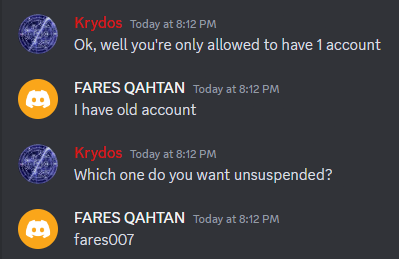
-
[Solved] I can't continue to the Plesk control panel
Krydos replied to fares007's topic in Suspended and Queued Accounts
Have you read the terms of service? https://wiki.helionet.org/hosting/terms -
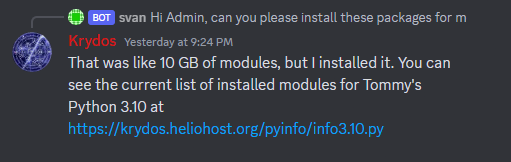
Roughly 24 hours ago, or about 14 hours before you posted this. https://discord.com/channels/398197622168616962/398538798994161664/1183610297437655080
-
We've had quite a few people ask us to implement a dark theme on our website over the years. We all love dark themes too, but there was always something more important to work on. Most of the credit for our night mode goes to Flaze who took it upon himself to recolor every page of our main website. Krydos also contributed by merging the changes into the website code, and all of our staff contributed by testing out the new theme and making suggestions on how to make it look even better. If you want to check out the new theme go to https://heliohost.org/#night and take a look around. You can always go back to day mode by clicking the little sun icon on the menu bar, or if you're using a mobile device you can find the night mode and day mode toggle at the bottom of the menu. Let us know what you think of the new night mode theme.
-
[Solved] Did not receive email for Plesk transfer
Krydos replied to mrxdwolf's topic in Escalated Requests
It was so corrupted it was breaking the entire server so I manually deleted it. I wasn't sure if it was even being used anymore because it was so broken, but it sounds like the owner would like a new account so I sent an invite to recreate your account. -
Everyone please welcome the newest addition to our HelioHost staff, MoneyBroz. A question that we get a lot is how to get promoted to admin. You need to do exactly what MoneyBroz did by helping out on the forums and Discord with simple questions that don't require admin access. Since he continued helping out we took notice and offered to give him access to the admin tools so he can help out even more. Here at HelioHost we all started as regular users helping out like MoneyBroz, and eventually got promoted.
- 1 reply
-
- 4
-

-
-
This domain has been removed from your account.
-
You were probably following a guide for cPanel where your home directory is your username. On Plesk the home directory is your main domain.
-
We now have a new uptime monitor that you can find at https://status.heliohost.org/ This page uses the open source project Upptime which uses Github cron jobs to monitor the status of our servers, and then hosts the results on Github pages. Since the system is fully external to our servers, if there is some catastrophic event that takes all of our servers offline at the same time, the status page will still be accessible and you'll be able to read updates for what is going on. The page also attempts to automatically determine what the reason is for the downtime. In the case of Johnny and Tommy the short downtimes are usually scheduled Apache restarts to load new settings.
-
- 1
-
-
The start.py file in your cgi-bin directory is not 755 permissions. It should be rwxr-xr-x.
-
The module python-telegram-bot has been installed on Tommy's Python 3.10. You can see the current list of installed modules at https://krydos.heliohost.org/pyinfo/info3.10.py
-
Thanks for the donation. One of the things we frequently do during fundraisers is give people 1 month inactivity immunity for each $5 that they donate. We don't have an active fundraiser going right now, but since you gave us $10 I gave you 2 months of inactivity immunity. That means you won't go inactive until 2024-03-02 and you won't get archived until 2024-04-02. You should also check your spam filters to make sure you're receiving emails from us. We send an email at 28 days reminding you to login in the next 2 days, and then we send you another email at 30 days when your websites are taken offline. If you check your email at least once every couple days you can avoid being suspended at all by just logging in when you get the reminder. Another thing we can mention is we're going to release a new server soon named Morty that will start at $1 per month, and as long as the $1 per month gets paid you don't have to remember to login ever again.