


wolstech
-
Posts
19261 -
Joined
-
Last visited
-
Days Won
766
Everything posted by wolstech
-
google translate says: No account exists with the username kharab7esh.
-

[Solved] Request for Installation of Python Modules
wolstech replied to mishra's topic in Escalated Requests
So then these probably need to be installed on both Morty and Tommy...the modules don't follow you when you move. -
[Solved] Request for Installation of Python Modules
wolstech replied to mishra's topic in Escalated Requests
Krydos will reply here when he installs it. But yes, it'll probably show on that list as well. -
[Solved] Set Up SPF, DKIM, and DMARC Records
wolstech replied to gebu8f's topic in Escalated Requests
The PYZOR one is usually because you sent an email that says "test" or similar as its body. Send a real real email and that won't happen. The others labeled "abused TLD", and "untrustworthy TLD" have no fix besides buying a normal domain that ends in a standard TLD like .com or .net. A lot of these funky TLD's like .top and .xyz are heavily abused for spam phishing and similar, and as a result, the bulk of email providers will not accept email from them or will send that email to spam. -
[Solved] Request for Installation of Python Modules
wolstech replied to mishra's topic in Escalated Requests
Typing extensions 4.12.2 is already present. Escalating to have djangorestframework installed... -
[Solved] Upgrade VPS without creating PayPal Account
wolstech replied to ocarina's topic in Escalated Requests
Krydos can assist with this. We can probably accept the payment via stripe instead. Just keep in mind that when we process manual payments like this, we usually require you to purchase 6 months worth of service at a time due to the labor associated with the manual processing. I'm not sure how that will be handled with an upgrade. -
Note that for the .xyz domain, on the mail tester test mentioned above, it is impossible to get a 10/10 because .xyz is considered an abused TLD. Many mail providers will mark email from .xyz domains as spam regardless of what you do.
-
If that website doesn't work for you either, then it's your PC or home network, which means there isn't much we can do on our end. Try turning off your security software and firewall, and also make sure your router and ISP allow outbound connections on port 3389. If you have a cell phone data plan and can run a hotspot, try connecting to your VPS while on the hotspot instead of the home internet to eliminate the router and ISP as the cause. Try another computer if available, and also try a cell phone RDP app (on your data plan with wifi turned off if possible). Until you can make a connection on port 3389, your VPS's RDP won't work for you.
-
It's on your end most likely. It works for both me and Krydos. Does this site load for you? http://portquiz.net:3389/ (it may take a minute or two to load if it works, that site is very slow). Also, are you on an enterprise/school network by chance? It's pretty common for port 3389 to be blocked on those networks, and RDP will not work from them as a result.
-
Removed.
-
I'll let krydos handle this since he is the one who suspended you.
-
This request does not make sense to us. Do you mean you want the domain name to be the same as the account username? Please note that we cannot change hosting account usernames, so the domain will be changed instead. Also, I can't find a hosting account matching your forum account. What is your hosting account's username?
-
It was not suspended in error. It was suspended because you almost crashed Johnny due to extremely excessive load. Can you explain?
-
Account ebsug has been unsuspended. It may take a few minutes to start working. please let us know if you need anything else.
-
Try port 25 with no encryption. SSL isn't really required for a connection to localhost since it never leaves the server. I'm going to have Krydos a look at this anyway, because I am not sure where the other IP is coming from.
-
Try using localhost for the mail hostname when code is running on the server. The .186 is an old IP (may have been the one used to configure the server base image when we made it). I'll bet it was left in a host file or something.
-
Do you want me to just merge the two accounts? That way you can keep using both websites and all of your data, you'll be able to login to ebsug and see all of it together. Also, we don't have a problem with people having a personal and a business account, you just have to ask us first. We can unsuspend both accounts if that's the case. The contents of itrk can be downloaded here: https://heliohost.org/backup/
-
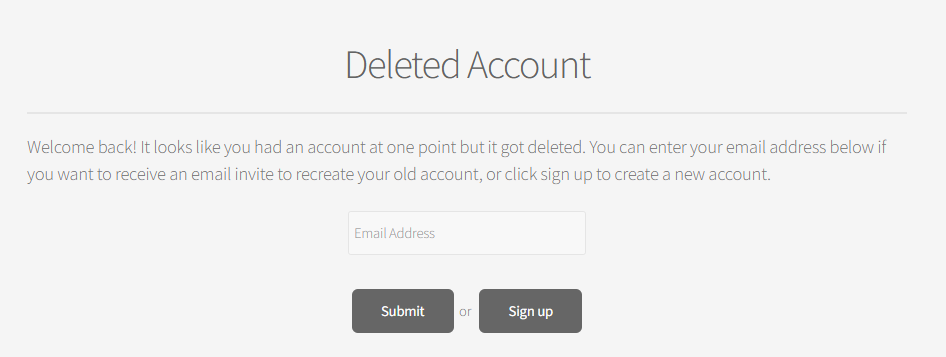
Yes. If you delete your own account, you can recreate it yourself by signing into it and entering your email when prompted. You'll see a screen like the attached picture when you sign into a deleted account. A user can contact support if they would like the record fully deleted so the account cannot be recreated. Note that even if you contact support to delete an account completely, our system retains logs that include the account information and the history of the account such as payments/donations made against the associated email address, suspension history, and domain changes. Such data is retained for compliance and abuse prevention reasons and cannot be removed.
-
What error message do you see when you try uploading files?
-
Domain changed. It can take up to two hours for everything to work...
-
You're suspended for having more than one account. Users are only allowed to have one account (except on Morty). Please see this topic where the other account in the pair also requested unsuspension.
-
MariaDB is an open source fork of MySQL and should run all the same software and scripts. Try running your script using Maria DB and it’ll probably work
-
He is VPS113.
-
Krydos can check on your VPS for you.
-
That email just got flagged as spam because your test email mentions Nigeria and large sums of money in the body of the email. Nearly all spam comes from Nigeria or similar countries, and mentions large sums of money (typically claiming you owe a fee to collect it). Looking at the contents of the email, I would agree with it's classification as spam. I would suggest you not send this as it's currently written. If this is the sort of content you plan to be sending, I would recommend removing the entire section mentioning countries and money. It also looks like the server might be blacklisted. Pretty common when we get an abusive user sending spam or phishing emails. The site mentioned doesn't want to give me any information now about what exactly is blocked. I click the submit button after entering the IP and nothing happens. I'll ask about this one in the staff channel...
