
KazVee
-
Posts
1,209 -
Joined
-
Days Won
46
Everything posted by KazVee
-

[Solved] Request to Add an Addon Domain for QuantumExchange.
KazVee replied to rokinyt55's topic in Customer Service
Looks like this was requested and resolved on Discord. All helpers are unpaid volunteers who donate their time to assist others. Most are based in North America and some are asleep in the middle of our night time. For support response timelines (SLAs and ETAs), check: https://wiki.helionet.org/ETA For guidance on where and how to ask for help, see: https://wiki.helionet.org/FAQ#Where_do_I_ask_for_help? To understand how Community-Powered Technical Support works, visit: https://wiki.helionet.org/FAQ#How_does_community-powered_support_work? -
Please provide proof of purchase/license for the software. For the SQL issue, looks like you raised a duplicate request by email, which has been replied to. Please refer here. As I've already asked you here: Please do not create duplicate forum threads for the same issue. All helpers are unpaid volunteers who donate their time to assist others. Asking the same question in multiple posts can lead to wasted effort and slower support. For guidance on where and how to ask for help, see: https://wiki.helionet.org/FAQ#Where_do_I_ask_for_help? To understand how Community-Powered Technical Support works, visit: https://wiki.helionet.org/FAQ#How_does_community-powered_support_work? For support response timelines (SLAs and ETAs), check: https://wiki.helionet.org/ETA Posting the same question multiple times may delay answers to your request as well as to other users who ask for help.
-
I've added that subdomain to your account for you. Please note that it may take up to 2 hours for the change to take effect. If after a full 2 hours it doesn't work on your side, please make sure you clear your web browser cache: https://wiki.helionet.org/Clear_Your_Cache
-
[Solved] Is there a trash that I need to empty?
KazVee replied to mgmason's topic in Customer Service
I just checked in my test account, and I didn't get a .trash folder in my Home directory until I actually deleted something. Could you try to make a new file and then delete it? Make sure to leave the "Skip the Recycle Bin and permanently remove [filename]" option unchecked. Once the file is deleted, you should see a new .trash folder appear right in your Home directory. Edited to add: Plesk confirms the .trash folder (they also call it Recycle Bin) is created when the user deletes a file. -
[Solved] Alias request Add new domain for "karvp"
KazVee replied to karvp's topic in Escalated Requests
You're very welcome! This support request is being escalated to our root admins who can set up the alias for you. -
[Solved] Alias request Add new domain for "karvp"
KazVee replied to karvp's topic in Escalated Requests
Do you want it added as an alias or do you want it added as a separate domain? The best way to decide which way you want it setup is: Do you want to have one set of files for both web addresses so visitors to each domain see the exact same content? If yes, you probably want an alias. If you want to have each website different from the other and for each site to not share the same files and content, you want an addon domain. We can add it either way for you, so just let us know which setup you want. 🙂 -
Subdomains don't get a httpdocs folder. Instead, you'll see new folders at the same level as your httpdocs folder (which is where your main domain files go) with the same names was your subdomains. You'll put the web files for the subdomains in the folders named after them.
-
I've added those subdomains to your account for you. Please note that it may take up to 2 hours for the subdomain additions to take effect. If after a full 2 hours they don't work on your side, please make sure you clear your web browser cache: https://wiki.helionet.org/Clear_Your_Cache
-
You're welcome! I've just added that last one now, so it'll work in up to 2 hours. Once a request has been marked [Solved], we usually recommend raising a new ticket, just to make sure nothing gets missed accidentally. Stuff not marked solved is easier to spot when we look for new posts. But as you can see by my reply here, we do still try to keep an eye on all new posts, so it's not a big deal either way. 🙂
-
I've added those domains to your account for you. Please note that it may take up to 2 hours for the domain changes to take effect, and they won't work until you set up your DNS with your domain registrar. To configure your DNS, please see the steps provided on our Wiki to either set NS records pointed at the HelioHost nameservers (ns1.heliohost.org and ns2.heliohost.org) or create A/AAAA records and point them to your server's IPv4/IPv6 address: https://wiki.helionet.org/Addon_Domains#Custom_Addon_Domains If after a full 2 hours the domains don't work on your side, please make sure you clear your web browser cache: https://wiki.helionet.org/Clear_Your_Cache
-
Looks like you raised a duplicate request by email, which has been replied to. Please refer here. Please do not create duplicate forum threads for the same issue. All helpers are unpaid volunteers who donate their time to assist others. Asking the same question in multiple posts can lead to wasted effort and slower support. For guidance on where and how to ask for help, see: https://wiki.helionet.org/FAQ#Where_do_I_ask_for_help? To understand how Community-Powered Technical Support works, visit: https://wiki.helionet.org/FAQ#How_does_community-powered_support_work? For support response timelines (SLAs and ETAs), check: https://wiki.helionet.org/ETA Posting the same question multiple times may delay answers to your request.
-
This support request is being escalated to our root admins.
-
[Solved] Removal of domain and adding of domain
KazVee replied to tinagolden's topic in Customer Service
You're welcome! I see you've also asked for the modules here so please follow that thread for updates. By the way, raising the new thread for the modules was the right thing to do. 🙂 Admins like myself can add/remove domains, but only a root admin can add Python modules, so keeping reach request for domains and modules in its own separate thread makes it easier to get the request to the right admin level who can make the changes needed. -
When asking for modules to be added, please be sure to provide which version of Python you're using. You're on the Tommy server, so are you using Python 3.9 or 3.12? Please see here for more information on how to request additonal Python modules: https://wiki.helionet.org/Python_Tutorial#Request_Additional_Python_Modules
-
[Solved] Removal of domain and adding of domain
KazVee replied to tinagolden's topic in Customer Service
I've made those changes for you. Please note that it may take up to 2 hours for the domain changes to take effect. Please note there is a risk of data loss when domains are removed, since the folders for the domains inside Plesk will be deleted. I made a full account backup for you before I removed the domain, in case you need any of the old files. You can download the backup here: https://heliohost.org/backup If you're not sure how to extract the backup files, please follow our how-to guide here: https://wiki.helionet.org/Account_Backups If after a full 2 hours the newly-added domain doesn't work on your side, please make sure you clear your web browser cache: https://wiki.helionet.org/Clear_Your_Cache -
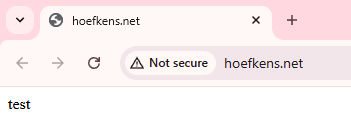
We can certainly reset your account if you want, but when I check your site now, it loads for me: Have you tried clearing your cache? Please give that a try and if you still want a reset, please let us know.
-
I don't remember seeing 2 options for Drupal (CMS, Core) last December when I installed it. I spotted a Softaculous banner earlier that said "Drupal CMS is a version of Drupal that includes core and common extensions, pre-installed and configured to give you a head start", so I guess if you knew you needed whatever common extensions came with the CMS version, that'd be convenient. I didn't notice the CMS one doesn't let you specify a version. The banner didn't list which common extensions the CMS comes with, though. I just tried a test install of Drupal Core 10.5.2 on my test Tommy account, and it completed successfully, so it works okay with MariaDB 10.5.27. It already seems to have a bunch of modules available to be enabled already, so it's not a completely bare bones option to use. I didn't change any of the pre-set default settings in the Custom Installation options, except to set a much stronger admin password. It may be worth trying out Drupal Core (v.10.5.2) and if you need any more extensions, it seems possible to add more contributed modules from Drupal's list of them here. If you don't necessarily have your heart set on Drupal, we have a few other CMS options listed on this page. Depending on what kind of content you had in mind for a CMS, you may find something interesting there, too. If you're planning a wiki-type of site, we've also been using MediaWiki for the HelioHost Wiki and I've been enjoying Docusaurus for a wiki-style recipe collection with blog.
-
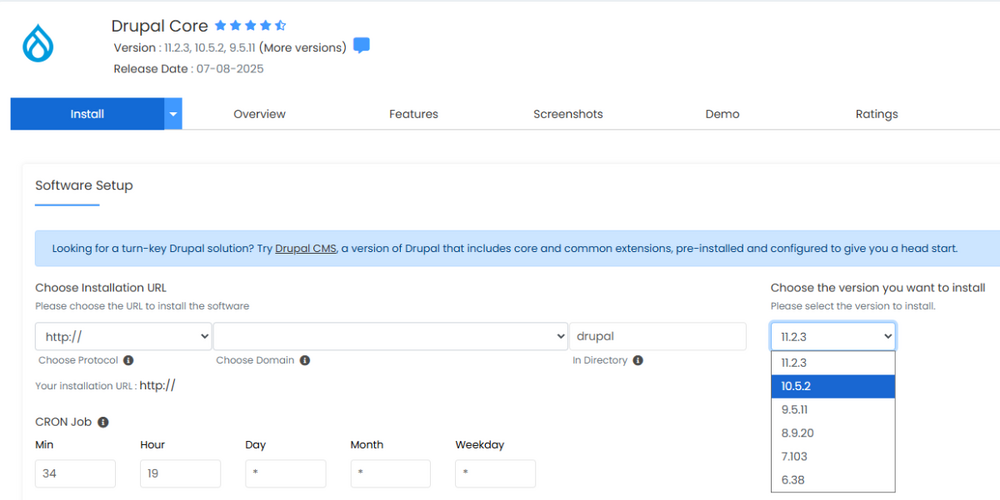
Back in December 2024, I installed Drupal 10.3.10 since that's what worked with the MariaDB v10.5.22 we had at the time, to do some load testing on it. It looks like 10.3.0 is not offered anymore, but you may have luck with 10.5.2 which seems to be the next most recent listed now. To specify the Drupal version inside Softaculous, click on the arrow on the blue Install button and choose Custom Install. Then a screen will open up like the below, where you could choose an older version to try.
-
All HelioHost Staff are Volunteers Helio Networks dba HelioHost is a 501(c)(3) non-profit organization whose mission is to provide free or low cost web hosting, and all of our staff are volunteers. We all have full time jobs and lives outside of this project. We run this organization in our free time, and if we don't have very much free time things don't get done very quickly. Most for-profit hosting companies have a staff of full time employees who sit around providing support and working 40 hours a week. It's very rare for any of our volunteers to work more than an hour or so each day. None of our volunteers are required to log a certain number of hours and may come and go as they please. If we aren't having fun volunteering, providing support, chatting with the community, and developing new features then we take a break and do things that are more fun for us. This is why we don't have SLAs or ETAs for new features or repairs, and this is why things move a little slower than a for-profit company that you might be used to dealing with. ETA for Support Requests All HelioHost staff are unpaid volunteers, so there is no guaranteed timeframe for a response to support requests. Help is generally provided within 24 hours, but this can vary for multiple reasons: Time zone differences (most staff are based in North America) Real-life commitments: Work School Family For more information on ETAs (and why we do not offer them), please see: https://wiki.helionet.org/ETA
-
I've added that domain to your account for you. Please note that it may take up to 2 hours for the domain change to take effect, and it will not work until you set up your DNS with your domain registrar. To configure your DNS, please see the steps provided on our Wiki to either set NS records pointed at the HelioHost nameservers, or create A/AAAA records and point them to your server's IPv4/IPv6 address: https://wiki.helionet.org/Addon_Domains#Custom_Addon_Domains If after a full 2 hours it doesn't work on your side, please make sure you clear your web browser cache: https://wiki.helionet.org/Clear_Your_Cache
-
I've escalated this request to Wolstech's attention who can set this up for you when he has time. 🙂 He'll update this thread once it's all ready to go for you.
-
You've also created a request here: https://helionet.org/index/topic/65533-regarding-domain-add-remove/ Please note that creating duplicate requests can lead to delays in responses to you. Please see here for more details: https://wiki.helionet.org/FAQ#Where_do_I_ask_for_help?
-
You've also created a request here: https://helionet.org/index/topic/65534-regarding-domain-add-remove/ Please note that creating duplicate requests can lead to delays in responses to you. Please see here for more details: https://wiki.helionet.org/FAQ#Where_do_I_ask_for_help?
-
You're very welcome! 🙂 Please let us know if we can help with anything else!
-
I've added that domain to your account for you. Please note that it may take up to 2 hours for the domain change to take effect, and it will not work until you set up your DNS with your domain registrar. To configure your DNS, please see the steps provided on our Wiki to either set NS records pointed at the HelioHost nameservers, or create A/AAAA records and point them to your server's IPv4/IPv6 address: https://wiki.helionet.org/Addon_Domains#Custom_Addon_Domains If after a full 2 hours it doesn't work on your side, please make sure you clear your web browser cache: https://wiki.helionet.org/Clear_Your_Cache