


Krydos
-
Posts
26752 -
Joined
-
Last visited
-
Days Won
954
Everything posted by Krydos
-

[Solved] Web site suspended for high load
Krydos replied to dahuhunter's topic in Escalated Requests
You say, "Reset my account please" and we create a full backup, and then reset your account back to the default empty state. Be careful restoring files from your backup though because they could include backdoors that the hacker could use to gain access again. -
[Solved] Web site suspended for high load
Krydos replied to dahuhunter's topic in Escalated Requests
If your account has been hacked we recommend doing a full reset. Just deleting a few files that the hacker uploaded is unlikely to fix whatever vulnerability they used to upload the files in the first place. -
Your subscription has been canceled and you won't be charged again. Thanks for using our VPS service.
-
[Solved] hh:suspended "devashraf" and "prize"
Krydos replied to devashraf's topic in Escalated Requests
Part of the reason we don't allow multiple accounts is because the first 1000 MB of storage is free and then you can donate to increase the storage space, but some people think they're clever by creating 6 accounts to get 6000 MB for free instead of donating to increase the storage on their 1 account to 6000 MB. -
[Solved] hh:suspended "devashraf" and "prize"
Krydos replied to devashraf's topic in Escalated Requests
If you're managing a website for someone else it would make the most sense to add it to your 1 account. You can add up to 10 completely separate domains to your 1 account for free. -
It looks like you donated $1 in 2017-02-05. When we lost our cPanel licenses in 2021 we started rebuilding Tommy with Plesk first and then started moving our largest donors over first. Our plan was obviously to put all the donors back on the donor server, but as we moved more and more people we ran into a dilemma: Johnny, our free server, had 100% uptime and barely anyone on it, and was much faster than Tommy. Meanwhile Tommy was completely overloaded, slow, had really high load, and the uptime was dropping down to 97% or lower. I guess it's a good problem to have so many donors that we can't even fit them onto one server, but it's a terrible idea to punish donors with terrible service and slow servers and give the fastest best servers to our free users. So the choice was to continue packing all of our donors onto our slowest most overloaded server, or put the remaining donors on the fastest server with barely any accounts on it. I believe the cut off was $1 or higher donations made after 2020-07-15 or so ended up on Tommy, and $1 donors prior to that date went to Johnny instead. At the time we told all of the remaining donors that we would allow them to move back to Tommy someday after the servers were balanced better. Anyways, Johnny still has better uptime right now, but you're welcome to move back to Tommy for free now if you wish.
-
Your domain has been added. Delete the micahlindstrom.com/index.html file and upload your files there to get your site set up.
-
Your subscription has been canceled and you won't be billed again. Thanks for using our VPS hosting.
-
[Solved] Web site suspended for high load
Krydos replied to dahuhunter's topic in Escalated Requests
Good bots check your robots.txt file and abide by the rules in it. We received 785401 page hits to our website on 2024-10-22 and 25 of them were from Google when we have a properly configured robots.txt file published. There is no reason Google should need to visit your website 46230 times in a single day unless you've got something seriously misconfigured. Create the file and put it in httdocs. -
Here is our wiki article explaining how to check your error logs, if you don't already know how to do that https://wiki.helionet.org/tutorials/plesk/view-error-logs
-
What does the error log say?
-
[Solved] Request for Remote Access to PostgreSQL
Krydos replied to spanishbibivan's topic in Escalated Requests
Remote access enabled. host=65.19.154.90 port=5432 username=spanishbibivan_test_db_user dbname=spanishbibivan_test_db password=<set in Plesk> -
[Solved] Request to Move Johnny Server to Tommy
Krydos replied to szhiro's topic in Escalated Requests
Still waiting... -
[Solved] Rebuild of vps29 with control panel
Krydos replied to fulianto7691's topic in Escalated Requests
Your VPS has been rebuilt and Hestia has been installed. You should be able to login to Hestia at https://vps29.heliohost.us:8083/ using the username admin and the password you use for SSH. Let us know if you need help with anything else. -
Here's your disk space breakdown right now. Backups 39.21 MB Emails 0 MB Files 548.13 MB Trash 0 MB Logs 4.33 MB PSQL 0 MB MySQL 12.97 MB Total 604.64 MB 273M ./httpdocs 12K ./.composer 0 ./.pki 20K ./.ssh 0 ./.trash 15M ./.wp-cli 0 ./.wp-toolkit 0 ./dBot 241M ./wordpress-backups 12K ./private 20M ./git 24K ./.nodenv 4.0K ./.phpenv 52K ./.rbenv 8.0K ./.npm 0 ./tmp
-
Yep, one of your PHP processes was running for over 22 hours. Thanks for helping us figure out what was wrong.
-
[Solved] Delete both my Johnny account and Helionet account
Krydos replied to a topic in Escalated Requests
Your forum account has been deleted as well. -
Over the last few weeks we've seen a lot of cases of previously low load accounts suddenly getting suspended for high memory usage. Of course, quite a few people have accused us of having inaccurate load monitoring, and we have wasted a great deal of time testing the load monitoring over and over and over and over again. As far as we could see the load monitoring was working perfectly. Since we're going to be launching Morty soon it is very important to us to have accurate load monitoring. Well, we finally figured out the problem. The load monitoring is working perfectly, and since it works so well, it helped us find the actual issue: People's PHP processes aren't always exiting like they should. Normally PHP processes fire up, spit out some website after a few milliseconds, and then hang around for a maximum of 30 seconds or so before their memory is reclaimed by the OS. We've been seeing some PHP processes lock up and continue using memory for over 22 hours. We have already devised and implemented a fix that should make sure this high memory usage doesn't continue, but as always we recommend keeping an eye on your load chart at https://heliohost.org/dashboard/load/ and let us know if anything abnormal is happening. We also recommend taking a look at your web statistics, and blocking any abusive IPs you find. We're also seeing a lot of accounts with 10k to 100k page hits per day from hacker bots, etc. Obviously no human has visited your site ten thousand times in a single day so just block them with .htaccess. We can't block IPs for you because there are legitimate reasons for you to have tons of page hits from a single IP, such as running an API. Let us know if you need help.
-
- 4
-

-

-
Your forum account has been deleted.
-
Remote access enabled. host=65.19.154.90 port=5432 username=jasperfuelle_admin dbname=jasperfuelle_coindb password=<set in Plesk>
-
Maybe the confusion here is what you mean by "completely disabled access to the service domains". If you do something like this <?php echo "Go away!"; It's still going to load the PHP script and use some memory, but since the script is so simple it will use very little CPU. If you do something like this in .htaccess Deny from all Then the PHP script won't even load at all and there will truly be zero load.
-
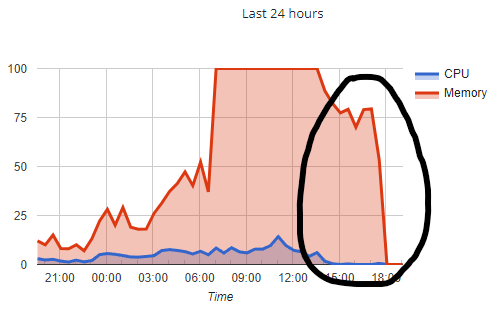
If you're talking about this section of the graph There were 3124 PHP processes recorded during that time period. Here are a few of them | alexgoldberg | 0.00 | 34524 | /opt/plesk/php/8.0/bin/php-cgi -c /home/system/check.dosprn.com/etc/php.ini | 2024-10-16 17:52:17 | | alexgoldberg | 0.00 | 34004 | /opt/plesk/php/8.0/bin/php-cgi -c /home/system/version.dosprn.com/etc/php.ini | 2024-10-16 17:52:54 | | alexgoldberg | 0.00 | 34524 | /opt/plesk/php/8.0/bin/php-cgi -c /home/system/check.dosprn.com/etc/php.ini | 2024-10-16 17:52:55 | | alexgoldberg | 0.00 | 34004 | /opt/plesk/php/8.0/bin/php-cgi -c /home/system/version.dosprn.com/etc/php.ini | 2024-10-16 17:53:34 | | alexgoldberg | 0.00 | 34524 | /opt/plesk/php/8.0/bin/php-cgi -c /home/system/check.dosprn.com/etc/php.ini | 2024-10-16 17:53:35 | | alexgoldberg | 0.00 | 34004 | /opt/plesk/php/8.0/bin/php-cgi -c /home/system/version.dosprn.com/etc/php.ini | 2024-10-16 17:54:09 | | alexgoldberg | 0.00 | 34524 | /opt/plesk/php/8.0/bin/php-cgi -c /home/system/check.dosprn.com/etc/php.ini | 2024-10-16 17:54:22 | | alexgoldberg | 0.00 | 30804 | /opt/plesk/php/8.0/bin/php-cgi -c /home/system/version.dosprn.com/etc/php.ini | 2024-10-16 17:55:13 | | alexgoldberg | 0.00 | 31324 | /opt/plesk/php/8.0/bin/php-cgi -c /home/system/check.dosprn.com/etc/php.ini | 2024-10-16 17:55:14 | | alexgoldberg | 0.00 | 30804 | /opt/plesk/php/8.0/bin/php-cgi -c /home/system/version.dosprn.com/etc/php.ini | 2024-10-16 17:56:11 | | alexgoldberg | 0.00 | 31324 | /opt/plesk/php/8.0/bin/php-cgi -c /home/system/check.dosprn.com/etc/php.ini | 2024-10-16 17:56:13 | | alexgoldberg | 0.00 | 30804 | /opt/plesk/php/8.0/bin/php-cgi -c /home/system/version.dosprn.com/etc/php.ini | 2024-10-16 17:56:48 | | alexgoldberg | 0.00 | 31324 | /opt/plesk/php/8.0/bin/php-cgi -c /home/system/check.dosprn.com/etc/php.ini | 2024-10-16 17:56:49 | | alexgoldberg | 0.00 | 30804 | /opt/plesk/php/8.0/bin/php-cgi -c /home/system/version.dosprn.com/etc/php.ini | 2024-10-16 17:57:16 | | alexgoldberg | 0.00 | 31324 | /opt/plesk/php/8.0/bin/php-cgi -c /home/system/check.dosprn.com/etc/php.ini | 2024-10-16 17:57:18 | | alexgoldberg | 0.00 | 22612 | /opt/plesk/php/8.0/bin/php-cgi -c /home/system/version.dosprn.com/etc/php.ini | 2024-10-16 17:57:49 | | alexgoldberg | 0.00 | 22876 | /opt/plesk/php/8.0/bin/php-cgi -c /home/system/check.dosprn.com/etc/php.ini | 2024-10-16 17:57:50 | We don't just make up these numbers randomly. The CPU in the second column is indeed 0, but the processes were still running and taking up memory. Are you sure your processes exit correctly? If they lock up and never exit you would see something like this.
-
WSGI control access has been enabled on the domain shanka.helioho.st. To restart your Flask app and load new code changes in simply edit /home/shanka.helioho.st/httpdocs/swigposapp/flask.wsgi. Adding a blank line, removing a blank line, adding a space, or removing a space are examples of editing the file. As long as the last modified timestamp changes it will clear the server cache. Let us know if you run into any issues.
-
Your storage quota has been increased to 2000 MB. The account move process has been started and you will get an email when it finishes. You may need to update your DNS records if you use external DNS, but if you use ns1.heliohost.org and ns2.heliohost.org they will be updated for you. That's an interesting idea. No one has ever requested that before, and none of us have ever considered it either. If we implement something like that we'll let you know.
-
[Solved] Web site suspended for high load
Krydos replied to dahuhunter's topic in Escalated Requests
Are you visiting your own site 38k times per day, or do you think that some of these IP addresses might be bots? You might want to block some of these IPs if you want to reduce the load your website causes. 439 35.183.70.152 463 66.249.68.1 477 209.38.128.20 527 52.167.144.167 547 157.55.39.58 859 199.47.82.21 860 199.47.82.20 1332 199.47.82.19 1527 216.244.66.232 1927 66.249.68.71 2038 199.47.82.18 3485 143.110.228.131 5467 66.249.68.70 38373 66.249.68.69