


wolstech
-
Posts
19261 -
Joined
-
Last visited
-
Days Won
766
Everything posted by wolstech
-
This is because the SPF record is stale at heliohost.org...it references old IPs from before the Tommy/Johnny rebuilds. Thanks for pointing it out. Also, admin@heliohost.org is a real email address, it's just not one that's monitored. Not sure if it these alerts can be easily changed to support or not, though it would make sense so people can reply to submit a ticket if they have questions. Escalating...
-
Addon domains cannot be converted to a main domain easily. Making an addon domain primary involves removing it entirely, then changing the main domain to it. The process usually results in data loss as the process of removing the addon domain sometimes deletes the addon domain's document root and all of its content. Are you sure you want to do that? It might be easier for you to just disable the free subdomain in Plesk and ignore it. MTA-STS requires a policy file be hosted on your account. I can add the subdomain, but you'll need to provide the policy file yourself as Plesk doesn't offer a way to generate it. I'll hold off on adding this because if I add it now and you still want to go through with the main domain change mentioned above, I'd have to remove it again. Users cannot add their own domains because our DNS system does not talk to Plesk. We use external scripts to handle it at the moment (basically a script that updates multiple systems one after the other). Developing that integration is on our to do list but is low priority due to other projects.
-
Please check your PMs for information regarding your Lily account.
-
This VPS has been rebuilt with windows server, please check your email for login information.
-
OK. Turns out mariadb restarted in the middle of your unarchive and caused it to not see your domains, so the zone never recreated. The missing DNS zone has been created and your site should start working soon
-
The DNS zone didn't recreate after the account unarchived for some reason...I've asked in a staff channel about why this might have happened. Once I have an answer to that issue, we'll manually create the missing DNS records to get you online
-
This was handled by PM since this is a Lily user. He purchased VPS113 but picked linux by mistake and needs it rebuilt as Windows Server 2022.
-

[Solved] Request to unsuspend my account
wolstech replied to titanik00's topic in Suspended and Queued Accounts
You were suspended for high load. Please be mindful of your CPU and memory usage. You can watch your load here: https://heliohost.org/dashboard/load/ If this happens again, you’ll need to provide us with information on how you plan to fix the issue. Unsuspended. It may take a few minutes to work again. -
Unsuspended. It might take a few minutes to start working again. Node is one of the few things you have to be very careful with on here because it consumes exorbitant amounts of memory very easily. Please don't run this app here again. I would suggest looking at the node tutorial on our wiki if you plan to use it. Most pre-built node applications out there are designed to be run on a VPS where you have the entire server to yourself.
-
It's suspended for high load. Whatever you were running is WAY too heavy on memory. You used your entire day's quota (100GB cumulative use in a 24 hour period) in ~2 hours. How do you plan to fix this so it doesn't happen again?
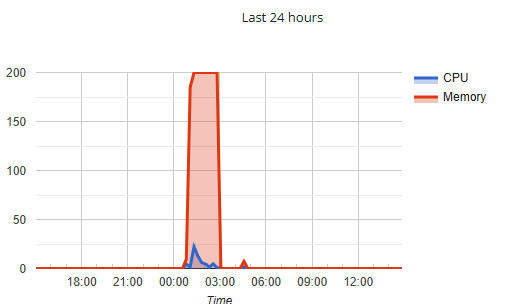
-
Your third party DNS provider's servers are broken and aren't propagating records. Since you aren't using our DNS, you'll need to contact your DNS provider (looks to be a service called mydomain.com) for assistance. https://www.whatsmydns.net/#NS/ronvdc.com If you would like to use our DNS instead, please update the NS records for your domains at your registrar to point to ns1.heliohost.org and ns2.heliohost.org and wait 24 hours. EDIT: looks like this may have resolved while I was writing this post. It's showing correctly now. Some of your domains are now resolving on our side again (dutchoutpost for example). Guessing mydomain.com just had an outage or something...
-
[Solved] Activate my account (merge accounts)
wolstech replied to mohab24's topic in Escalated Requests
Account mohab24 has been merged into mohab23. The domain that was on mohab24 may take up to 2 hours to work properly. Note that mailboxes do not survive a merge, so the mailbox info@hms.helioho.st was discarded. You'll need to recreate that if you need it. Content can be downloaded from https://heliohost.org/backup/ if necessary. -
[Solved] Activate my account (merge accounts)
wolstech replied to mohab24's topic in Escalated Requests
The contents of the account mohab24 do not fit inside the remaining free space of mohab23. You'll need to either purchase a space upgrade ($5) or tell me what you want deleted from the accounts so I can free enough space to make mohab24's content fit. You need to free up about 100MB. It looks like the file infyhms.zip is an installer that can probably go, and is about 128MB...do you want me to delete that? -
You were suspended back in September for sending 278 emails in one day. When we unsuspended you, we did not give you email access back due to the possibility your account was compromised. https://helionet.org/index/topic/62167-solved-request-unsuspension/#comment-277368 As a result, you have a sending limit of 0 emails per day and can't send anything. Has that issue been resolved? If so, we can turn the email back on for you.
-
Changed. If you plan to also send email from this domain, you'll probably also want to provide an SPF and DKIM value for us to set so your mail isn't flagged as spam.
-
Your account has been reset so you can start over. Please check your email for a link to finish the process and set up a fresh account. If you need the data from your old account, it can be downloaded from https://heliohost.org/backup/
-
This turned out to be a new one for us. The load was due to excessive SFTP usage...try reducing the number of concurrent connections in your client, and be sure to disconnect when you're finished.
-
Free content should be fine as long as the license/terms of use of the service you're pulling the streams from allows for sharing (i.e. if the service expressly says you can embed it on your own site at no cost, it should be fine). Note that if we receive a copyright complaint your account will be suspended again. Your original M3U files had links to cable TV and subscription channels that aren't legally available for free (Discovery's content was one example, you either need cable or a Discovery+ subscription to watch most of their content legally).
-
I've put a deny from all in htaccess so the content will not be accessible. You have 24 hours to remove all copyrighted material from your account. If the content is not removed within 24 hours, you'll be suspended again and we will require your account be reset (which deletes all content) to be unsuspended again. Unsuspended. It may take a few minutes to work again.
-
The application hosted on the site has references and tools for viewing paid TV channels. The playlists folder contains m3u8 files pointing to what looks like pirate sites offering free access to pay TV streams such as Discovery's channels. We are in the USA and as such are subject to US copyright law and the DMCA. Pirated content and piracy tools cannot be hosted here.
-
[Solved] Request Additional Python Modules
wolstech replied to qinsoon's topic in Escalated Requests
He updated it to the dev version when he replied previously. -
[Solved] Request Additional Python Modules
wolstech replied to qinsoon's topic in Escalated Requests
I could’ve sworn we’ve installed development versions for people before but I may be misremembering. Anyway, this particular one is weird. It’s a library to talk to the API for WeChat, and it has no working stable version (some digging and Google translate shows the stable version is no longer compatible with the API it’s designed to interact with, so is useless). -
[Solved] Request Additional Python Modules
wolstech replied to qinsoon's topic in Escalated Requests
Reopened since wrong version was installed. -
Added. Also, since I saw the question in your other topic, if you need additional domains, you can ask for all of them at once. The domain can take up to 2 hours to work.
-
Domain added. Please be sure to configure DNS for the domain, by either setting name servers to ns1.heliohost.org and ns2.heliohost.org, or by using A and AAAA records pointed to the IP addresses shown in Plesk. The domain can take up to 2 hours to function.

