


Krydos
-
Posts
26752 -
Joined
-
Last visited
-
Days Won
954
Everything posted by Krydos
-
Last month we made some changes to our MariaDB connection limits after multiple users abused our generous unlimited connections settings and caused hours of downtime for all of the other users on the server. Since then we've received quite a few complaints from people who are now being forced to write good code when their software tries to open dozens if not hundreds of connections. You need to keep in mind that if you're on Johnny or Tommy you're sharing the server resources with thousands of other users, and it isn't fair for you to hog all the resources. If you want to open unlimited connections we offer VPS plans starting at only $4 per month where you will have the whole server to yourself. If you are getting errors regarding the connection limit, and don't want to get a VPS, please let us know and we can help you rewrite your bad code. We wanted to point out that even though the noisy minority may not like the changes, the server is now much more stable for the silent majority. Prior to the limits MariaDB would crash 4-5 times per day on both Johnny and Tommy and it would take 2-5 minutes for the database to come back online each time. Now MariaDB on both Johnny and Tommy is able to run for weeks without a restart which increases the uptime and stability for the server as a whole.
-
- 5
-

-

-

[Solved] Request to increase max upload size and add a subdomain
Krydos replied to Palpale's topic in Escalated Requests
DKIM has been fixed on your account. dkim._domainkey.papale.my.id. IN TXT "v=DKIM1; p=MIIBIjANBgkqhkiG9w0BAQEFAAOCAQ8AMIIBCgKCAQEA2vQ3mE3FUzsehqf1fnY2jlnZAEm/jwwkM9XuTaro0K1EF+t4KSKAwy3HZFLNnew+fIo1ICMkYo4Wt0bYVk2ceuNk5Uz5nbe1gUwAbUCbQLP25Uc0zhahvGtIjfDxN8hAO7iNrm63D4xHKPwLq4X99bAoVqukKb4O2rUs4KKZQVVlrIhcOZc1JycdFuPVL4iU1MSPPTQhT+QZu8c6KCLbmYHEqxBVEXHpJ3OG7fxmNQudr9m+Xc8L3VOhKDM49Nb0Or8wuxYbpO4bnb9CyQfH3mmvIdzjkxwKdw7Zr0L/GR/F8rS9Iv80+z3n1lGfedrYPtzL3EGskVWiOi862+Hq8wIDAQAB;" _domainkey.papale.my.id. IN TXT "o=-" The execution time has been increased, but like Wolstech said it increases your chance of being suspended for high load so keep an eye on that at https://heliohost.org/dashobard/load/ For future reference, I work on escalated tickets from oldest response to newest response so when you bump your thread like this it moves it to the bottom of my todo list. If you want to make sure you get helped as slowly as possible please continue bumping it like this. -
What is the PostgreSQL username, and database you want remote access to?
-
Remote access enabled. host=65.19.141.67 port=5432 username=alevka_envbUser dbname=alevka_envirobaby password=<set in Plesk>
-
[Solved] I got error when uploading files
Krydos replied to xiaotusoushu's topic in Escalated Requests
Just for future reference, I work on support requests by oldest response to newest response. So if you bump your thread it moves it to the bottom of my todo list. -
[Solved] I got error when uploading files
Krydos replied to xiaotusoushu's topic in Escalated Requests
I recalculated the usage and reactivated your account. Can you login now? Here is your current disk usage Backups 0 MB Emails .02 MB Files 350.17 MB Trash 0 MB Logs 1.33 MB PSQL 0 MB MySQL 31.49 MB Total 383.01 MB If you need more than 1000 MB you can upgrade your Tommy account up to 6000 MB for a one-time donation of $5 per 1000 MB. If you need more than 6000 MB you can get a VPS which start at 50 GB storage for $4 per month, up to 300 GB storage. -
I guess I'll copy/paste the same answer that websys didn't read twice already on Discord here too.
-
Remote access enabled. host=65.19.141.77 port=5432 username=itechpros_sb dbname=itechpros_accuzip password=<set in Plesk>
-
It's because your username has more than 8 characters and the ps command was truncating it to softspi+ I edited your bot_control script for you to handle longer usernames, and I'll add the changes to the wiki as well. Thanks for letting us know.
-
I tested the domain disabling system with your three subdomains, and the way everything is configured right now they won't get disabled again.
-
When a main domain is disabled, it takes all the subdomains down with it, regardless of whether the subdomains are hosted by us or not. What I have done is removed orcagroup.top from your account and left the subdomains. If the subdomain's MX point to us they should stay enabled, and if the main domain isn't attached to the subdomains it won't take them offline too when it's disabled. If you decide to host the main domain with us some day we can just add it back to your account. I created a full backup before I changed anything which you can download from https://heliohost.org/backup/ in case anything got lost in the shuffle. KazVee has written up a nice guide on how to extract the full backups if you need help with that too which can be found at https://wiki.helionet.org/tutorials/plesk/account-backups
-
[Solved] Request to increase max upload size and add a subdomain
Krydos replied to Palpale's topic in Escalated Requests
You can find it yourself in the mail settings in Plesk. -
Clear your browser cache and try it again now. Let us know if it's working now.
-
The additional CNAME record has been added. si7453205 14400 IN CNAME inbound.systeme.io.
-
Installed. You can see the current list of installed modules and their versions for Johnny's Python 3.10 with this link https://krydos2.heliohost.org/pyinfo/info3.10.py
-
[Solved] Request to increase max upload size and add a subdomain
Krydos replied to Palpale's topic in Escalated Requests
The max upload size on the domain papale.my.id has been increased to 16 MB. DKIM, SPF, and DMARC have been set up for the domains plj.my.id and papale.my.id. We recommend sending a test email to https://www.mail-tester.com/ to make sure that everything is set up correctly. If you get less than a 10/10 score please post a link to the full report so we can help you fix any other issues that there may be. -
How many accounts total are you wishing to create? One for each of the seven people using the same PC?
-
[Solved] Request to increase max upload size and add a subdomain
Krydos replied to Palpale's topic in Escalated Requests
Which domain? -
[Solved] Request to increase max upload size and add a subdomain
Krydos replied to Palpale's topic in Escalated Requests
Which domain? -
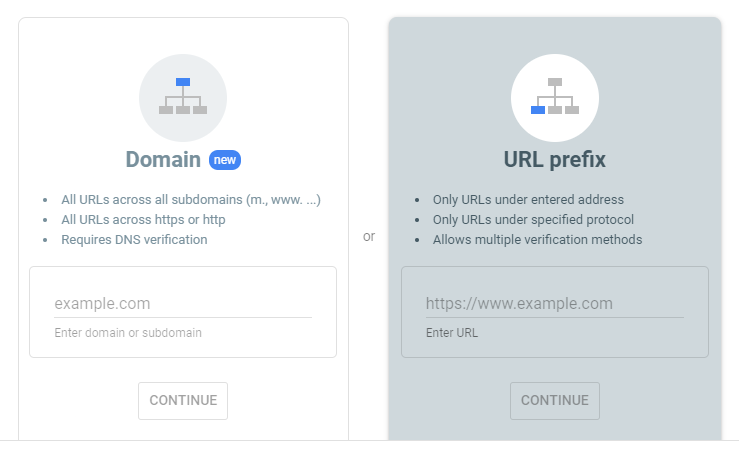
You can verify your site with html verification. Just choose URL prefix instead of domain.
-
Which domain?
-
Your subscription has been canceled and you won't be billed again. Thanks for using our VPS service.
-
The DNS records have been added. si1868340 14400 IN CNAME inbound.systeme.io. systemeio1._domainkey 14400 IN CNAME key1.systeme.io. systemeio2._domainkey 14400 IN CNAME key2.systeme.io. _dmarc 14400 IN TXT "v=DMARC1; p=none; rua=mailto:keidy@keimktafil.helioho.st"
-
Ok, I've adjusted a few more settings. Another thing to keep in mind is we have auto-ads turned on which means we have very little direct control over how many ads are shown. Adsense just adds ads where it "thinks" is best. When I view the demo site it looks nothing like your screenshots. Another thing we've discussed is disabling ads entirely for anyone who has donated $1 or more in the last 6 months.
-
[Solved] Python: ModuleNotFoundError: No module named 'pymysql'
Krydos replied to xiaotusoushu's topic in Escalated Requests
Installed, but I'd like to mention that we already have 3 different Python modules to connect to MySQL. Why not use one of the existing modules rather than installing a different one? # /usr/local/python3.10/bin/pip3.10 install smtplib ERROR: Could not find a version that satisfies the requirement smtplib (from versions: none) ERROR: No matching distribution found for smtplib You can see the current list of installed modules on Tommy's Python 3.10 with this link https://krydos.heliohost.org/pyinfo/info3.10.py