Krydos
-
Posts
26752 -
Joined
-
Last visited
-
Days Won
954
Everything posted by Krydos
-
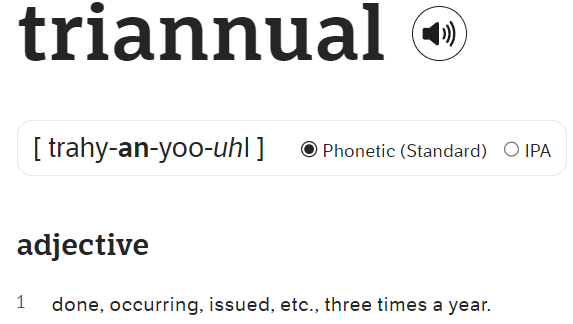
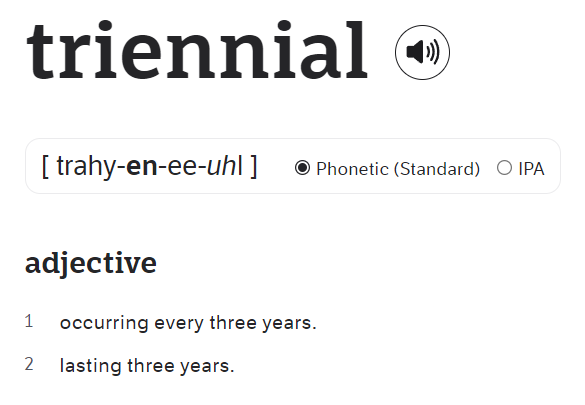
I see where the confusion came from. The screenshot doesn't show biannually, it shows biennially. Likewise you said triannually not triennially. Triannually means happens 3 times per year, or you want to pay every 4 months. Triennial means happens every 3 years, or you want to pay for 3 years at a time. Using that a or that e makes a large difference here. When are you able to pay for this VPS?

-
WSGI control access has been enabled on the domain lucy.helioho.st. To restart your Flask app and load new code changes in simply edit /home/lucy.helioho.st/httpdocs/iHairdresser/flask.wsgi. Adding a blank line, removing a blank line, adding a space, or removing a space are examples of editing the file. As long as the last modified timestamp changes it will clear the server cache. Let us know if you run into any issues.
-

[Solved] Double charge claim and subscription cancellation
Krydos replied to azr05ljqe04's topic in Escalated Requests
Yep, you're right. Sorry about that. The original $4.00 subscription didn't get canceled correctly, so we have sent you a full refund. Your subscription has been canceled and you won't be charged again. Thanks for using our VPS service. -
The bad news, is it looks like we're going to have to do some major changes to our servers in order to support PostGIS again. The good news, is I successfully upgraded PostgreSQL from version 13 to version 17 and installed PostGIS version 3.5 on Morty. The bad news, is Johnny (the server you are on) is going to be a lot more complicated to upgrade since there are so many existing PostgreSQL databases. The good news, is Morty will be entering his beta period soon, and we could use someone to test PostGIS prior to upgrading Johnny and Tommy. The bad news, is Morty's beta is limited to $30+ donors only right now.
-
We generally don't install beta or dev versions since they are usually quite buggy and unstable. I didn't install the "wrong" version, I just installed the latest stable version like we always do, and exactly as I intended to do. Sometimes when people ask for ancient versions of things we do the same thing and install the latest stable version instead. It's highly unlikely anyone other than you will use this itchat-uos so it probably won't hurt to have an unstable, development version of it installed.
-
The module itchat-uos has been installed on Tommy's Python 3.12. You can see the current list of installed modules at https://krydos1.heliohost.org/pyinfo/info3.12.py
-
The problem is .well-known has to be accessible via http. # curl "http://borbach.com/.well-known/acme-challenge/ysITPUa8hTIqNhE7FjrKF9WjF0QDi4AUgdjhK5ioL3U" <html> <head><title>301 Moved Permanently</title></head> <body> <center><h1>301 Moved Permanently</h1></center> <hr><center>nginx</center> </body> </html> As you can see requests for http get redirected to https so SSL verification will always fail. I disabled redirection to https and now it returns the contents of the verification file instead of redirecting to https. # curl "http://borbach.com/.well-known/acme-challenge/ysITPUa8hTIqNhE7FjrKF9WjF0QDi4AUgdjhK5ioL3U" ysITPUa8hTIqNhE7FjrKF9WjF0QDi4AUgdjhK5ioL3U.JYseh45lQBxj41K6qwq7KQASWpf6M7NBo1lNHke015E Here is the recommended way to redirect to https, while making an exception for .well-known to be accessed via http RewriteEngine On RewriteCond %{HTTPS} !=on RewriteCond %{THE_REQUEST} !/.well-known/(.*)$ [NC] RewriteRule ^ https://%{HTTP_HOST}%{REQUEST_URI} [L,R=301] I added the above code to your .htaccess and I reissued Let's Encrypt via Plesk for you and now everything is working as expected. https://www.sslshopper.com/ssl-checker.html#hostname=borbach.com
-
DKIM, SPF, and DMARC have been set up for the domain a0795683865.helioho.st. We recommend sending a test email to https://www.mail-tester.com/ to make sure that everything is set up correctly. If you get less than a 10/10 score please post a link to the full report so we can help you fix any other issues that there may be.
-
[Solved] remote access to postgresql request
Krydos replied to joyless's topic in Escalated Requests
When I first glanced at this I read joyless trout. Haha. Remote access enabled. host=65.19.154.90 port=5432 username=joyless_user dbname=joyless_tryout password=<set in Plesk> -
Usernames that we know of who are in this class: devlab, romrarito, aelreje, dtfj03, meglopez, duckworth, vinzj Are there any others?
-
Since so many of these students are using personal gmail.com addresses they are still getting suspended by our multi account detection system. Can we please get this organized so they are all using studentname@usls.edu.ph email addresses or something like that so we can identify them prior to getting suspended, and then requesting to be added to the class exemption list?
-
I thought all of the students in this class were going to be using username@usls.edu.ph email addresses. I also thought all of the students accounts were going to be listed in this thread We are extremely happy to provide accounts to help this class learn about hosting in the real world, but unless someone actually gets this organized you are all going to continue getting suspended since you're all using the same computers and IP addresses.
-
[Solved] Python3 Dependencies Needed for Tommy
Krydos replied to kkaviani's topic in Escalated Requests
The module psycopg2 has been installed on Tommy's Python 3.12. You can see the current list of installed modules at https://krydos1.heliohost.org/pyinfo/info3.12.py -
[Solved] Python3 Dependencies Needed for Tommy
Krydos replied to kkaviani's topic in Escalated Requests
You can use the binary /usr/bin/python3.9 or /usr/bin/python3.12 to choose the version you want to use. If you're just using /usr/bin/python3 then that's 3.9. -
Your subscription has been canceled and you won't be billed again. Thank you for using our VPS service.
-
Set your MX record to johnny.heliohost.org and your domain should stay active.
-
Do you have any antivirus or antimalware programs? They could be blocking access to Johnny, where your website is hosted, but not to Brody, where this forum is hosted. Some internet connections and routers also have malware blocking built in so they could be blocking you as well. Have you tried using a different internet connection?
-
The module dydx-v4-client has been installed on Tommy's Python 3.12. You can see the current list of installed modules and their versions at https://krydos1.heliohost.org/pyinfo/info3.12.py
-
Sure. If you provide unique email addresses for each account we can send out invites.
-
Your VPS has been upgraded to 16 GB memory, 8 CPUs, and 300 GB storage. Let us know if you need help with anything else.
-
Your subscription has been canceled and you won't be charged again. Thanks for using our VPS service.
-
Everything looks good. Your upgrade should be completed later today. I'll reply to this forum post when it is done.
-
Alright, your full backup has been created. Go ahead and use this page to upgrade to the hard drive space, CPUs, and memory you need https://heliohost.org/dashboard/upgrade/
-
I'm creating a full backup now.
-
Yeah, you can definitely use our servers to teach your class. Let us know how many accounts you need, and how long they will be used for.