


Krydos
-
Posts
26741 -
Joined
-
Last visited
-
Days Won
954
Everything posted by Krydos
-
Here's the log for your contact form. Jul 14 02:38:20 tommy2 plesk-sendmail[48064]: S48062: py-limit-out: stderr: INFO:__main__:Setting 'X-PPP-Vhost' header to 'infantex.com.mx' Jul 14 02:38:20 tommy2 plesk-sendmail[48064]: S48062: py-limit-out: stderr: PASS Jul 14 02:38:21 tommy2 plesk-sendmail[48064]: S48062: check-quota: stderr: SKIP Jul 14 02:38:21 tommy2 postfix/pickup[44550]: 23602401FAEE: uid=10183 from=<infantx@infantex.com.mx> Jul 14 02:38:21 tommy2 postfix/cleanup[45317]: 23602401FAEE: message-id=<1ae95ef6ce2de4bc3179c9c8515f7197@infantex.com.mx> Jul 14 02:38:21 tommy2 postfix/qmgr[28715]: 23602401FAEE: from=<infantx@infantex.com.mx>, size=2985, nrcpt=1 (queue active) Jul 14 02:38:21 tommy2 postfix-local[48103]: 23602401FAEE: from=<infantx@infantex.com.mx>, to=<infantx@infantex.com.mx>, dirname=/var/qmail/mailnames Jul 14 02:38:21 tommy2 spamd[9978]: spamd: connection from localhost.localdomain [::1]:40948 to port 783, fd 6 Jul 14 02:38:21 tommy2 spamd[9978]: spamd: using default config for infantx@infantex.com.mx: /var/qmail/mailnames/infantex.com.mx/infantx/.spamassassin/user_prefs Jul 14 02:38:21 tommy2 spamd[9978]: spamd: processing message <1ae95ef6ce2de4bc3179c9c8515f7197@infantex.com.mx> for infantx@infantex.com.mx:30 Jul 14 02:38:21 tommy2 spamd[9978]: spamd: clean message (0.2/7.0) for infantx@infantex.com.mx:30 in 0.4 seconds, 3064 bytes. Jul 14 02:38:21 tommy2 spamd[9978]: spamd: result: . 0 - HEADER_FROM_DIFFERENT_DOMAINS,HTML_MESSAGE,NO_RELAYS,T_SCC_BODY_TEXT_LINE scantime=0.4,size=3064,user=infantx@infantex.com.mx,uid=30,required_score=7.0,rhost=localhost.localdomain,raddr=::1,rport=40948,mid=<1ae95ef6ce2de4bc3179c9c8515f7197@infantex.com.mx>,autolearn=no autolearn_force=no Jul 14 02:38:21 tommy2 postfix-local[48103]: 23602401FAEE: spam: stderr: PASS Jul 14 02:38:21 tommy2 dk_check[48118]: 23602401FAEE: DKIM Feed: No signature Jul 14 02:38:21 tommy2 postfix-local[48103]: 23602401FAEE: dk_check: stderr: PASS Jul 14 02:38:21 tommy2 dmarc[48119]: 23602401FAEE: SPF record was not found in Authentication-Results Jul 14 02:38:21 tommy2 dk_check[48118]: 23602401FAEE: DKIM Feed: No signature Jul 14 02:38:21 tommy2 postfix-local[48103]: 23602401FAEE: dk_check: stderr: PASS Jul 14 02:38:21 tommy2 dmarc[48119]: 23602401FAEE: SPF record was not found in Authentication-Results Jul 14 02:38:21 tommy2 dk_check[48118]: 23602401FAEE: DKIM Feed: No signature Jul 14 02:38:21 tommy2 postfix-local[48103]: 23602401FAEE: dk_check: stderr: PASS Jul 14 02:38:21 tommy2 dmarc[48119]: 23602401FAEE: SPF record was not found in Authentication-Results Jul 14 02:38:21 tommy2 dmarc[48119]: 23602401FAEE: DMARC: smtpdomain=infantex.com.mx maildomain=thankyou.com mailfrom=no@thankyou.com stamp=1657766301 ip=unknown adkim=relaxed aspf=relaxed p=REJECT sp=UNSPECIFIED pct=100 align_dkim=fail align_spf=fail spfres=unknown dkimres=unknown dmarccheck=DMARC_POLICY_REJECT dmarcstatus=STOP Jul 14 02:38:21 tommy2 postfix-local[48103]: 23602401FAEE: dmarc: stderr: STOP Jul 14 02:38:21 tommy2 postfix-local[48103]: message discarded by a mail handler Jul 14 02:38:21 tommy2 postfix/pipe[47528]: 23602401FAEE: to=<infantx@infantex.com.mx>, orig_to=<info@infantex.com.mx>, relay=plesk_virtual, delay=0.69, delays=0.06/0.01/0/0.62, dsn=2.0.0, status=sent (delivered via plesk_virtual service) Jul 14 02:38:21 tommy2 postfix/qmgr[28715]: 23602401FAEE: removed Your SPF is "v=spf1 include:_spf.google.com ~all" which doesn't include 65.19.141.77, so since Tommy isn't authorized to send emails the message is discarded. You can fix this by allowing Tommy to send emails for your domain.
-
993 is IMAP. I prefer IMAP because you get your emails quicker. Yeah, use ns1.heliohost.org and ns2.heliohost.org or turn off proxying in Cloudflare.
-
Not being able to connect to IMAP, and SMTP on the tommy2.heliohost.org domain was my fault. Apparently the server was using a self-signed certificate. I set up email with a real SSL certificate and now it should work. SMTP host: tommy2.heliohost.org SMTP port: 465 SMTP SSL/TLS: on IMAP host: tommy2.heliohost.org IMAP port: 993 IMAP SSL/TLS: on
-
Cloudflare is the problem. When your mail client tries to connect to SMTP or IMAP it's looking at the A record for zaldivar.mx and it gets 172.67.139.59 and 104.21.79.5, and then it tries to connect to port 995 or 465 or whatever on those Cloudflare servers and it times out. There's a few easy ways to fix it. I recommend just typing tommy2.heliohost.org into your mail client rather than zaldivar.mx. That's the easiest way to make it work. The other option if you really need to hide the server that you're on is you could create a subdomain like smtp.zalivar.mx and imap.zaldivar.mx or mail.zaldivar.mx or whatever and have Cloudflare give 65.19.141.77 as the A record. The third option is to switch to ns1.heliohost.org and ns2.heliohost.org instead of using Cloudflare, but then you would have to make a support request each time you needed your DNS changed. Eventually we will implement the ability to edit DNS records on your own.
-

Login unavailable: I didn't received email for Plesk
Krydos replied to ceomega's topic in Customer Service
The email address that you created your hosting account with is on a freenom .ga domain. It looks like you changed your forum email address to a gmail though, so I'll update your hosting account to use the same email. You should have received a new email with a link. Click the link and your account will be moved to Plesk. -
@esn024 You asking about your position in line to be moved to Plesk was more or less on topic for this news post, but the best place for Customer Service requests like SSL and why is Wordpress not working have been moved to
-
Your SSL certificate got issued for thebrooksreflections.com but not for wwwthebrooksreflections.com. I reissued the SSL certificate for you so it will cover both. You could have done this yourself by going to Websites & Domains > thebrooksreflections.com > SSL/TLS Certificates > Reissue Certificate and then checked the box next to www. The reason your Wordpress stopped working is because you were using esn024 as your MySQL user. On cPanel if you used your username you could access all of your databases will full access. Plesk is a little more secure, and you have to actually grant permission to each database. What I recommend doing is creating a MySQL user named 'esn024_wp' or something like that and granting that new user access to just the Wordpress database. Make sure you update the wp-config.php file to match the new user and password. It's actually pretty insecure and bad practice to use a MySQL user that has full access to all of your databases for something like this. Wordpress is the most easily hacked software you can possibly install, and if someone gets a hold of the password that can access all of your databases on the whole account they can do that much more damage and not be contained to just Wordpress. If you can't figure out how to create a MySQL user and grant them access to your database let us know and we can help some more.
-
Yep, that donation counts for the Plesk transfer. You've moved from #960 to #1. You should have received an email with a link that allows you to move to Plesk. Let us know if you didn't get the email, or if you have any questions.
-
Yes, even though we don't have a functional control panel on cPanel anymore we have kept everyone's websites online during the transition. AutoSSL requires a cPanel license though so we've been installing SSL for people manually. If you want to get rid of the security warnings you can go to https://zerossl.com/ and create a free 90 certificate. Then upload the .zip file to /home/esn024/, but don't upload it to public_html. Let us know once it's uploaded and we can install it for you. If you don't like ZeroSSL for some reason you can pick any free certificate you want. We just recommend ZeroSSL because it's the easiest. Regarding the donation, can you find a transaction ID or anything so we can look it up? If the donation was made after 2020-07-14 it counts towards your Plesk ETA and we may be able to get you moved over immediately.
-
Oops, I already refunded the second payment before I read this post. The problem is PayPal is telling us one number before the transaction, and then telling us a different number after the transaction. It worked for years where PayPal would tell us the same number before and after, but a few months ago we noticed that it wasn't reliable anymore. I've made some changes to the website that should fix this issue. I'll make the new code live before much longer, but your payment went through on the old code.
-
Need IPs opened for Google Data Studio connection
Krydos replied to bee1's topic in Technology and the Internet
No, 65.19.143.6 is the old cPanel server. Only one server can use an IP address at a time so Plesk is using 65.19.141.77. Normally when we rebuild a server we shutdown the old server and then rebuild it on the same IP, but since we wanted to have both online at the same time we had to do it this way. -
Removed. Is this an adsense ad or something?
-
There you go https://www.heliohost.org/vps/pay/?code=Vg9WFIP3qfSZtsli
-
You've been sent an invite to move to Plesk for your existing Tommy account. Let us know if you haven't received the email.
- 1 reply
-
- 1
-

-
[Solved] Remove SSL force-redirect from Apache config
Krydos replied to eggcite's topic in Customer Service
The redirect has been removed. You may need to clear your browser cache to get the cached redirect to go away too. The better way to handle this for free is to go to https://zerossl.com/ and create a 90 SSL certificate. Then use SFTP to upload it to /home/dqdang. Don't upload it to public_html. Let me know once it's uploaded and I can install it for you. Then once you have working SSL you can use .htaccess to redirect to SSL again. The even better way to handle this is to get moved to Plesk. We're not moving any free accounts right now because it wouldn't be fair to the donors who don't have Plesk accounts yet if free people filled up the server before they even got an account, but if you donate as little as $1 for an existing account you can get moved to Plesk within 24 hours. You can check out https://www.heliohost.org/eta/?u=dqdang for your position as a free account. We're hoping to get new account creation fully tested soon and get the queue moving again. -
I did a Wordpress files checksum and it said that none of the files had been modified. I reinstalled the core Wordpress files anyways, and hit the refresh button and your Wordpress install is no longer quarantined. It might have just been a fluke that it timed out like that. The load on Tommy is extremely low so I can't see why it would time out, unless Apache was restarting maybe. Anyways, it says Wordpress is good again now. Thanks for letting us know about that. It's actually pretty cool that Plesk detects hacked sites like that.
-
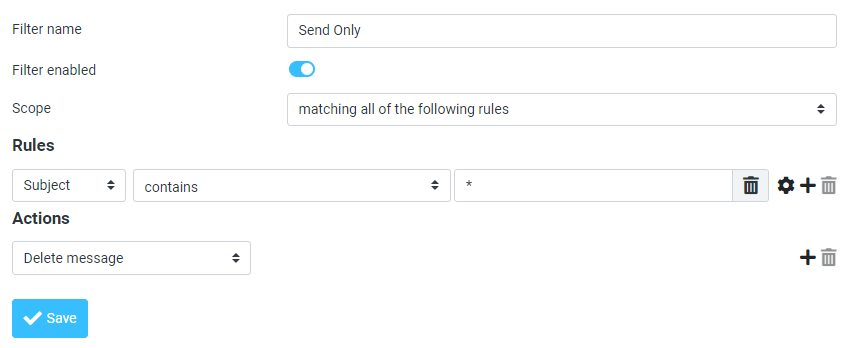
What I would do is log into webmail and on the left click settings, then click filters, and create a filter that deletes all email before it even enters the inbox.
-
I took a look at https://docs.nopcommerce.com/en/installation-and-upgrading/installing-nopcommerce/installing-on-linux.html and that's not going to run on Tommy with Plesk. On a shared server like that you don't have access to install random executables, and we're not going to be installing .Net Core for you. Wolstech can take a look at the Windows install instructions https://docs.nopcommerce.com/en/installation-and-upgrading/installing-nopcommerce/installing-on-windows.html but I think that would work on Lily for free. The other option is you can get a VPS to run that software, and that way you can install .NET Core and anything else you need because you have the whole server to yourself. This Linux VPS would run that software for only $4 per month. https://www.heliohost.org/vps/subscription/?mem=1&cpu=2&hdd=50&os=ubuntu20 You can save 10% if you pay for 6 months up front too.
-
The way we did ASP.net prior to losing our cPanel licenses was you had to have an account on Tommy, Ricky, or Johnny and Lily was like a supplemental account that you had also to do the ASP.net part while cPanel took care of all the DNS, mail, etc etc. because Lily doesn't have a control panel of any kind. You just basically SFTP your files on there, and that's about it. The other thing that may have caused you confusion is before Lily we had ASP.net running through Mono on Tommy. That wasn't a very good configuration though because Mono doesn't support a lot of things, isn't very up to date, and it would cause a lot of load on Tommy. The main reason I approached Plesk first when I was looking for a new control panel is because Plesk runs on both Linux servers and Windows servers. The hope is that we will be able to do things like transfer you between Tommy and Lily, but we're not even thinking about testing something like that yet. It's going to be months before we even consider installing Plesk on Lily. Wolstech runs the Windows servers, and I take care of the Linux servers for the most part so he can create a Lily account for you, get you set up with ASP.net, and give you all the instructions on how to put your files on Lily when he sees this. Let us know if you have any other questions, or if anything else is confusing for you.
-
There you go https://www.sslshopper.com/ssl-checker.html#hostname=swlabr.heliohost.us
-
It looks like you installed your Joomla on public_html and overwrote your homepage. If you're going to test Joomla like that you should install it on a subdirectory or a subdomain so your existing website stays online while you test the new software.
-
Need IPs opened for Google Data Studio connection
Krydos replied to bee1's topic in Technology and the Internet
Can you connect remotely now? -
Need IPs opened for Google Data Studio connection
Krydos replied to bee1's topic in Technology and the Internet
Which user would you like to have remote access to your PostgreSQL database? -
It looks like Hestia locked up, and couldn't restart. I logged in to your VPS and ran the commands sudo kill 285478 sudo systemctl restart hestia Your login page on port 8083 appears to be working now. Let us know if you have any other issues.
-
I logged into your account and clicked the webmail button for all three email addresses and the webmail page loaded up. Do you want me to change the passwords on them to see if they log in correctly? After I'm done testing them you could change the password back to what it was before.
