


wolstech
-
Posts
19315 -
Joined
-
Last visited
-
Days Won
767
Everything posted by wolstech
-
This happens sometimes. Usually the fix is to either reissue the certificate, or if it's not expired you can unassign the certificate from the domain then reassign it. After that, wait 2 hours for the change to apply and it will work again. I just reissued it for you since it only had a month left. Give it 2 hours then clear your cache and it should work again.
-
We have not been able to recover the data so far, and there is a non-zero chance it is not recoverable at all. Tommy is available immediately if you're interested, but it would be an empty account. As a reminder for others reading, HelioHost specifically disclaims liability for data loss in the event of malfunction (e.g. disk failure), misuse (e.g. deploying buggy code that deletes your data, selecting the wrong option in Plesk, etc.), or abuse (both internal, such as being banned without backups due to illegal activity, and external, such as a cyberattack) in the disclaimer section attached to our terms of service. While we do make backups and/or recover data when possible, such is "best effort" and users are ultimately responsible for the creation and maintenance of backups.
-
You can donate and receive a Tommy account immediately, but it will be an empty account. We have not been able to successfully recover the data from Johnny to date.
-
Several major Russian telecom and software companies are currently sanctioned and cannot legally do business with the USA, so I wouldn't be surprised if something like that is the cause...
-
The Morty beta was only offered as one of the gifts available to donors of a previously-held fundraiser (the one that was used to buy the Annie hardware).
-
Cody and Brody are not hosting servers. Cody hosts one name sever and the account management backend. Brody hosts the other name server, our website, and the forums. Morty is an upcoming paid offering that isn’t out yet. Beta testing access (given to donors of a fundraiser we held a while back) will begin in the next week or so per the News posted last night.
-

[Solved] Request for unsuspension of my account
wolstech replied to seintitus's topic in Suspended and Queued Accounts
You're suspended for high server load, and it looks like your email service also got disabled. If you didn't change anything, I'm thinking you probably got hit by bots. It's been 3+ months since there was a load issue and it suddenly started pushing a bunch of load yesterday 1800 UTC. The email disabled itself on the 12th after it tried sending 74 emails. You may want to consider bot mitigation, and also need to investigate the origin of those emails if you don't know what's sending them. I've left the email disabled for now, let me know if you want that turned back on. Unsuspended, it may take a little while to work again.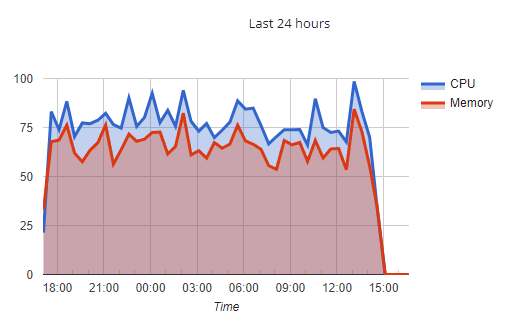
-
There is no update at this time. Last I heard Krydos was trying to get HE to set up the idrac on the server so we can look at the storage configuration. If the array ultimately refuses to rebuild, the result will be a rebuild of Johnny with partial or complete loss of the user accounts. Timeframes on a full resolution are likely to be measured in weeks at minimum in that scenario. News will likely be published documenting the outcome of the recovery.
-
[Solved] dosprn.com Lets Encrypt SSL certificate problem
wolstech replied to dosprn's topic in Customer Service
That incident does not affect us as we don't use Crowdstrike. We also don't use Windows (Lily notwithstanding). My full time job uses both though...I spent much of yesterday morning cleaning that mess up at work. Ugh. It only affects Windows 10/11 and Windows Server 2016/2019/2022 computers at companies that use Crowdstrike. It was not a bug in Windows itself, but rather a bad security definition update for Crowdstrike. Personal devices were unaffected as Crowdstrike is only found in enterprise environments. For the SSL issue, assuming its not expired, you can just unassign the certificate and reassign it, then wait 2 hours. -
Not at this time. We're working to see if we can recover the raid array that failed to rebuild...
-
[Solved] Suspended: codecrafters
wolstech replied to codecrafters's topic in Suspended and Queued Accounts
Neither account can be unsuspended because they're on the broken Johnny server and no backup exists in the system to move them to Tommy. User needs to sign up on Tommy and create only one account this time around... Marking solved. -
A fresh backup is being made based on your Tommy account and should be available from https://heliohost.org/backup/ within the hour.
-
Krydos can rebuild your VPS for you.
-
Nothing to do with the crowdstrike disaster this morning. Tommy's just slower. You can manually back up your account in Plesk by picking you domain, then Backup & Restore, then Back Up. You'll probably want to configure a remote FTP server or something before doing this though so you don't get suspended for exceeding quota. Alternately, we can run a backup on our side and you can download it from our website.
-
@Lena Johnny's hard disk failed. Do you want me to send you a Tommy invite?
-
[Solved] dosprn.com Lets Encrypt SSL certificate problem
wolstech replied to dosprn's topic in Customer Service
Weird. The tdm account is indeed working despite me doing nothing to it. I checked the IP configuration (nothing wrong) and replaced the certs for the luanreis account's domains even though they weren't expired. I suspect its the remove/reassign action that occurs in the background during a renewal that actually fixes these, not the new cert itself, so perhaps just unassigning and reassigning manually without reissuing would work as a fix. Give it 2 hours and that should work again. The dosprn.com domain is now working properly as well. -
That account does not exist. When was this account last working?
-
[Solved] dosprn.com Lets Encrypt SSL certificate problem
wolstech replied to dosprn's topic in Customer Service
I've gone ahead and removed/reinstalled the certs on all of your domains for you. Also, I fixed an issue with your main domain's IP configuration as well. Please give it 2 hours then clear your cache. If the SSL is still not working after that, I'll have Krydos take a look at it. -
[Solved] dosprn.com Lets Encrypt SSL certificate problem
wolstech replied to dosprn's topic in Customer Service
I wonder if it's to do with the DDoS mitigation that was applied recently... I'll take a look at it in a few minutes. -
[Solved] dosprn.com Lets Encrypt SSL certificate problem
wolstech replied to dosprn's topic in Customer Service
Have you waited at least two hours after installing the certificate? -
The backup is currently restoring on Tommy. Assuming it goes well you should be able to log in when it finishes and your domain should go live in the next 2 hours.
-
Sure. Since I have an actual Plesk backup from July 3rd for your account, I'm checking to see if we can just restore your backup onto Tommy vs. just reinviting you and you restoring data manually. I've asked about this possibility in a staff channel...if we can restore the backup directly it'll be a lot less work for you
-
As of the latest update, the hard disk rebuild failed. Krydos is looking into whether it can be recovered, but that is going to take quite some time assuming its possible. The good news is in your specific case, we had backed your account up on July 3rd for an unrelated reason, so you can download your backup to restore to how it was 2 weeks ago if needed. Many of our users are moving to Tommy for the time being, and VPSes are also an option.
-
I don't think the 2019 Tommy had RAID, so the disk dying just killed the server. Johnny's data was on a RAID1 volume (a mirror), but we're still trying to get the new disk to rebuild now that it's been replaced. If it ultimately refuses to rebuild and/or the second disk in the mirror dies, it's functionally the same as all of the other disk crashes we've had...
-
Sparkie is a vmware ESXi server. The -ie names are all physical boxes, the servers with -y names are VMs living on the -ie boxes. The physical boxes have various data stores made up of groups of disks. In Sparkie's case, there's 3 groups of disks forming 3 datastores (DS1, DS2, DS3) that store the VMs and virtual disks. The disk group that held DS2 is what failed. DS2 only contained the virtual disks for the /home and mysql/pgsql data partitions for Johnny, so Johnny broke. DS1 and DS3 are fine, which is why there isn't a more severe outage. The other virtual servers on the Sparkie hardware are working normally. Those include Lily (Windows hosting), Cody (an account management server), and VPSes rented by customers. Ricky was ultimately done away with due to the cPanel license being revoked. It ran for a while afterwards without a control panel until we transferred all the accounts off it, then we retired it. We currently don't have a Plesk license to rebuild it.
