


KazVee
-
Posts
1,170 -
Joined
-
Days Won
45
Everything posted by KazVee
-
I've added that domain to your account for you. Please note that it may take up to 2 hours for your new domain to fully work. If after a full 2 hours it doesn't work on your side, please make sure you clear your web browser cache: https://wiki.helionet.org/Clear_Your_Cache In the meantime, please make sure you configure DNS for the new domain. You can either: 1) Set NS records pointed to the HelioHost nameservers: `ns1.heliohost.org` and `ns2.heliohost.org`, or 2) Manually create DNS records: a) Add an A record (IPv4) pointing to your server's IPv4 address b) Add an AAAA record (IPv6) pointing to your server's IPv6 address To find the correct IPs, please go to: Login > Plesk > Websites & Domains > [domain name] > and check at the bottom of the page.
-

[Solved] Set Up SPF, DKIM, and DMARC Records
KazVee replied to wanpaopao's topic in Escalated Requests
This support request is being escalated to our root admins. -
Great news! I will mark this as [Answered] then, but if you're comfortable to share what type of card worked for you (debit, credit, etc.) please let us know so we can suggest it as an option to others in Nepal who may encounter similar problems.
-
I'm glad the card issues have been resolved! ? To enable us to add a domain for you, please let us know the full domain you would like added. If you're using HelioHost's domains, please include the "helioho.st" or "heliohost.us" ending you want to use. If you've purchased a custom domain, please make sure you include the final ".com" or ".net" or so on. We can then add the domain to your account for you. You can read more info here on how requesting to add domains works: https://wiki.helionet.org/Addon_Domains
-
I've added that domain to your account for you. Please note that it may take up to 2 hours for your new domain to fully work. If after a full 2 hours it doesn't work on your side, please make sure you clear your web browser cache: https://wiki.helionet.org/Clear_Your_Cache In the meantime, please make sure you configure DNS for the new domain. You can either: 1) Set NS records pointed to the HelioHost nameservers: `ns1.heliohost.org` and `ns2.heliohost.org`, or 2) Manually create DNS records: a) Add an A record (IPv4) pointing to your server's IPv4 address b) Add an AAAA record (IPv6) pointing to your server's IPv6 address To find the correct IPs, please go to: Login > Plesk > Websites & Domains > [domain name] > and check at the bottom of the page.
-
[Solved] Email Service on VPS (VPS Purchase)
KazVee replied to msbsurfi's topic in Escalated Requests
Thank you for your donation! ? You should have received an email confirmation of the thank you gift, and see the additional space in your hhfn account now, but please let us know if you have any issues. -
[Solved] Request to get mail verification
KazVee replied to mineturtle2's topic in Escalated Requests
This support request is being escalated to our root admins who can set up SPF, DKIM and DMARC records on the new mineturtle2.helioho.st domain for you. -
[Solved] Request to get mail verification
KazVee replied to mineturtle2's topic in Escalated Requests
I've changed the main domain on your account for you. Please note that it may take up to 2 hours for your new domain to fully work. If after a full 2 hours it doesn't work on your side, please make sure you clear your web browser cache: https://wiki.helionet.org/Clear_Your_Cache Please note there is a risk of data loss when main domains are changed, so I made a full backup for you before I made the changes, in case you need any files from the old domain. You can download the backup here: https://heliohost.org/backup If you're not sure how to extract the backup files, please follow our how-to guide here: https://wiki.helionet.org/Account_Backups Once the new main domain is fully working, I'll escalate this same thread so a root admin can setup the SPF, DKIM and DMARC records for you. -
I've added that domain to your account for you. Please note that it may take up to 2 hours for your new domain to fully work. If after a full 2 hours it doesn't work on your side, please make sure you clear your web browser cache: https://wiki.helionet.org/Clear_Your_Cache In the meantime, please make sure you configure DNS for the new domain. You can either: 1) Set NS records pointed to the HelioHost nameservers: `ns1.heliohost.org` and `ns2.heliohost.org`, or 2) Manually create DNS records: a) Add an A record (IPv4) pointing to your server's IPv4 address b) Add an AAAA record (IPv6) pointing to your server's IPv6 address To find the correct IPs, please go to: Login > Plesk > Websites & Domains > [domain name] > and check at the bottom of the page.
-
[Solved] Request to Add Addon Domain to My Hosting Account
KazVee replied to rseann's topic in Customer Service
You've given us all the info we needed to add a domain for you. ? I've added it now, but please note that it may take up to 2 hours for your new domain to fully work. If after a full 2 hours it doesn't work on your side, please make sure you clear your web browser cache: https://wiki.helionet.org/Clear_Your_Cache -
Your account has been suspended for breaking our Terms of Service, specifically the very first line that says "Each person is allowed to have one account". Our system detected that you have duplicate accounts, so they have all been suspended under our Duplicate Account policy. Is this the account you wish to keep?
-
You're very welcome! ?
-
Absolutely, I've added that one now. Please note that it may take up to 2 hours for your new domain to fully work. If after a full 2 hours it doesn't work on your side, please make sure you clear your web browser cache: https://wiki.helionet.org/Clear_Your_Cache If you need more domains added, please create a new request in the Customer Service section here: https://helionet.org/index/forum/45-customer-service/ We do try to check all parts of the forum, but it's less likely for support requests to be accidentally missed in the proper section for them. ?
-
I'm not sure what you mean by "return" the hosting, could you please explain? Your hosting account is a free account, so there is nothing to "return" as such. If you mean that you want your hosting account deleted, please confirm and we can delete it for you. You are not able to log in to your account because it has been suspended for breaking our Terms of Service, specifically the very first line that says "Each person is allowed to have one account". Our system detected that you have duplicate accounts, so they have all been suspended under our Duplicate Account policy. Please let us know if you want to proceed with the account deletion, and we can delete your accounts. Or if you decide you want to keep using our hosting, please let us know if hayahsocial2024 is the account you want to keep, and we can unsuspend it so you can login again.
-
I've added that domain to your account for you. Please note that it may take up to 2 hours for your new domain to fully work. If after a full 2 hours it doesn't work on your side, please make sure you clear your web browser cache: https://wiki.helionet.org/Clear_Your_Cache In the meantime, please make sure you configure DNS for the new domain. You can either: 1) Set NS records pointed to the HelioHost nameservers: `ns1.heliohost.org` and `ns2.heliohost.org`, or 2) Manually create DNS records: a) Add an A record (IPv4) pointing to your server's IPv4 address b) Add an AAAA record (IPv6) pointing to your server's IPv6 address To find the correct IPs, please go to: Login > Plesk > Websites & Domains > [domain name] > and check at the bottom of the page.
-
I've added that domain to your account for you. Please note that it may take up to 2 hours for your new domain to fully work. If after a full 2 hours it doesn't work on your side, please make sure you clear your web browser cache: https://wiki.helionet.org/Clear_Your_Cache To view the IPs to use for the A/AAAA records, please login and go to: Plesk > Websites & Domains > [domain name] > and check at the bottom of the page
-
Since your existing domains end with "helioho.st", I guessed you would want the same and have now added nkportfolio.helioho.st to your account. Please note that it may take up to 2 hours for your new domain to fully work. If after a full 2 hours it doesn't work on your side, please make sure you clear your web browser cache: https://wiki.helionet.org/Clear_Your_Cache In the future please make sure you let us know the full domain you want, including the ending. For the free domains, we offer endings of "helioho.st" and "heliohost.us". If you've registered your own domain, we'd need you to tell us if it ends in .com or .net, and so on. You can check here for full details on how to request an addon domain: https://wiki.helionet.org/Addon_Domains
-
I'm sure your students will have an amazing learning experience! I've sent invites to the latest 4 now, please let us know if you need anything else. ?
-
Invites have been sent for the last batch. Please note there were already existing accounts for: [ email addresses redacted by KazVee ] If the 2 students above have trouble logging into their accounts, please ask them to try password resets with this link: https://heliohost.org/reset/
-
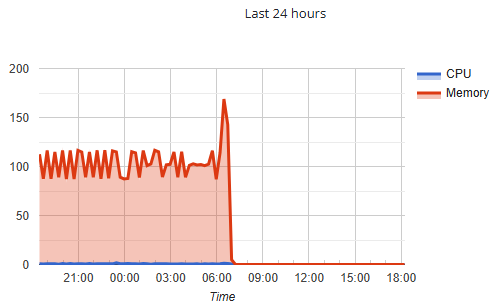
Your account was suspended for High Server Load: 100.84 GB memory. This is a snapshot of your account load at time of suspension, the cliff where it drops is when the suspension happened. Please see our Suspension Policy page here for the account load limits: https://wiki.helionet.org/Suspension_Policy#High_Server_Usage I have unsuspended your account now, please give it a few minutes to get fully back up and running. If you're not sure what caused the load, if you give us more details about what you were running (Node apps and WordPress often result in high load suspensions, for example), we can try to suggest ways to reduce your load. Please fix the issue quickly to reduce the load your account is causing. If you don't make any changes, it's very likely that the system will suspend your account again. You can keep an eye on your account load here: https://heliohost.org/dashboard/load/
- 1 reply
-
- 1
-

-
I've added that domain to your account for you. Please note that it may take up to 2 hours for your new domain to fully work. If after a full 2 hours it doesn't work on your side, please make sure you clear your web browser cache: https://wiki.helionet.org/Clear_Your_Cache In the meantime, please make sure you configure DNS for the new domain. You can either: 1) Set NS records pointed to the HelioHost nameservers: `ns1.heliohost.org` and `ns2.heliohost.org`, or 2) Manually create DNS records: a) Add an A record (IPv4) pointing to your server's IPv4 address b) Add an AAAA record (IPv6) pointing to your server's IPv6 address To find the correct IPs, please go to: Login > Plesk > Websites & Domains > [domain name] > and check at the bottom of the page.
-
I've removed that domain and its subdomains from your account. Please note there is a risk of data loss when domains and subdomains are removed, since the folders for them inside Plesk will be deleted. I made a full account backup for you before I removed them, in case you need any of the old files. You can download the backup here: https://heliohost.org/backup If you're not sure how to extract the backup files, please follow our how-to guide here: https://wiki.helionet.org/Account_Backups
- 1 reply
-
- 1
-
-
Great news! Thanks for coming back to post that it worked, I am sure it will help other users who have the same problem who search the forum and find this thread. ?
-
Sorry you're having trouble. While I cannot see any of their payment info, I can confirm we do have users from Nepal on the Tommy donor server, so it may be that you would need to try a different card. On this page https://heliohost.org/donate/ we have a "Fundraiser Info" button that will allow you to donate towards the 20th Anniversary Rebirth of Stevie Fundraiser, and the payment processer for the fundraiser is different than the one for the yellow PayPal button we've always had on there. I've just tested the Fundraiser Info button (it allows for a custom amount but the minimum is USD $3) and it will take cards or payment by bank transfer. Most of our current users in Nepal joined us before the fundraiser started last month, so they'd have used the yellow PayPal button. If you planned to donate USD $3 or more anyway, you might want to try the Fundraiser Info button since that uses a different payment processor, and let us know if you have better luck. If you're trying to donate USD $1 for a Tommy invite and using the yellow PayPal button, it sounds like you might need to speak to the bank that issued your card and let them know what error message you are getting to see if there is anything they can help with, or try a different card. I'm not sure if the USD $3 minimum amount on the Fundraiser Info method is something that can be changed. I didn't know there was a minimum before I tested it just now, so I've mentioned it in the staff channel and we can look into it. Edited to add: After checking in the staff channel, if you're trying to get a Tommy invite, a root admin can make a link to pay with Stripe and see if that works for you. Please let us know!
-
I'm guessing you want Hestia since this seems to be the most popular control panel that folks ask for. I've escalated this thread to the attention of Krydos who can install that for you. Next time, if you have trouble with SSH or anything else, please could you give us more details about the problem. Things like: 1) what are you trying to do 2) what did you expect to happen 3) what actually happened 4) what else you tried to fix the issue 5) what error message you are getting. The more details you give us about the problem, the quicker we can give you accurate help.
