Kairion
-
Posts
305 -
Joined
-
Last visited
-
Days Won
7
Everything posted by Kairion
-
Regarding the WordPress matter, Plesk has a feature called WP (WordPress) Toolkit, where you can automatically install and update WordPress and its plugins and themes. Just login to Plesk and click on the penultimate item on the left panel called "WordPress". There you'll have an option to "Install" WordPress or "Scan" for it (if you have it already installed and just wants Plesk to recognize it so you can take benefit of Plesk's WordPress management). This way you just fill some fields and Plesk will take care of installing WordPress (plus the "Plugin/theme set" if you choose one) as well as keeping it up to date according to your choices on "Automatic Update Settings" section.
-
Hello. Java was supported on Tommy and Johnny when HelioHost was using cPanel, as you can check here: https://wiki.helionet.org/features/java. As of right now HelioHost installed Plesk on Tommy and is migrating users to this server and also are configuring Johnny to run this new control panel (and migrate users to that server as well) so there's no ETA to when Java will be supported again (it's a well requested feature, so probably it won't take long). You do have an option if you can't wait until then: you can join the waitlist to get a VPS (https://heliohost.org/vps) and then you can run anything that you want on it since you'll be the only one using it and will have super user access.
- 1 reply
-
- 1
-

-

[Solved] No permission to access server via SSH
Kairion replied to chamnabyun's topic in Customer Service
Hello @chamnabyun. If you have an account on one of the shared host servers (Tommy, Johnny, Ricky) then you can't access SSH for security reasons: https://wiki.helionet.org/faq#can-i-use-ssh However if you have a VPS server then you can easily have access to SSH: Login on https://heliohost.org/login/ with your account's username and password. Click on "Connect to SSH on your VPS." (our just click here: https://heliohost.org/dashboard/ssh/). On that page you'll have access to your VPS IP address, SSH service connection port and your username (your password is the same as your HelioHost account you used to login on dashboard). Use Putty (if your OS is Windows), Google Chrome's extension "Secure Shell" (any OS that runs Chrome) or run "ssh" on your terminal (if your OS is either Mac, Linux, BSDs etc.). Note: I did a briefly explanation about SSH connection because I'm considering that you do know how to use it. If it isn't your case reply providing your OS and I'll post a specific step-to-step for you. Also, if you found any errors while trying to connect to a VPS using SSH, please provide as many details as possible (error message, what OS and software you're using to connect to your server etc.) so we can provide a better support for you. -
I'd be glad if you did that. I don't check my Gmail that often so it's possible that I might miss something. It's fine, I'm not in a hurry and I do know you're all overworking to get things done so there's no need to worry ?. Thank you so much for all your hard work, I really do appreciate it.
-
Sorry to bother, but is it possible to keep Tommy and VPS on the same account (fasouza & same email)? When I tried using it on VPS subscription page it wasn't possible. If it isn't, could the VPS account be changed to "kairion" (I also tried it but even that wasn't possible either)?
-
[Solved] Increase Storage, add new alias & enable compressed URLs
Kairion replied to Kairion's topic in Escalated Requests
Thank you so much! I really appreciate all your help ? -
[Solved] Increase Storage, add new alias & enable compressed URLs
Kairion replied to Kairion's topic in Escalated Requests
Wow, that's actually a pretty nice idea. Please do so and thanks for the insight. -
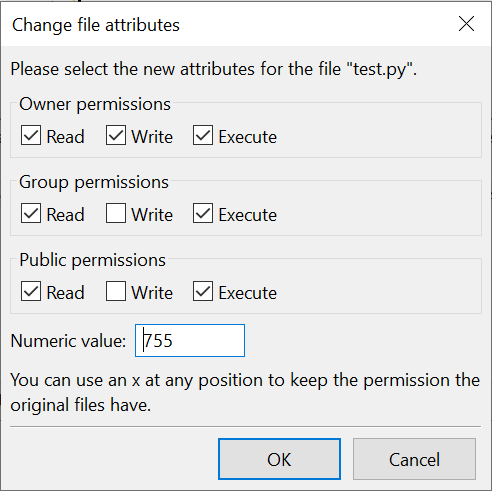
To be honest I've never used Python for web but since you have FastCGI enabled, I don't think it is the problem. Try to run the following script on your website's "cgi-bin" directory: #!/usr/bin/python3.10 print("Content-type: text/html") # Send our page's header to webserver print() # Blank line to end page's header # Now our page's content below: print("<html><head><title>Python \"Hello World!\" testing</title></head><body><pre>") print("Hello World!") print("Heliohost rules!") print("</pre></body></html>") Here's the above script on my website: https://fasouza.eu.org/cgi-bin/test.py Remember that the file should have chmod (permission) 755, so it has to be like that (I used a FTP program but you can do it on Plesk's file manager): If it doesn't work, then probably it is necessary to enable CGI support. But to be sure we need to know what kind of error are you getting when runing your script (and it would be helpful to also have your logs). You're seeing this error because port 8443 has the SSL certificate of "tommy2.heliohost.org". You should access Plesk on https://tommy2.heliohost.org/ or preferably on https://heliohost.org/login/.
-
[Solved] Increase Storage, add new alias & enable compressed URLs
Kairion replied to Kairion's topic in Escalated Requests
I'm not sure how to ask it on Plesk, but what I'm aiming is something like *.felipeamorim.eu.org/* redirecting (HTTP 301 redirection) to *.fasouza.eu.org/* so whatever subdomain or whatever file/directory used on "felipeamorim.eu.org" would be pointed towards its counterpart on "fasouza.eu.org". Is it possible? That's odd. If GZIP is enabled then I'll have to check Grav, since Plesk's site audit warns me of two uncompressed URLs. I'll look into it, thanks. -
User: fasouza | Server: Tommy | Main domain: fasouza.eu.org Hello guys, I hope you're all fine. I'd like to request an increase on my account's storage of 1000 MB. Here's the transaction ID on PayPal: 1MT65525Y2984620R Also I'd like to see if it's possible to create an alias blog.felipeamorim.eu.org pointing to blog.fasouza.eu.org and if it's possible to enable BROTLI or GZIP or my account. As usual, thank you for this service and your kindly support ?
-
[HH#538398] heliohost.org question. Hosted content related.
Kairion replied to HelioHost's topic in Email Support
Hello, Gregory, I hope you're doing fine. As a HelioHost user for some time (with no affiliation to HelioHost's team at all) I'd like to add my two cents: Yep, most sites with legal content are acceptable and HelioHost welcomes them. But you need to be aware that there are rules that should be complied specially (but not limited to) because it is a free host, so adult content or huge usage of server's resources for example are two things that would be a problem. About those websites, to be honest I've never heard of them, but I decided to read and to be completely honest, all I could see from those "thought-provoking" was users who misused or abused the free service they were using as they were doing a favor for HelioHost by using its services for things that wouldn't be acceptable even on paid hosts. So, to put it short, by obeying the rules we all agree when signing up to HelioHost service it's simply impossible to have any kind of problem. PS.: Please do note that even if they call us as customers or clients, we are receiving a free service provided by a NPO (Non-Profit Organization) which has no obligation to take orders from us, so we have the duty to be nice to all of them as they're all volunteers. -
Got it. Right now I'll stay on Tommy since it's not worth the trouble to configure and manage a VPS just for a basic blog. As a last resource option I can find another software as an alternative to Grav. I think it's better to stay with 60 seconds. I'll use Plesk's "Backup & Restore" feature as an alternative for making backups. Thanks again ?
-
User: fasouza | Server: Tommy | Domain: fasouza.eu.org Hi, it's me Mario! again. I did some test with Grav and I've found two issues that didn't happen when I was running it on cPanel's version of Tommy. I totally understand if it is caused by features not available yet (or even removed ones) but since I'm not sure if that's the case I'm posting here to get some help (aka: to know if I didn't screw up when restoring my backup). First issue: When I try to run Grav's backup tool I get the following errors on my logs (and the backup isn't done): Second issue: When I try to access Grav's scheduler I get the following exception: If someone can help me with those issues (or just clarify if they're features unavailable/removed) I'd be really thankfull.
-
Yep. It's working perfectly now, thanks ?
-
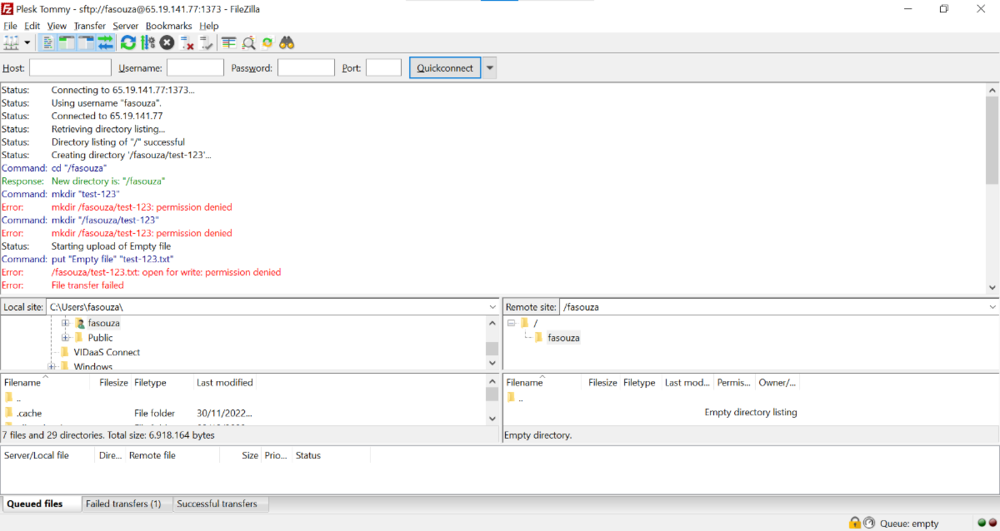
Username: fasouza | Server: Tommy | Domain: fasouza.eu.org When I connect to SFTP with my username/password I can't see any of my files, just a directory named "fasouza" with no content. I'm also unable to create files and directories inside this mentioned directory. Here's a print from my SFTP client:
-
I made a test with Filezilla (free desktop FTP client, you can download it here: https://filezilla-project.org/) using the info @Krydos provided and I was able to connect to cPanel version of Tommy. Are you setting it as a SFTP connection (it won't work as FTP connection)? About connecting to Plesk's version of Tommy, if your account wasn't migrated then Plesk doesn't have an account with your username/password, so it really won't work until your account is migrated.
-
[Solved] Issues and/or questions after migration to Plesk
Kairion replied to Kairion's topic in Escalated Requests
I'm not sure when or why, but the ".htaccess" file was renamed to ".htaccess.disabled" thus causing the 404 error. Renaming it back to ".htaccess" did the tricky. Any way to fix that? -
[Solved] Issues and/or questions after migration to Plesk
Kairion replied to Kairion's topic in Escalated Requests
Since my domain is up again I made another test and directory index listing seems to be enabled, as you can check here: https://fasouza.eu.org/test/ About the subdomain blog.fasouza.eu.org pointing to "{my_root_directory}/blog", it seems it isn't fully propagated because I'm seeing the Plesk default page (no web site at this address) and I'm unable to create a Let's Encrypt certificate for it, so I'll wait a couple hours before validating this again. -
[Solved] Issues and/or questions after migration to Plesk
Kairion replied to Kairion's topic in Escalated Requests
Are you sure? I created a "test" directory containing a text file and it was listed. I'll check it again after my domains start working again. Either way, I already commented the "Options" line on ".htaccess" so it should work properly. Thanks ? -
[Solved] Issues and/or questions after migration to Plesk
Kairion replied to Kairion's topic in Escalated Requests
Backup done and domain pointed to HelioHost nameservers. I think it's ok now to continue this process. Which reminds me, in that case, I think it isn't necessary to keep "fasouza.heliohost.org". Just keep "felipeamorim.eu.org" as an alias to "fasouza.eu.org" and "kairion.eu.org" remaining as a normal domain. I figured it could be that. Grav uses "Options" to disable directory index listing (Options -Indexes) for security purposes. Is there another way to disable directory index listing without this option on .htaccess (some configuration on Plesk for example)? -
[Solved] Change HelioNet account e-mail address
Kairion replied to Kairion's topic in Contact HelioNet
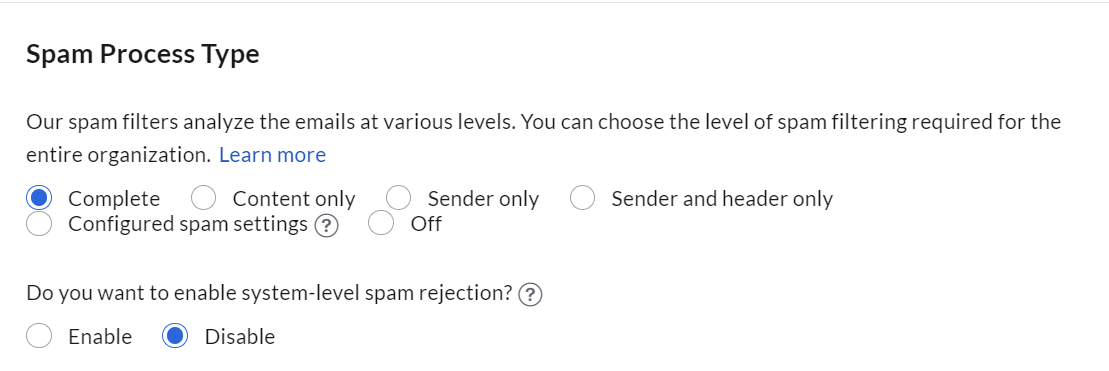
Originally my hosting account e-mail address was my GMail. I changed to my own domain e-mail because of this post: I'll try opening a support ticket with Zoho and if it doesn't work I'll try using my GMail as I was using it before. Thanks ? Edit: I figured a way to solve it. On my admin panel I went to "Security & Compliance" > "Spam Control" > "Spam Processing" and disabled "Do you want to enable system-level spam rejection?" (which allowed HelioNet e-mail to be delivered to my spam box where I marked it as "not spam"): Again, thanks for the info, it's thanks to that I figured out what to do.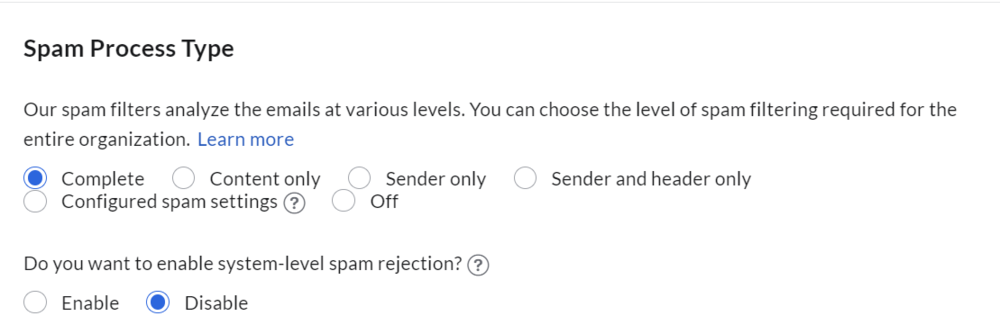
-
Hello guys. I'm trying to change my e-mail address on HelioNet to match my e-mail address on HelioHost (which uses an email on my domain fasouza.eu.org) but I'm not receiving the verification link. Could you guys help me to find out why I can't receive it on my own domain e-mail? PS.: Right now I'm using a GMail address and it works without issues.
-
Hello guys. I'm not sure if it's already to start a topic with multiple issues so if I'm not supposed to do that this topic can be closed and I'll post again in separated topics. First of all, my info: Username: fasouza Domain: fasouza.eu.org Server: Tommy Now my issues: Could you change my DNS settings by adding the following records (in order for me to migrate to HelioHost nameservers)?: Type Name Data / Content TTL Priority MX @ mx.zoho.com 5 min (300 sec) 10 MX @ mx2.zoho.com 5 min (300 sec) 20 MX @ mx3.zoho.com 5 min (300 sec) 50 TXT _dmarc v=DMARC1; p=quarantine; rua=mailto:dmarc@fasouza.eu.org 5 min (300 sec) TXT @ zoho-verification=zb79303131.zmverify.zoho.com 5 min (300 sec) TXT @ v=spf1 include:zoho.com ~all 5 min (300 sec) TXT zmail._domainkey v=DKIM1; k=rsa; p=MIGfMA0GCSqGSIb3DQEBAQUAA4GNADCBiQKBgQCGDshrf0dJR897tiXXUlSawljNTtKRnsumAy29dLOYl8a4uxcD4IMGyTQAxxZ2uVahyOmKSD09UszRTy5np8tKtm4esSCXGDZwtWoOK/sSoruvopVwsNPi/riLVnBFxkgTo0ikrx7hjpWp8+XkITj/A+yLmHTnUCaXNwDYzgFZEQIDAQAB 5 min (300 sec) On cPanel I had the subdomain blog.fasouza.eu.org (pointing to {my_root_folder}/blog). Is it possible to have it back on Plesk? On cPanel I used Grav as my CMS/blog system as an alternative to WordPress. When trying to install it on Plesk I get a 500 error apparently because of its ".htaccess" file saying "Options not allowed here". Is it possible to check what are these not allowed options? I couldn't find on Plesk logs.
-
Thanks for the info. I had no idea HelioHost was suffering DDoS attacks. Honestly, why would anyone attack a NPO who just provide free hosting? Some people really are jerks. I hope they realize this is stupid and stop it soon.
-
Hello guys. On 2022-12-01 (YYYY-MM-DD) at 02:18 am (UTC -3) I made a donation to jump the line on Plesk's migration. After that the "Plesk ETA" page indicated that my account would be moved on 2022-12-03 (YYYY-MM-DD). My problem is: now the same page is saying that my account will be moved on 2022-12-04 (YYYY-MM-DD). Did I do something wrong that is interfering with the process? If so, how could I fix it? PS.: Receipt number (PayPal): 1815307862842061.