


Krydos
-
Posts
26738 -
Joined
-
Last visited
-
Days Won
954
Everything posted by Krydos
-
 Alright, the VPS finished building, and you should have received an email with the subject "VPS17 has been created!" that contains the username, IP address, etc for your new VPS. I copied your password from the Tommy account so you should be able to login with the same password as before, but if the password doesn't work for the VPS you can try resetting it at https://heliohost.org/reset/ I also installed java and Tomcat for you and installed SSL. You can see Tomcat running at https://vps17.heliohost.us:8443/manager/html Once you login via SSH to your VPS you'll see a file named tomcat.txt in your home directory that contains the username and password to login to the Tomcat manager. Since you exchanged the Tommy account for a VPS I went ahead and created a full backup of your Tommy account, which you can download from https://heliohost.org/backup/ and deleted the Tommy account. Let us know if you need help with anything else.
 -
I've started a VPS building for you, that will support Java/Tomcat. We can exchange your $4 that you paid for 2 Tommy accounts towards the VPS.
-
I guess OP never responded because they realized all of their requested modules were already installed.
-
DKIM, SPF, and DMARC have been set up for the domain abraxas.wtf. We recommend sending a real email (not just the word "test" or a blank email) to https://www.mail-tester.com/ to make sure that everything is set up correctly. If you get less than a 10/10 score please post a link to the full report so we can help you fix any other issues that there may be.
-
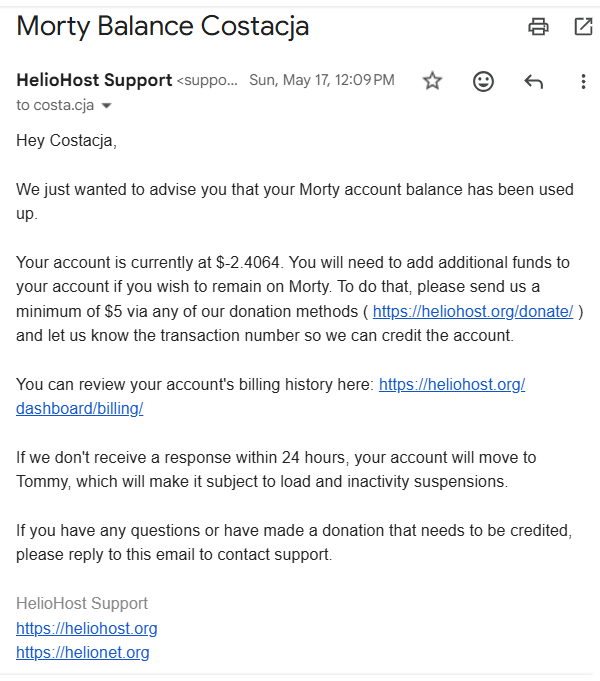
It's been a week with no response so I'm going to close this as solved because it seems to me like all of the questions have been answered: Q: Why can't I install Moodle? A: You're on Tommy which doesn't support it. You'll need to re-upgrade to Morty if you want to run Moodle. Q Why am I no longer on Morty? A: You ran out of prepaid balance and ignored our emails. Q: Why did I run out of balance earlier than expected? A: You started a bunch of high load cronjobs which burned through your balance quickly due to overage charges. Q: How can I move back to Morty. A: You can move yourself back to Morty with this link https://heliohost.org/dashboard/move/ Q: Why am I not receiving HelioHost emails? A: You'll need to check your spam settings or change your contact email address to something that will deliver our emails to your inbox. If you have more questions or still need help with anything else please feel free to open a new support ticket with this link https://helionet.org/index/forum/45-customer-service/?do=add
-
Installed. You can see the current list of installed modules for Johnny's Python 3.14 at https://johnny-info.heliohost.org/pyinfo/info3.14.py
-
DKIM, SPF, and DMARC have been set up for the domain alk.helioho.st. We recommend sending a real email (not just the word "test" or a blank email) to https://www.mail-tester.com/ to make sure that everything is set up correctly. If you get less than a 10/10 score please post a link to the full report so we can help you fix any other issues that there may be.
-
What is the error message when you try to install SSL?
-
The default document root is /natsu-scripts.fr/ and your main domain is in /httpdocs/ I would argue that putting a domain inside the document root of another domain will cause more interference than the default.
-
[Solved] Payment error and request some time
Krydos replied to kbp2025's topic in Escalated Requests
I linked the new Stripe subscription to your VPS, and sent you an invoice. I have also canceled the old PayPal subscription so it won't bill again accidentally. Thanks. -
Is there some reason why the default document root won't work for you?
-
Take a look at the modules that are already installed on Tommy's Python 3.12 and then request only the modules that aren't already present https://krydos1.heliohost.org/pyinfo/info3.12.py
-
[Solved] Payment error and request some time
Krydos replied to kbp2025's topic in Escalated Requests
I guess the card isn't working with Stripe either. We'll keep your VPS powered on until July 18th. -
[Solved] An error occurred while using Johnny alongside MariaDB.
Krydos replied to swaloy's topic in Escalated Requests
Does it work now? -
[Solved] Email not delivering - dmarc issue?
Krydos replied to autonetix's topic in Escalated Requests
DKIM, SPF, and DMARC have been set up for the domain h3x.au. We recommend sending a real email (not just the word "test" or a blank email) to https://www.mail-tester.com/ to make sure that everything is set up correctly. If you get less than a 10/10 score please post a link to the full report so we can help you fix any other issues that there may be. -
DNS record added.
-
DNS records set.
-
The August estimate was based on your current load average over the previous 30 days which at the time was about $1.00 per month. If you start having overages you get billed more per day. On 2026-05-02 you added a bunch of cronjobs that ran really frequently and were causing you to have overages every day. +----------+--------+ | username | bill | +----------+--------+ | costacja | 0.4386 | | costacja | 0.3904 | | costacja | 0.3625 | | costacja | 0.3495 | | costacja | 0.3243 | | costacja | 0.3127 | | costacja | 0.3113 | | costacja | 0.3060 | | costacja | 0.3051 | | costacja | 0.3242 | | costacja | 0.3387 | | costacja | 0.3272 | | costacja | 0.3485 | | costacja | 0.3823 | | costacja | 0.2885 | +----------+--------+ You can move back to Morty if you want at https://heliohost.org/dashboard/move/
-
[Solved] The option to log out of the Heliohost Dashboard
Krydos replied to a topic in Escalated Requests
Yeah, as long as the mobile version works there should be no reason to request a desktop site from a mobile device. -
[Solved] The option to log out of the Heliohost Dashboard
Krydos replied to a topic in Escalated Requests
You'll probably need to clear your browser cache, but can you see the logout button at the very bottom of the mobile menu while logged in now? -
[Solved] Payment error and request some time
Krydos replied to kbp2025's topic in Escalated Requests
You said your card wasn't working on PayPal so I gave you a Stripe link. Does your card work on Stripe? -
[Solved] Payment error and request some time
Krydos replied to kbp2025's topic in Escalated Requests
Does this link work? https://buy.stripe.com/14AeVf3VAdIP5JfegZco007 -
Did you get this email we sent you on May 17th?
-
Your current balance was $1.0443 plus $10.00 plus $2.00 bonus brings your new total to $13.0443. Based on your load from the last 30 days your new estimated expiration date is 2027-07-30, but if your load increases it could run out sooner. We will email you occasionally to let you know how your balance is being used. Thanks for increasing your Morty balance.
-
We've temporarily closed our automated VPS signups to make some upgrades to our billing system. In the meantime we can still build VPS manually. If you're interested in signing up for a VPS please select the plan you want from https://heliohost.org/vps and submit your email address. After your VPS request is submitted post at https://helionet.org or chat with us at https://heliohost.org/chat and we can manually email you an invite link to get your VPS set up. We hope to get the automated VPS builds without needing to contact support soon. Let us know if you have any questions.
-
- 1
-

