


Krydos
-
Posts
26741 -
Joined
-
Last visited
-
Days Won
954
Everything posted by Krydos
-
The domain has been added. Since you're using Cloudflare make sure you create an A record with the value 65.19.141.77 and an AAAA record with the value 2001:470:1:1ee::2002 The document roots have been modified as requested. Please note that Node.js uses a lot of memory so it's not recommended to run 2 at the same time. You're already using 114 GB of memory per day, and we recommend people stay below 200 GB per day to avoid getting suspended. You will be able to monitor you're own CPU and memory usage eventually at https://heliohost.org/dashboard/load/ but that feature hasn't been implemented yet, so if you're curious how much memory you're using just make a post to ask. We'll make a news post when the dashboard is updated with the load information.
-
The webmail part wasn't working because your domain was missing the webmail subdomain DNS record. I added the record and reissued your SSL for you so it's secured now.
-
If you're curious, it's because you typed your domain with www on the front of it. Apparently that breaks everything. The www is supposed to be a CNAME record not part of your actual domain. The code has been fixed so this won't happen to anyone else.
-
The domain has always been pointing at cPanel. You just didn't notice it until cPanel was shutdown and the domain went offline. Anyways, the DNS records have been updated so you should be able to generate an SSL certificate for it now. Just don't check the wildcard SSL box, because that isn't implemented yet. Let us know if you're still having issues with it and we can take a closer look.
-
Added.
-
I also should mention that Flask and Django apps on our VPS plans don't use caching like that and your changes will show up immediately. VPS plans start at $4 per month and you can signup at https://heliohost.org/vps/
-
Correct, WSGI uses server side caching, like it says in our guide. That means that Flask and Django apps can use the same old code for up to 2 hours. To make matters even worse different Apache processes can have different versions of your code cached so refreshing the page over and over may result in randomly picked versions of your site from the last 2 hours. This is why we recommend developing your Flask and Django apps on your development computer, and then uploading the production version to be hosted on our server. Note that Python CGI doesn't have caching like that, just Flask and Django. Remote access has been enabled to your only PotgreSQL database from your only PostgreSQL user.
-
Your daily limit has been raised to 200 per day. The day resets at midnight UTC. Thanks for the extra information.
-

[Solved] Website Error WHEN TRY TO sign up new account
Krydos replied to Gary987889's topic in Escalated Requests
Actually, there were a few minutes last night around the time that this was posted where Cody got blocked in Brody's firewall which would have given that error. It was fixed within 5 minutes though. -
[Solved] Website Error WHEN TRY TO sign up new account
Krydos replied to Gary987889's topic in Escalated Requests
What page did you get that error on? Selecting the plan Submitting an email address Clicking the validation link Submitting a username Submitting a password Submitting a domain Accepting the terms Logging in for the first time Something else? -
Awesome. Glad you got it working.
-
All of your email addresses now have a 20 per hour limit, but the 50 per day that Kairion is talking about is for the account as a whole. If you want to raise that limit we would need the additional information.
-
[Solved] VPS36 would like a fresh operating system
Krydos replied to eotsr's topic in Escalated Requests
Thanks for the donation. ? -
The most common cause of 500 errors after transferring to Plesk is having Options in your .htaccess. You can try renaming your .htaccess file temporarily to see if the 500 error goes away. If the Options lines are the problem you can comment them out. We plan on enabling full support for Options in .htaccess eventually. You can also go to Login > Continue to Plesk > Websites & Domains > drroshan.ayur.heliohost.org > Logs. There it will list the exact reason for the 500 error. Let us know if you need further assistance.
-
[Solved] VPS36 would like a fresh operating system
Krydos replied to eotsr's topic in Escalated Requests
Your VPS has been rebuilt. Let us know if you need help with anything else. -
A password reset link has been emailed to you. Let us know if you need help with anything else.
-
It looks like you're using Laravel so I googled the error and came up with this https://stackoverflow.com/a/28893877/2336864 Hopefully that helps you get a more useful error message if nothing else.
-
Added.
-
Fixed. DNS was saying 65.19.141.77 and your account was saying 64.62.151.106. Now they are both set to the same.
-
https://webmail.tomauritius.com/ https://webmail.ekholiday.com/ https://webmail.gorodrigues.com/ And babooa.com has been removed. What I did was mostly just fixing old broken cPanel DNS records, and then reissuing SSL certificates once the DNS was correct. Let us know if you need help with anything else.
-
I wanted to mention that our VPS creation system will now allow port 22 by default because this tends to happen pretty frequently.
-
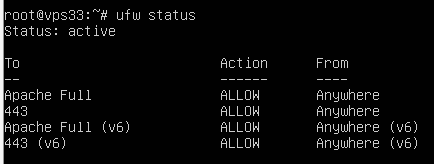
Yup, the firewall is active, and port 22 is blocked so you can't SSH in anymore. I ran the command ufw add 22/tcp And SSH is working again. Let us know if you need help with anything else.
-
We're planning on adding a Python section to the dashboard where you can see currently installed modules and request more, but for now here's the list for Python 3.10 on Johnny. Also if you try to load a module that's not installed you will get a 500 error and you can check your error log and it will say which module isn't installed. aiohttp==3.8.3 aiosignal==1.3.1 appdirs==1.4.4 asgiref==3.6.0 async-timeout==4.0.2 attrs==22.2.0 beautifulsoup4==4.11.2 certifi==2022.12.7 charset-normalizer==2.1.1 click==8.1.3 clikit==0.6.2 cmdstanpy==1.1.0 commonmark==0.9.1 contourpy==1.0.7 convertdate==2.4.0 crashtest==0.3.1 cryptocmd==0.6.1 cycler==0.11.0 Deprecated==1.2.13 discord==2.1.0 discord.py==2.1.0 Django==4.1.5 django-bootstrap-modal-forms==2.2.0 django-nested-admin==4.0.2 ephem==4.1.4 Flask==2.2.2 Flask-Limiter==3.1.0 fonttools==4.38.0 frozenlist==1.3.3 gunicorn==20.1.0 hijri-converter==2.2.4 holidays==0.19 httpstan==4.9.1 idna==3.4 itsdangerous==2.1.2 Jinja2==3.1.2 joblib==1.2.0 kiwisolver==1.4.4 korean-lunar-calendar==0.3.1 limits==3.2.0 LunarCalendar==0.0.9 lxml==4.9.2 MarkupSafe==2.1.1 marshmallow==3.19.0 matplotlib==3.6.3 multidict==6.0.4 numpy==1.24.2 ordered-set==4.1.0 packaging==23.0 pandas==1.1.4 pastel==0.2.1 paytmchecksum==1.7.0 Pillow==9.4.0 plotly==5.13.0 prophet==1.1.2 psycopg2-binary==2.9.5 pycryptodome==3.16.0 Pygments==2.14.0 pylev==1.4.0 PyMeeus==0.5.12 pyparsing==3.0.9 pysimdjson==5.0.2 pystan==3.6.0 python-dateutil==2.8.2 python-dotenv==0.21.0 python-monkey-business==1.0.0 pytz==2018.5 requests==2.28.2 rich==12.6.0 scikit-learn==1.2.1 scipy==1.10.0 six==1.16.0 soupsieve==2.3.2.post1 sqlparse==0.4.3 tablib==3.3.0 tenacity==8.2.1 threadpoolctl==3.1.0 tqdm==4.64.1 typing_extensions==4.4.0 tzdata==2022.7 urllib3==1.26.14 webargs==8.2.0 Werkzeug==2.2.2 whitenoise==6.3.0 wrapt==1.14.1 yarl==1.8.2
-
Thanks for the reminder. Your VPS has been rebuilt. Let us know if you need help with anything else.
-
All of the users who are still on the cPanel version of Tommy have now received their invites to move to Plesk as of last Tuesday the 7th. We will finally be shutting down Tommy cPanel on Thursday the 16th. If you haven't moved your account off cPanel by then your account will be backed up and your website will be taken offline. Also Thursday the 16th is when we will turn inactivity monitoring back on for Tommy Plesk so make sure you get logged in before then. Let us know if you haven't received your invite yet, or if you have any questions.

