New Topics
Showing topics posted in for the last 365 days.
- Past hour
-
Domains that use CF are explicitly excluded from the DNS checking because it would be impossible for the Cloudflare security features to work otherwise. It's the only provider that has such an exception. CF domains used to be validated using a file-based method that doesn't involve DNS, i'm not sure if this is still performed or not.
- Today
-
DKIM, SPF, and DMARC have been set up for the domain codecreature.net. We recommend sending a real email (not just the word "test" or a blank email) to https://www.mail-tester.com/ to make sure that everything is set up correctly. If you get less than a 10/10 score please post a link to the full report so we can help you fix any other issues that there may be.
- Yesterday
-
Your account must have a domain associated with it, and akels.cl is the only domain you have. We can change your domain to a .helioho.st or .heliohost.us domain if you'd like.
-

[Solved] Add SPF, DKIM, and DMRC to my Account
douglaswebster21 replied to douglaswebster21's topic in Customer Service
Thank you, the test is reporting 10/10 and my gmail account is receiving the emails as well. Regards Douglas -
My apologies, the issue described previously with 404 errors, at least this time (after reset) does seem to be related to waiting for an apache restart.
- Last week
-
Domain changed, it'll take effect in about 30 minutes.
-

[Solved] Why was my account suspended? (devashraf)
wolstech replied to devashraf's topic in Suspended and Queued Accounts
Glad to see you figured it out Please let us know if you need anything else. -
Java / JSP is not currently available on the shared hosting accounts. Although it is on the roadmap, there is no estimated timeframe as to when Java may be offered. You can read more about ETAs here: https://wiki.helionet.org/ETA In the meantime, if you need Java / JSP, you would need a VPS. We offer different plans, starting at $4 USD / month, with a discount of 10% if you pay for 6 months upfront (which is confirmed once you select a specific pricing plan): https://heliohost.org/vps/ Once Java support returns, it will be announced in our forum News section (https://helionet.org/index/forum/1-news/), the Java page in our Wiki (https://wiki.helionet.org/Java_JSP), our Discord channel, and our social media.
-

ToolHive - Multiple tools, one spot
PoppaBuzz replied to PoppaBuzz's topic in Technology and the Internet
Here is a screenshot.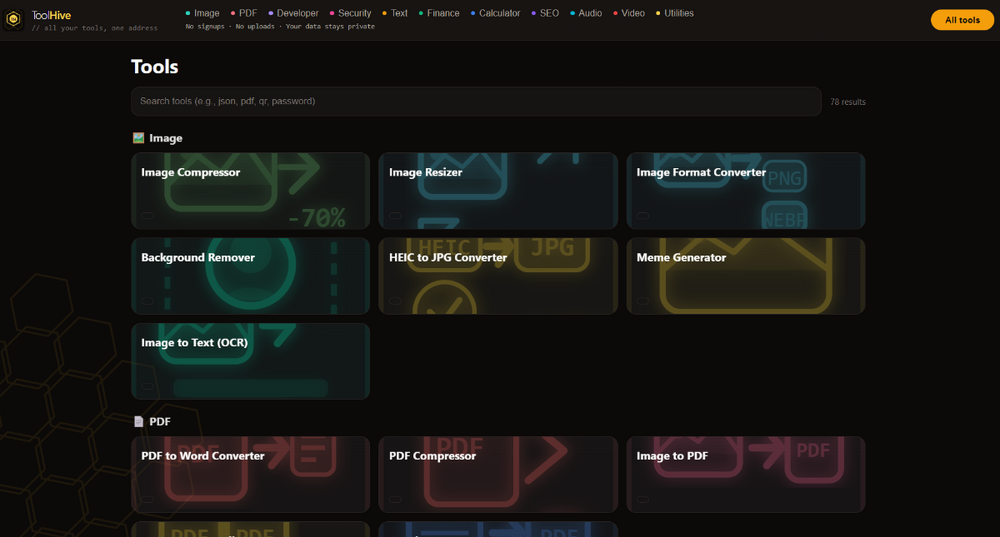
-
I've changed the main domain on your account for you. Please note that it may take up to 2 hours for the domain change to take effect, and it will not work until you set up your DNS with your domain registrar. To configure your DNS, please see the steps provided on our Wiki to either set NS records pointed at the HelioHost nameservers, or create A/AAAA records and point them to your server's IPv4/IPv6 address: https://wiki.helionet.org/Changing_Your_Main_Domain#Custom_Domains If after a full 2 hours it doesn't work on your side, please make sure you clear your web browser cache: https://wiki.helionet.org/Clear_Your_Cache Since there is a risk of data loss when main domains are changed, I made a full account backup for you before I made the changes, in case you need any files from the old domain. You can download the backup here: https://heliohost.org/backup If you're not sure how to extract the backup files, please follow our how-to guide here: https://wiki.helionet.org/Account_Backups
-
Subdomain added, it will take effect in two hours. If you're not using HelioHost's nameservers, you'll need to create an A/AAAA record to Morty's IP address for the domain to work.
-

[Solved] Issue with Morty Plan Website Not Loading
Unknown025 replied to peeky's topic in Contact HelioNet
Glad you figured it out. -
ty
-
I've added that domain to your account for you. Please note that it may take up to 2 hours for the domain change to take effect. If after a full 2 hours it doesn't work on your side, please make sure you clear your web browser cache: https://wiki.helionet.org/Clear_Your_Cache
-
For clarification, cloudflare keeps throwing a gateway timeout error which means the software you are using is too heavy for the site to load. For example Wordpress is notorious for this.
-

[Solved] Request to reset my Account to start over
elkhaddir replied to elkhaddir's topic in Customer Service
i can now recreate it, thanks @wolstech you are the best -
I've changed the main domain on your account for you. Please note that it may take up to 2 hours for the domain change to take effect, and it will not work until you set up your DNS with your domain registrar. To configure your DNS, please see the steps provided on our Wiki to either set NS records pointed at the HelioHost nameservers, or create A/AAAA records and point them to your server's IPv4/IPv6 address: https://wiki.helionet.org/Changing_Your_Main_Domain#Custom_Domains If after a full 2 hours it doesn't work on your side, please make sure you clear your web browser cache: https://wiki.helionet.org/Clear_Your_Cache Since there is a risk of data loss when main domains are changed, I made a full account backup for you before I made the changes, in case you need any files from the old domain. You can download the backup here: https://heliohost.org/backup If you're not sure how to extract the backup files, please follow our how-to guide here: https://wiki.helionet.org/Account_Backups
-
Okay thanks
-
I've added that domain to your account for you. Please note that it may take up to 2 hours for the domain change to take effect, and it will not work until you set up your DNS with your domain registrar. To configure your DNS, please see the steps provided on our Wiki to either set NS records pointed at the HelioHost nameservers, or create A/AAAA records and point them to your server's IPv4/IPv6 address: https://wiki.helionet.org/Addon_Domains#Custom_Addon_Domains If after a full 2 hours it doesn't work on your side, please make sure you clear your web browser cache: https://wiki.helionet.org/Clear_Your_Cache
-
I only deal with XMR and Aeon because they require separate processing. All other currencies are handled through coinbase on our end, which is done by Krydos. But yes, we can accept LTC or any other currency listed on the donate page: https://heliohost.org/donate/ Please provide the transaction ID and coin used after sending crypto. The amount credited will be based on the amount received in our wallet (which is after fees/gas/etc.) so be sure to account for those when sending.
-
Hello! Domains like "helio.st" are not available in our free domains. I've guessed that you meant "familybudget.helioho.st" and added that one. Please note that it may take up to 2 hours for the domain change to take effect. If after a full 2 hours it doesn't work on your side, please make sure you clear your web browser cache: https://wiki.helionet.org/Clear_Your_Cache I also removed the familiybudget and api.familiybudget subdomains as requested. Please note there is a risk of data loss when domains are removed, since the folder for the domain inside Plesk will be deleted. I made a full account backup for you before I removed the subdomains, in case you need any of the old files. You can download the backup here: https://heliohost.org/backup If you're not sure how to extract the backup files, please follow our how-to guide here: https://wiki.helionet.org/Account_Backups
- 1 reply
-
- 1
-

-
I've added those domains to your account for you. Please note that it may take up to 2 hours for the domain change to take effect. If after a full 2 hours they don't work on your side, please make sure you clear your web browser cache: https://wiki.helionet.org/Clear_Your_Cache
-
Your current balance is $0.0122 plus $5.00 plus $1.00 bonus brings your new total to $6.0122. Based on your load from the last 30 days this balance should last until 2026-10-03. If your load increases it may run out sooner. We'll email you occasionally to let you know how your balance is being use. Thanks for increasing your Morty balance.
-
It looks like this domain is now using Cloudflare as I suggested. I'm going to mark this as solved. Let us know if you need help with anything else.
-
Are you trying to sign up for Johnny? The Johnny option on the Plans page does that intentionally when its full for the day to keep people from registering. See https://wiki.helionet.org/Signing_Up#Helpful_Tips_for_Getting_a_Free_Account_on_Johnny for more information on how to get an account on that server. The other options are available 24/7 but are not free. Tommy: https://heliohost.org/tommy/ and Morty: https://heliohost.org/morty/