New Topics
Showing topics posted in for the last 365 days.
- Past hour
-
Private Girls From Your Town - No Selfie - Private Casual Dating https://PrettyGirls.sbs Private Girls In Your City - Anonymous Casual Dating - No Selfie NEW GIRLS Daphne Dangereux Sam Sam Eva Angel Whitney Wright BONNIE KNEEL Suki Sofa Bamby Belle Linda Warners Alica Mia Gag Medix Kate Sara Core
- Today
-
Please add to account Gled.helioho.st: Abratec.com.br Fabianafranco.psc.br Thanks!
-
Great, thanks!
-
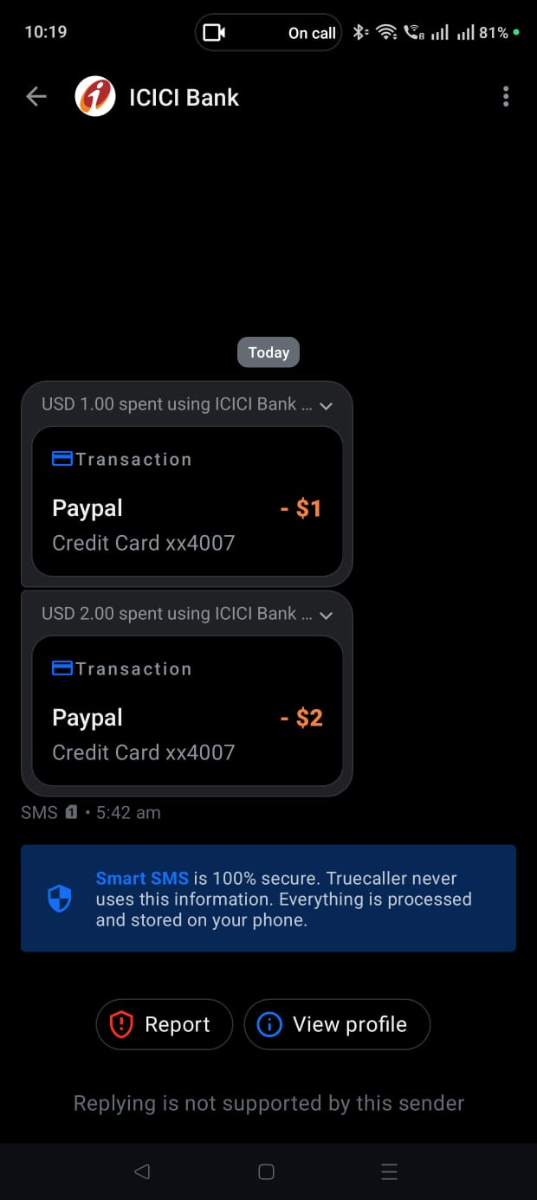
Sure Krydos, I totally understand the security concern and I respect that. I will find a way to run JavaScript on this platform as I am just going through the wiki on Node.js (I think, the Passenger is already doing what I was expecting) to avoid running node service 24/7👍. I haven't looked at the doc earlier as I came from other hosting service-hack and thought of the same approach - that was my bad. I think we don't need php/cgi middleware to run node scripts here. Looks like I can run node scripts natively without burning memory/cpu.👍👏 Apart from this. I just want to bring it to your notice that your payment system charged me $1 extra than the expected $2. Though $1 is insignificant and for the service you're offering it can be ignored, but it will be translated more than 100 times in other countries. I'm bringing it to your notice as you're the CEO and so need to know how your system works. People expect transparency in communication especially when money is involved. Please don't get me wrong, I could have ignored and moved on but felt like bringing it to your notice. Nothing against your service to the community. 🙏 Thanks for taking your time to understand my requirement, much appreciated. Have a great day.
-

[Krydos] Custom Services ( Python, Django, Flask ) enable
Krydos replied to abhisrv2's topic in Escalated Requests
Are you able to access the wiki now? https://wiki.helionet.org/ -
Are you able to access the wiki now? https://wiki.helionet.org/Morty#Adding_Funds_to_Morty_Account
-
Are you able to access the wiki now? https://wiki.helionet.org/
-

[Solved] i want to add a doamin to my account
KazVee replied to bankbkms's topic in Customer Service
I've added those domains to your account for you. Please note that it may take up to 2 hours for the domain changes to take effect, and they will not work until you set up your DNS with your domain registrar. To configure your DNS, please either set your NS records to the HelioHost nameservers (ns1.heliohost.org and ns2.heliohost.org), or create A/AAAA records and point them to your server's IPv4/IPv6 address. You can see the IP addresses inside Plesk. If after a full 2 hours they don't work on your side, please make sure you clear your web browser cache. - Yesterday
-
I've reset your account as requested. You should receive an email shortly so you can take the next steps to recreate it. I made a backup before the reset, so if you discover you need any of your old files, you can download the backup here: https://heliohost.org/backup If you're not sure how to extract the backup files, please let us know which Operating System you use, and we can send you the specific steps you'll need. Thanks!
-
I've added that domain for you, it'll take effect in about two hours. If you don't want to use HelioHost's nameservers, then create an A record and/or an AAAA record to Tommy's IP (which you can find by logging in to Plesk and scrolling to the bottom).
-
Your VPS is rebuilding and you'll get an email when it finishes, your next free rebuild will be on 2026-07-22
- Last week
-
[Solved] Suspend/Degrade/Halt Hosting Service temporarily
KazVee replied to msbsurfi's topic in Customer Service
Looks like your friend was able to Archive their account on 2026-06-16 18:33:35 so I'll mark this as [Solved]. If you need assistance with anything else, please create a new post and we'll be happy to help. 🙂 -
Hello! I've added those domains to your account for you. Please note that it may take up to 2 hours for the domain changes to take effect. If after a full 2 hours they don't work on your side, please make sure you clear your web browser cache: https://wiki.helionet.org/Clear_Your_Cache
- 1 reply
-
- 1
-

-
That's crystal clear, I got it too. The real problem is where do I have to configure Python 3.14 so that it writes correctly in my logs? Translated with https://laratranslate.com
-
Yes, thank you! On Sun, Jun 21, 2026 at 1:35?AM HelioHost Support wrote: > Unblocked. Can you access the wiki now? https://wiki.helionet.org/ > > You may view the status of your ticket by visiting: > > https://helionet.org/index/index.php?showtopic=68383 > > Thank you, > HelioHost support > https://heliohost.org/ > https://helionet.org/ > >
-
Try sending a real email (not just the word "test" or a blank email) to https://www.mail-tester.com/ to make sure that everything is set up correctly. If you get less than a 10/10 score please post a link to the full report so we can help you fix any other issues that there may be.
-
 lmao
lmao -
I've unblocked a random IP address. Maybe it was yours? If you're still blocked, it may be faster to provide the IP address that was displayed in the error message to ask for it to be unblocked.
-
Domain added. It can take up to 2 hours to start working.
- 1 reply
-
- 1
-
-
Hello! As a quick follow-on from my email: Apologies, I misread your question about domain names. Will you NEED to buy a domain name? No, you don't need to! We offer free domain names ending with ".helioho.st" or ".heliohost.us" that you can use. If you WANT to buy a domain name, now or later on, we'd recommend Namecheap, using their affiliate link that I sent before. Please feel free to reach out if you'd like more information on anything, or if you have any other questions. Thanks!
-
Hello! I've added that domain to your account for you. Please note that it may take up to 2 hours for the domain change to take effect, and it will not work until you set up your DNS with your domain registrar. To configure your DNS, please see the steps provided on our Wiki to either set NS records pointed at the HelioHost nameservers, or create A/AAAA records and point them to your server's IPv4/IPv6 address: https://wiki.helionet.org/Addon_Domains#Custom_Addon_Domains If after a full 2 hours it doesn't work on your side, please make sure you clear your web browser cache: https://wiki.helionet.org/Clear_Your_Cache
-
Moodle 5.x is not supported on Tommy. The server is really outdated and is due for replacement in a few weeks time anyway, so not worth our time to upgrade MariaDB only to replace the whole server later. If you want to use 5.x immediately, you can either upgrade to Morty or downgrade to Johnny, as both of those servers have newer versions of MariaDB on them that should support it. Tommy will be getting a newer version when it gets rebuilt.
-
Thanks for letting us know. For the future, you can disable WAF rules yourself via Plesk. There is a page in Plesk specifically for the application firewall settings. Among those settings is a box where you can enter a list of rule numbers that you want to disable. You can find the rule number in your logs, then enter it there to disable it. Note that when you disable rules this way, the changes take up to 2 hours to become effective.
-
Much thanks for the knowledge sharing... I had heard of this - of course - but not solid on the differences...
-

[Solved] Question regarding AWStats
kittforhire replied to kittforhire's topic in Escalated Requests
Yeah no problem. Don't do anything at this point. I didn't know that the stats are discontinued by the creator of it. If it's not working right now, there's no point to deal with it when you replace the server anyways. No sweat. But thank you for looking into it. 🙏🏻