All Activity
- Past hour
-
Sorry, actually I didn't read it. As I have no other accounts I think the most probable reason is sign in to my account with University WiFi. I will make sure the connection is not public in the next time I sign in to my account. Sorry for any violation of rules and can you please re-activate my account? I will avoid this fault in future and thank you for your support. Regards, maryelliot238@gmail.com
- Today
-
 araizas joined the community
 -
Did you read the email that was sent to you?
-
Hello HelioHost Support, My account (Username: [senex]) on the [Johnny] server has been suspended, and I am unable to reactivate it through the standard renewal script. URL: https://senex.helioho.st I am an engineering student at the University of Moratuwa, and I use this hosting for my academic projects and web development practice. Could you please let me know the reason for the suspension and help me restore access so I can continue my work? Thank you for your time and assistance. Best regards, Senex maryelliot238@gmail.com
-
 marciodoxosse joined the community
 -
 mlopesol joined the community
 -
 phantomnanites joined the community
 -
 krisvalentine joined the community
 - Yesterday
-
A new subscription was set up on 2026-03-25 and the new expiration date is 2026-04-25. Hopefully the subscription will bill automatically for $7.00 USD on that date. If there is any issue with the payment we will email you.
-
Can you explain why all of the accounts have very similar usernames? (Also, on the off chance these are a result of you just needing multiple websites, you can have multiple sites on 1 account...a Johnny account can have up to 5 websites/domains on it).
-
Hello Sir I'm using my office WiFi network maybe that's why violation detecting I don't create multiple accounts, I have only once account in my device
-
I've changed the main domain on your account for you. Please note that it may take up to 2 hours for your new domain to fully work. If after a full 2 hours it doesn't work on your side, please make sure you clear your web browser cache: https://wiki.helionet.org/Clear_Your_Cache Please note there is a risk of data loss when main domains are changed, so I made a full backup for you before I made the changes, in case you need any files from the old domain. You can download the backup here: https://heliohost.org/backup If you're not sure how to extract the backup files, please follow our how-to guide here: https://wiki.helionet.org/Account_Backups
-
Username: meowl, Server: Johnny, Main domain: meowl-browser.helioho.st from meowl-browser.helioho.st to pouncenet.helioho.st
-
 dingdong1 joined the community
 -
 gorakuma joined the community
 -
 meet joined the community
 -

Disk space questions (especially r.e. Plesk logs)
codecreature replied to codecreature's topic in Questions
Thanks so much, that helps a ton! -
 kamus joined the community
 -
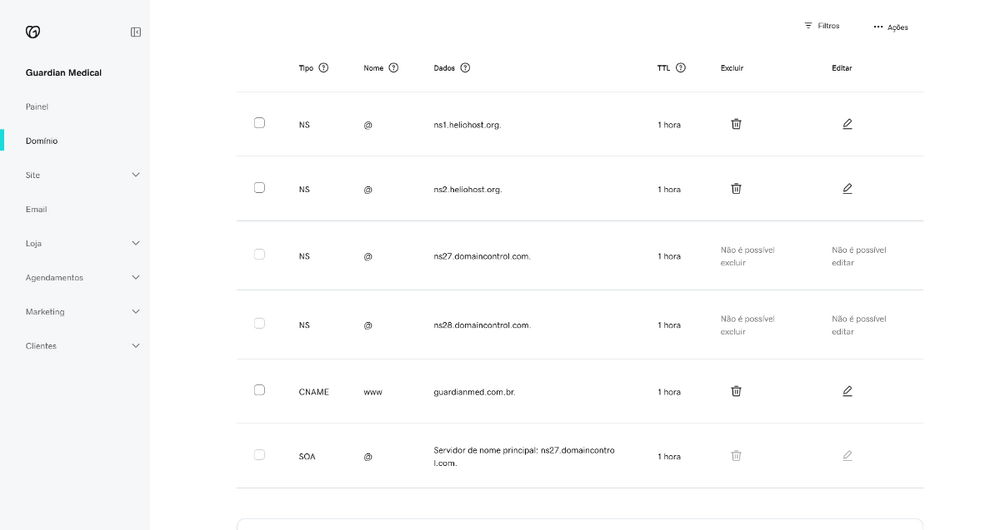
Hello there! Seems like I couldn't make it work. Maybe something on my end?
-

Disk space questions (especially r.e. Plesk logs)
MoneyBroz replied to codecreature's topic in Questions
You can limit the size of logs by clicking the logs button in plesk and then clicking the three lines in the top left and then clicking log rotation. From there you can enable log rotation and set the size you want. I usually set it to something like 30000kb which is 30mb. You can also delete your current log files by clicking "Manage log files" in the same menu that you click on to go to the log rotation page. -
Working for me. if it still persists, try clearing your browsers cache. Usually 503 errors after changing settings or increasing disk space like in this scenario need an Apache restart to resolve.

-
It looks like your disk space has been increased to 4000 MB. It's possible it just needs an Apache restart to take effect, but an administrator can look into this in the morning.
-
Hello i increased the disk space because the account was suspended to exceed the disk share accounts have remained offline and show error: 503 Service Unavailable example: https://thenewsaddicts.com/ Could you check it? Thank you W2hsystem
-
 nickjacobson1234 changed their profile photo
 -
Sorry if these are obvious questions, I've been trying to figure this out myself but I don't know much about web hosting or Plesk. Is there a way to directly limit the total amount of disk space Plesk's Apache SSL/TLS access logs are permitted to use before they start clearing themselves? I'm working on cutting down the number of requests I'm currently sending via PHP because I did some things unwisely, but I'd also like users to be theoretically able to send a good number of requests without me ever having to manually clear the logs to avoid going over my storage limit. Also, the Plesk disk space usage statistics for my site is listing 286 MB for Web (as opposed to logs/databases/mail/backups/config) but the repository I pull from only contains 94 MB of files. I'm currently trying to figure out where the remaining file size comes from. If anyone has suggestions on what sorts of things I might be able to look for or where, I'd appreciate it. I haven't had any luck digging through my folders so far.
-
 avycado13 joined the community
 - Last week
-
Domain added. It can take up to 2 hours to start working.
-
Main domain changed. It can take up to 2 hours to start working.
-
My user name is bitstream and my current main domain is bitstream.helioho.st Please set my new main domain to shootingstarssquaredance.org Thank you.
-
My username is “jeremybrown”
-

Request for Account Suspension Removal
Krydos replied to emmanuelfosso205's topic in Escalated Requests
I created a full backup before I deleted anything, which you can download at https://heliohost.org/backup/ if you need any of the files. I deleted the 405 MB backup. I deleted the 56 MB composer directory. I deleted the 49 MB npm directory. I deleted the 196 MB file 'Globheart Cameroon.zip' You are now at 1932.93 MB which is just barely below your 2000 MB limit, so I still recommend trying the Stripe link I posted above. Are you able to login now? -
Request for Account Suspension Removal
Krydos replied to emmanuelfosso205's topic in Escalated Requests
Here is a breakdown of your current storage space usage: Backups 405.08 MB Emails 2.26 MB Files 1622.53 MB Trash 0 MB Logs 2.22 MB PSQL 0 MB MariaDB 591.97 MB Total 2624.06 MB And a more details look at the Files category from above: 80K /home/tassimoacademysite.helioho.st/httpdocs 72K /home/tassimoacademysite.helioho.st/error_docs 883M /home/tassimoacademysite.helioho.st/geniussphere.helioho.st 433M /home/tassimoacademysite.helioho.st/smartify.helioho.st 56M /home/tassimoacademysite.helioho.st/.composer 24K /home/tassimoacademysite.helioho.st/.nodenv 49M /home/tassimoacademysite.helioho.st/.npm 8.0K /home/tassimoacademysite.helioho.st/.ssh 7.8M /home/tassimoacademysite.helioho.st/git 196M /home/tassimoacademysite.helioho.st/ibrain.helioho.st -
Request for Account Suspension Removal
Krydos replied to emmanuelfosso205's topic in Escalated Requests
If you can't use PayPal currently, you may still be able to use Stripe instead. You can try this link if you want to increase your storage by 1000 MB for $5 USD. https://buy.stripe.com/5kQ9AV77M7kr5Jf3Clco00j -
Request for Account Suspension Removal
Krydos replied to emmanuelfosso205's topic in Escalated Requests
Your account was suspended because you exceeded your storage limit. You have 3 options to regain access to your account: You are able to regain access to your account immediately without waiting for an admin by increasing your account's storage space. This storage space upgrade is good for the life of the account, and has no monthly cost. Tell us which files you would like deleted and an admin can delete them for you to get you back under your current storage limit. If you're not sure which files are taking up all of your space an admin can provide a detailed storage space usage report for you. We can also reset your account for you which deletes all files, deletes all settings, and restores your account back to the default state with 0 MB of storage usage. -
I've added that domain to your account for you. Please note that it may take up to 2 hours for the domain change to take effect, and it will not work until you set up your DNS with your domain registrar. To configure your DNS, please see the steps provided on our Wiki to either set NS records pointed at the HelioHost nameservers, or create A/AAAA records and point them to your server's IPv4/IPv6 address: https://wiki.helionet.org/Addon_Domains#Custom_Addon_Domains If after a full 2 hours it doesn't work on your side, please make sure you clear your web browser cache: https://wiki.helionet.org/Clear_Your_Cache