All Activity
- Today
-

Domain not pointing to HelioHost after nameserver update
wolstech replied to afonsofreitas's topic in Customer Service
The domain won't resolve until we add it to your account. This is normal. As Moneybroz asked above, how do you want this domain configured? -

Domain not pointing to HelioHost after nameserver update
MoneyBroz replied to afonsofreitas's topic in Customer Service
Would you like this domain set as an addon domain or alias? -
 afonsofreitas changed their profile photo
 -
Dear Sir or Madam, I would like the domain www.quartosconforto.pt to correctly point to my hosting at https://quartosconforto.helioho.st/ . I have already configured your nameservers, ns1.heliohost.org and ns2.heliohost.org, with my domain provider. This change was made about 1 hour ago, but so far there is not even the slightest sign of propagation, as can be seen here: https://whatsmydns.me/pt#A/www.quartosconforto.pt I would appreciate it if you could let me know where the problem may be and please take the appropriate steps to resolve it as soon as possible. Kind regards, Afonso Freitas
-
Your account has been reset. When the reset process completes, you'll receive an email with a link to create a new account. Once you've created the new account, please let us know so I can upload the backup of the Atlas folder and the process.php file for you.
-
 Closing due to inactivity since there has been no response in this thread for over a week. If you're still having this issue or need help with something else please open a new ticket.
 -
no thanks
-
 nae joined the community
 -
 elfaqiradam6 joined the community
 -
 pantherdaspen joined the community
 - Yesterday
-
 x119 joined the community
 -
That folder only contains one file (process.php) which looks to be a script for sending prebuilt prompts to google gemini. I'll grab that for you as well. I can't back up the entire site because there is malware laying around in a lot of these folders, as well as the phishing site. For what it's worth, I did notice that there is also a Wordpress installation in boomarenio.site/wp/ that is infected. I suspect this is how the phisher got into your account, and is one of the major reasons we don't recommend using Wordpress...it's extremely prone to being hacked. Anything else before I reset the account for you?
-
https://boomarenio.site/api this folder , if there is more than file backup all
-
I've backed up the contents of the atlas folder for you (looks like its mostly pictures for an ophthalmology guide of some kind). Once the account is reset, I'll upload this into your home folder for you. There is no file called prompt.php on your account that I can find (it's possible the hacker deleted it, there's several different webshells and PHP-based FTP scripts laying around in your account which I assume were uploaded by the hacker to make it easier for him to set up the phishing). Do you know where the prompt.php would have been?
-
keep those as it is: 1- project boomarenio.site/atlas 2- file prompt.php reset rest
-
The only option offered for phishing caused by an account being hacked is a full reset without a backup, which deletes all of the data and lets you start over. If there are a few specific files you know you need, we can see about grabbing those for you before resetting, but we cannot provide a backup of the entire website or account due to the presence of illegal/stolen information from the phishing site. Please let us know when you're ready to reset your account.
-
I have no idea about this page , at least can i recover my other pages files ? or you can delete the phishing pages at all
-
afonsofreitas joined the community
-
A fake government website was uploaded to your account at ~/boomarenio.site/Accelee/Accelee/govPt on February 11. The site shows a fake captcha that collects identifying info, then redirects to a fake login screen claiming to be autenticacao.gov.pt to steal login information, then stores the data and looks like it may send it to a telegram channel as well. If you didn't put this there, your account was hacked and the hacker did. Either way, because a phishing page and stolen information are present, the account cannot be recovered.
-
what phishing! i have no idea what you are talking about
-
That account is suspended for Phishing. HelioHost does not condone phishing, and for security reasons will not unsuspend, back up, or delete an account that was involved in phishing. You will need to create a new account and restore any backup you may have. Please be aware that you will not be able to reuse any domains on your suspended account, and will need to pick a new username. We apologize for any inconvenience this may have caused.
-
Unsuspend me
-
 MilonVAi joined the community
 -
I would like my account unsuspended
wolstech replied to luybenbrandon35's topic in Suspended and Queued Accounts
You've been resuspended for failing to make one of the changes above. Please let us know if you have any questions. -
I've added those domains to your account for you. Please note that it may take up to 2 hours for the domain changes to take effect, and they will not work until you set up your DNS with your domain registrar. To configure your DNS, please see the steps provided on our Wiki to either set NS records pointed at the HelioHost nameservers, or create A/AAAA records and point them to your server's IPv4/IPv6 address: https://wiki.helionet.org/Addon_Domains#Custom_Addon_Domains If after a full 2 hours they don't work on your side, please make sure you clear your web browser cache: https://wiki.helionet.org/Clear_Your_Cache
- 1 reply
-
- 1
-

-
 divyansu264 joined the community
 -
Hello my username is wltr could you please add the domain duuka.online to my account and also the subdomains others.duuka.online
-
 netishu2105 joined the community
 -
Hi, Newbie here, but how do I add an AAAA record to my DNS, is there an option for IPv6 hosting available here? I checked an online DNS Lookup tool and the IPv6 DNS entry lists a different owner for the same domain that I am hosting on your servers. **Updated : The lookup was faulty, my apologies, cross-checked from another source and I am ok now.
-
I've added that domain to your account for you. Please note that it may take up to 2 hours for the domain change to take effect. If after a full 2 hours it doesn't work on your side, please make sure you clear your web browser cache: https://wiki.helionet.org/Clear_Your_Cache
-
hi, i would like to add a domain, "pizgdps.helioho.st"
-
 saulo joined the community
 -
 dragoe joined the community
 - Last week
-
connectivity issues (ssh / sftp, and http)
Krydos replied to ajaxStardust's topic in Escalated Requests
0 MB free swap and 1920 MB swap in use. Like I said the last time this came up, you will want to continue increasing your memory until there is only 0 MB to 50 MB swapped. The other option is to use software that uses less memory. It's not a connectivity issue, it's your VPS is grinding to halt because you're trying to fit too much software into too small of a box. Try to imagine a 30 pound cat trying to fit into a 4 inch box. That's what you're doing to this VPS. If you want to increase the memory as a free trial for a few days to test it out we can do that.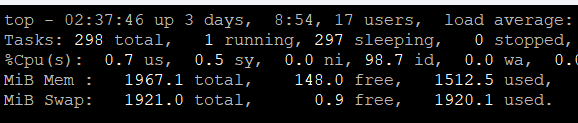
-
 Sounds like you need your own VSP if you need shell access: https://wiki.helionet.org/FAQ#Can_I_use_SSH? Here is what Perplexity said about your situation: Short answer: no, not in the way you’re hoping. Gunicorn is a long-running WSGI server process, and Flask’s docs describe it as something you run as a production server instead of the built-in development server. If HelioHost gives you no shell and no way to start a persistent process, you usually can’t launch Gunicorn yourself from shared hosting alone. What “pure Python” can do Gunicorn does have a Python entry point, so technically you can start it from Python code with something like from gunicorn.app.wsgiapp import run and then calling run() after setting sys.argv. That still does not remove the core requirement: something must execute that Python file and keep the server process alive. So “pure Python” is only a different launch mechanism, not a replacement for shell/process management. Why this is a hosting problem Flask’s deployment docs distinguish between the application and the WSGI server, and Gunicorn’s own docs show it as a server you install and run as a process. HelioHost’s Python docs emphasize CGI as the easy shared-hosting path, which is a very different execution model from Gunicorn’s always-on worker model. In other words, if your account can only run scripts on demand, Gunicorn is the wrong fit unless HelioHost exposes a WSGI startup hook or some equivalent service manager. Practical options Use HelioHost’s supported Python method, which appears to be CGI for shared hosting. If HelioHost provides a WSGI interface or app startup configuration, point it at your Flask app rather than trying to type gunicorn main:app yourself. Move the app to an environment where you control process startup, such as a VPS, container host, or a platform that supports a process command. Direct answer to your question You can write a small Python launcher for Gunicorn, but that only helps if HelioHost lets you execute that launcher as the service entrypoint. Without shell access or some admin-defined startup command, you generally cannot use Gunicorn on shared hosting in the normal way.
 -

connectivity issues (ssh / sftp, and http)
Unknown025 replied to ajaxStardust's topic in Escalated Requests
A VPS administrator can look into this for you. Are you also having issues logging in to your VPS using SSH?