All Activity
- Past hour
-
Yes the issue is DNS related, but as MoneyBroz said above, the terms of service violation has to be addressed first. From our terms of service: Please provide us with a valid, non-disposable email address and we can update your account, unsuspend it, and fix the DNS issue. If you are seen using a disposable email address a third time after we fix it again, your account may be subject to a ban.
-
Hi MoneyBroz, seems like I messed up with CNAME (I am new to this stuff). It's likely I have to add an A record pointing to Heliohost IP. Can you please remove those two subdomain simrsmp.buyut.heliohost.us and momcare.buyut.heliohost.us and add buyut.andantekno.id instead? I really appreciate your help, but if you can't, it's fine. Thank you.
-
Hi Team, Not able login to my account. i tried rest password did not go through. may be locked dont know my user: zoom5555 please help
- Today
-
We cannot provide further assistance until we address the disposable email on your account, we changed it to a normal email on 2026-04-25 and it seems that you changed it back to the disposable one. Is there a working email that you can provide us that isn't disposable?
-
My username is aleden and I'm on the Tommy server. Plesk seems OK but I cannot connect to aleden.heliohost.org via a browser or via fttp. Have tried different browsers and devices. This has been going on for at least 3 days. Help!
-

Johnny server issue - DB missing - Morty transfer
Krydos replied to whoguesswho's topic in Escalated Requests
There are two databases where messages is the only table. Can you narrow it down any further?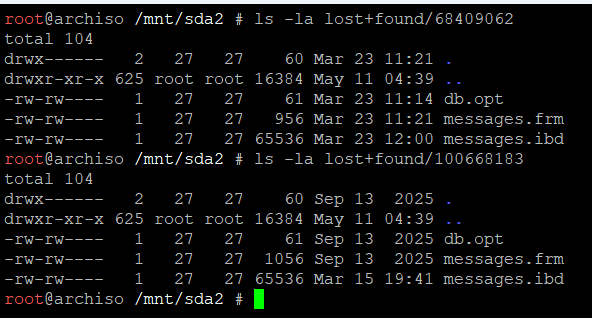
-
Password protection does require an Apache restart to turn on or off. The error is because turning it off deletes the password file, but until Apache restarts it’s still looking for the file that Plesk deleted. Just waiting 2 hours after turning it off should clear the error. You may need to clear your cache after Apache restarts. Also, when you turn it on, it can take up to 2 hours before it requires a password.
-
Try waiting up to 2 hours after changing the setting, sometimes settings like this require an Apache restart to apply.
- Yesterday
-

Johnny server issue - DB missing - Morty transfer
whoguesswho replied to whoguesswho's topic in Escalated Requests
Hi, yes. The database was for build quickly for a board, in the end was decide to keep users and any other stuff out and leave just that table. It was the quick solution for users to leave the msg and admins to approve/delete them, with no history/log necessary. -
Closing due to inactivity since there has been no response in this thread for over a week. If you're still having this issue or need help with something else please open a new ticket.
-
When asking for a domain, please make sure you provide all the following information: Your hosting account username The full domain name you want, including the top-level domain (TLD): If you're using HelioHost's domains, specify either helioho.st or heliohost.us before the domain you want (for example: coralsherwin2.helioho.st). If you've purchased a custom domain, specify the TLD (such as coralsherwin2.com, coralsherwin2.net, etc.) You can read more about the information we need to add a domain to your account on our technical documentation Wiki page at: https://wiki.helionet.org/Addon_Domains
-
Thank you 🙏
-
I'll mark this as [Solved] so we know you're not waiting for Support to do anything on this thread. 🙂 If you change your mind, please make a new post to let us know you want to move to Morty for free while Johnny is being fixed. Thanks!
-
I have reset your account as requested. You should receive an email shortly so you can take the next steps to recreate it. When you recreate the account, you can choose the new formacionvirtual.helioho.st domain that you want. I made a backup before the reset, so if you discover you need any of your old files, you can download the backup here: https://heliohost.org/backup If you're not sure how to extract the backup files, please follow our how-to guide here: https://wiki.helionet.org/Account_Backups Please let us know if we can help with anything else. ----- Este texto proviene de Google Translate, por lo que puede contener errores: He restablecido tu cuenta según lo solicitado. Recibirás un correo electrónico en breve para que puedas seguir los pasos necesarios para recrearla. Al recrear la cuenta, podrás elegir el nuevo dominio formacionvirtual.helioho.st que desees. Realicé una copia de seguridad antes del restablecimiento, así que si necesitas alguno de tus archivos antiguos, puedes descargarla aquí: https://heliohost.org/backup Si no sabes cómo extraer los archivos de la copia de seguridad, consulta nuestra guía aquí: https://wiki.helionet.org/Account_Backups No dudes en contactarnos si necesitas algo más.
-
[Solved] Request to move from johny to morty during free period
Krydos replied to kxamel's topic in Escalated Requests
An invite has been sent to create a Morty account. Please click the link and follow the instructions to create a new account. Data that was successfully recovered from your Johnny account can be downloaded from https://heliohost.org/backup/ Note that backups may not be available yet for all accounts, and not all data may have been recoverable (especially databases). If there is something specific you need that you don't have a backup of, let us know exact details of what you're looking for and we can take a second look to see if it can be recovered. If you need domains added, please let us know your new username and the domains you need once you finish creating the Morty account so we can get them set back up for you. Our apologies for the downtime. We should have rebuilt Johnny sooner before this happened. -
Added note: This is on the Morty2 server.
-

[Solved] Request to move from johny to morty during free period
KazVee replied to kxamel's topic in Escalated Requests
This support request is being escalated to our root admins. -
Perfect, thank you! Have a great weekend!
-
On my Wordpress website; sometimes when I turn off the Plesk "Password Protection" feature, the site goes down with a "500 Internal Server Error". The only way I have found to recover is to rebuild the web site. The error log says "AH01620: Could not open password file: /home/system/imggallery.helioho.st/pd/d..httpdocs" so it appears the "Password Protection" is not completely being turned off - the password file is being removed, but Apache still wants to use a password for the entire site. Is there a proper way to resolve this?
-
 Dear support team, My account: kxamel and all active domains Please move my account to Morty for the free period, as explained in your e-mail. I can also not login into my account on Plesk at the moment. Yours , Kamel
 -
Remote access enabled. There was no PostgreSQL user named victord1_mund_dev_user so I assume you meant victord1_mund_dev_user_2 which does exist. host=65.19.154.94 port=5432 user=victord1_mund_dev_user_2 dbname=victord1_mund_dev password=<set in Plesk>
-
Only staff members can escalate requests. I have escalated this topic for you. In the future, make sure to post this in Customer Service rather than Blocked IPs.
-
Subdomains added. It can take up to 2 hours for them to start working. We do not have access to your domain registrar, you'll need to do this yourself.
-
High server load. 10022.40 CPU Looks like it was caused by a combination of backups being made and excessive scheduled task usage. Please fix the issue quickly, including disabling any scheduled backups or scheduled tasks so they stop using CPU. If this happens again, you’re going to have to move back to Morty. Also, we intentionally don’t send notifications when users are suspended for anything other than inactivity. It is normal for you to not receive any communications about your suspension prior to contacting support. Unsuspended. It can take up to two hours for your domains to function.
-
Hello guys! Hope you're good! I'm almost sure this isn't the right channel, but I was not able to select "Escalated Requests" in the dropdown. I would like to enable access to my Postgress database. Here's some information you may need: DB name: victord1_mund_dev User: victord1_mund_dev_user Thanks in advance for your help.