
All Activity
- Today
-
 sbnms joined the community
 -
 wumengsangeng joined the community
 -
 gracefulfailure joined the community
 -
 jaykantjhain joined the community
 -
Would you like to increase the storage on your VPS or delete some files?
-
 shaheen_one joined the community
 -
 fletchersonjohn joined the community
 - Yesterday
-
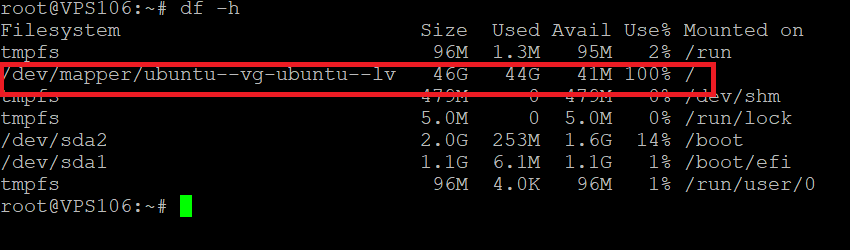
Looks like you're almost out of storage space (only 41mb available), this can throw errors if you were to try to upload a file over 41mb
-
 genesisio joined the community
 -
This support request is being escalated to our VPS admins.
-
Ah that's the issue. I've been looking at your Plesk account since that is was what matches your username mm1. Thanks for clarifying it's the VPS with the issue. Krydos or MoneyBroz will need to take a look at that for you since it's a VPS issue. Escalating.
-
I have been uploading with SFTP to 65.19.154.72 (where all my VPS files are, I think). It is with SFTP that now I get the error. From the image I sent yu it looks like Morty/Plesk is at 853mb. I seem unable to find login for VPS to check what I have available there. Is 1000mb the limit for both Plesk files and VPS files?
-
You have two different accounts, so two different blocks of storage, each of which is managed separately. Specifically you have: 1000MB on Morty Your VPS storage. You have to log into each of these separately depending on where you want the files stored. If you log into mm1 on Morty, you cannot upload files to the VPS using the plesk interface. You can only upload to the Morty storage through Plesk. For the VPS, you'll likely need to upload through an SFTP connection unless a control panel was installed. You don't have a tommy account that I can see. Your Tommy account became a Morty account when you upgraded it.
-
thank you. Does it mean that out of the two servers Morty and Tommy I have 1000mb? I thought I had that much when I started for free on Morty for my web pages. Then I paid a subscription on Tommy where my Files.mm1 (65.19.154.72) reside. Do I not get any extra space out of that subscription? Thanks

-
Removed.
-
This is not supported. Plesk uses httpdocs instead of www as the document root for the main domain, and renaming it can cause your account to malfunction.
-
Hello HelioHost, I am requesting to change the document root of my website hiswill.eu.org from httpdocs to www
-
Hello HelioHost, my username is hiswill. I am requesting to remove the domain hiws.eu.org from my account. Thank you.
-
You can't. It's disabled for security reasons on all Plesk plans. If you need access to SSH, you have to buy a VPS instead.
-
how to access terminal or ssh
-
Your account is marked as inactive, there isn't any login restriction for it at the moment so all you need to do is login at https://heliohost.org/login and make sure to keep logging in at least once every 30 days to keep from it being marked inactive again.
-
Hello, My user name Queued: hh_mahmudi.abdelaziz, kindly activate my account, and change the domain name to cybersecurityeg.pp.ua Thanks
-
I'm glad it works for you now. Feel free to let us know if you run into any other problems.
-
Main domain changed. it can take up to 2 hours to start working.
-
Can you please change my domain to playmax.k.vu
-
 h3xag0n joined the community
 -
I've reset your account as requested. You should receive an email shortly so you can take the next steps to recreate it. I made a backup before the reset, so if you discover you need any of your old files, you can download the backup here: https://heliohost.org/backup If you're not sure how to extract the backup files, please follow our how-to guide here: https://wiki.helionet.org/Account_Backups
-
 sangyum joined the community
 -
Hello, excuse me, I would like to reset my account and start from scratch. Thank you very much. My username is howl.
-
 noaman joined the community
 - Last week
-
Disk space usage can be seen in Plesk. You just log in and select Account on the left side. The "resources" section on that page will show what you're using overall.
-
Embarrassed to say, but where do I check my quota for Tommy, not Morty
-
Working now .... May be waiting 2H after after reactivation.
-
Hello, After 30 days of inactivity, I have just reactivated my account. However, when I try to log in, I keep receiving a “503 Service Unavailable” error. I have already tried clearing the cache and cookies, but the issue still persists. Could you please let me know what might be causing this problem Site: unlock.helioho.st Thank you in advance.
-
Main domain changed. it can take up to 2 hours for the new domain to start working.











