New Topics
Showing topics posted in for the last 365 days.
- Past hour
-
Yes, staff members can add domains for you at your request. You can ask for a .heliohost.us/.helioho.st domain, or a domain of your choosing if you have one through a domain registrar. Here's a wiki article describing the details: https://wiki.helionet.org/Addon_Domains
-
I assume Postgres? If so, we just need the database name and database user that needs remote access and we can set it up for you. If it's MariaDB, you can do it yourself in Plesk (it's at the bottom of the database user's properties below the permissions).
- Today
-
Okay. Thank You !
-
I have an important e-mail that I need to receive that keeps getting rejected at the server level for failing the DMARC check (specifically "Found DMARC record contained a bad v= value"). I admittedly know next to nothing about DMARC but based on google it looks like really they need to fix their server, however a year after notifying their tech support of the issue I'm having the same problem. Is there anything that can be done on my account to allow me to receive e-mail from one specific domain even if it doesn't pass the DMARC settings? If it helps my understand of the log seems to indicate the DMARC expects <domain>.com and the message in fact comes from email.<domain>.com
-
Just read this article and thought you guys might be interested. https://www.anthropic.com/news/claude-for-nonprofits
-
That's probably the monitor being broken considering you're on Morty. It's also possible the monitor is getting blocked by our firewall if it's opening too many connections. My first suggestion would be to try a different monitoring service. There's hundreds of other paying users on the same server as you and none of them are reporting issues.
-
Installed. You can see the current list of installed modules and their versions for Morty's Python 3.12 at https://krydos3.heliohost.org/pyinfo/info3.12.py
- Yesterday
-
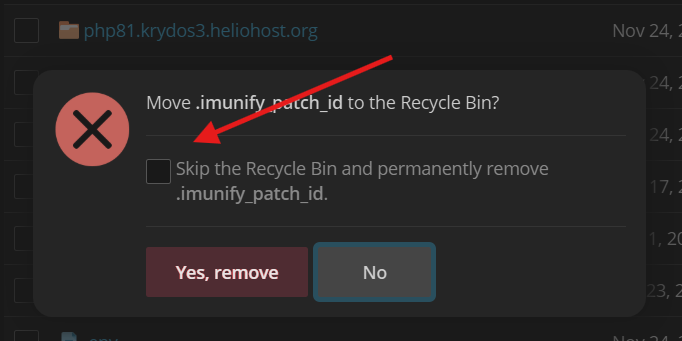
The quota includes the trash, and since you didn't clear the trash you're still over the limit. Backups 0 MB Emails 0 MB Files 12.94 MB Trash 970.56 MB Logs 4.90 MB PSQL 0 MB MariaDB 69.16 MB Total 1057.56 MB When you delete a file, if you don't check this box the file still takes up space on your account. You can also just occasionally go to /home/sisintex.heliohost.us/.trash and delete everything inside there before you exceed your limit. If you like having 970+ MB of junk sitting in the trash another option is you can use the link MoneyBroz posted to increase your storage.
- Last week
-
Tried that as well, to no success. Due to the way the folders are and the content , it's proving difficult. I'd appreciate if you can extract it from your end. Thank you.
-
 It looks like remote MariaDB is already enabled. MariaDB [(none)]> select user, host from mysql.user where user like 'lostandfound_%'; +-------------------+------+ | User | Host | +-------------------+------+ | lostandfound_user | % | +-------------------+------+ 1 row in set (0.048 sec) I can try updating Plesk. I believe we're an update or two behind.
 -
Marking solved because deleted the request.
-
server: johnny username thofficial
-
That suspended screen is not ours, so we cannot assist with that. You'll need to contact the developer of whatever game or program that is to get assistance.
-
See:
-
Domain added, it'll take effect in about twenty minutes.
-
Thanks for your quick response!
-
Glad you're on board with us! the subdomains have been added to your account. it can take up to 2 hours for them to start working.
-
I've added that domain to your account for you. Please note that it may take up to 2 hours for the domain change to take effect, and it will not work until you set up your DNS with your domain registrar. To configure your DNS, please see the steps provided on our Wiki to either set NS records pointed at the HelioHost nameservers, or create A/AAAA records and point them to your server's IPv4/IPv6 address: https://wiki.helionet.org/Addon_Domains#Custom_Addon_Domains If after a full 2 hours it doesn't work on your side, please make sure you clear your web browser cache: https://wiki.helionet.org/Clear_Your_Cache
-
It looks like PayPal attempted to bill you on 2025-11-25 and failed. PayPal will automatically try billing you again on 2025-11-30. There is no way for us to force PayPal to attempt to bill again before then. If the payment fails again on 2025-11-30 we will email you.
-
I've added that domain to your account for you. Please note that it may take up to 2 hours for the domain change to take effect, and it will not work until you set up your DNS with your domain registrar. To configure your DNS, please see the steps provided on our Wiki to either set NS records pointed at the HelioHost nameservers, or create A/AAAA records and point them to your server's IPv4/IPv6 address: https://wiki.helionet.org/Addon_Domains#Custom_Addon_Domains If after a full 2 hours it doesn't work on your side, please make sure you clear your web browser cache: https://wiki.helionet.org/Clear_Your_Cache
-
i visited johnny.heliohost.org too
-
Set. # dig +noall +answer -x 64.71.156.101 101.156.71.64.in-addr.arpa. 21539 IN CNAME 101.subnet96.156.71.64.in-addr.arpa. 101.subnet96.156.71.64.in-addr.arpa. 14339 IN PTR fatehsystems.com. # dig +noall +answer -x 2001:470:1:1ee::21 1.2.0.0.0.0.0.0.0.0.0.0.0.0.0.0.e.e.1.0.1.0.0.0.0.7.4.0.1.0.0.2.ip6.arpa. 14400 IN PTR fatehsystems.com.
-
Looks like this was resolved over email:
-

[Solved] Suspended Account
prabhatyadav2003 replied to prabhatyadav2003's topic in Suspended and Queued Accounts
Done thank you so much for your co-operation's Really mean a lot -
 We haven't supported Java since 2021. We're hoping to bring this functionality back in the future, but there's currently no timeframe for when this will be offered again. In the meantime, you would need to purchase a VPS and install tomcat on it to run this.