
New Topics
Showing topics posted in for the last 365 days.
- Past hour
-
Your account has been reset. When it finishes, you'll receive an email with a link to create a new account. If you need any data from the old account, a backup will be available at https://heliohost.org/backup/ once the reset is complete.
-

[Solved] I'd like my domain connected to my hosting
wolstech replied to imaraproducts's topic in Customer Service
Domain added. Please be sure to configure DNS with either NS records pointed to ns1.heliohost.org and ns2.heliohost.org or A and AAAA records pointed to the IPs shown in Plesk. The domain can take up to 2 hours to function. -
These aren't set up by default. What domain do you need these set up on?
- Today
-
 Many, many thanks!🙂
 -

[Solved] Primary domain change and DKIM/SPF activation
Krydos replied to wds657's topic in Escalated Requests
DKIM, SPF, and DMARC have been set up for the domain orionelectronica.com.ar. We recommend sending a real email (not just the word "test" or a blank email) to https://www.mail-tester.com/ to make sure that everything is set up correctly. If you get less than a 10/10 score please post a link to the full report so we can help you fix any other issues that there may be. -
Thank you very much for your reply! That was all I needed to know for now
-
At some point this disk usage issue was fixed. I have added the requested aliases without a redirect. In order to host them with us you'll need to fix your DNS settings though.
-
No worries, thanks for letting us know it's two people in the same house. We'll cancel the suspensions on qutegifts and thepottervault. It looks like ninagart is already deleted.
- Yesterday
-

[Solved] Suspicious files / folders in the root
slashbit replied to slashbit's topic in Customer Service
Hi, thanks, yes, I did set it up a while ago and manually ran I yesterday at that time . OK, nothing to worry about then , I just didn't notice it before somehow. Thanks -
[Solved] Remove suspension
wolstech replied to backupchiquipoli's topic in Suspended and Queued Accounts
That account has already been unsuspended. For the new domain, please use ns1.heliohost.org and ns2.heliohost.org as the name servers. -
[Solved] Add a domain to my account
wolstech replied to backupchiquipoli's topic in Customer Service
Unsuspended and domain added. Please be sure to configure DNS. The domains can take up to 2 hours to function. -

[Solved] change my username and edit the domain
nanachan replied to nanachan's topic in Customer Service
thank you very much for the solution😁 -
I appreciate your help, hope I'm not doing something dumb, or abusing your support! I have a brand new helionet django site on johnny, and it nondeterminstically throws a mysterious ModuleNotFoundError: No module named 'gianluca' exception. The traceback doesn't show which code is trying to import 'gianluca', and I can't find out anything about it. This django code works fine outside of helionet, and my virtual environments have no mention of gianluca. Here's the last part of the log, you can see the same request here happens to work fine three times, and then errors: 2026-02-26 03:26:09 Access 151.205.113.159 200 GET /mikvah/ HTTP/1.0 5.07 K Apache SSL/TLS access 2026-02-26 03:26:10 Access 151.205.113.159 200 GET /mikvah/ HTTP/1.0 5.07 K Apache SSL/TLS access 2026-02-26 03:26:10 Access 151.205.113.159 200 GET /mikvah/ HTTP/1.0 8.21 K Apache SSL/TLS access 2026-02-26 03:26:11 Error 151.205.113.159 500 GET /mikvah/ HTTP/1.0 1.24 K Apache SSL/TLS access 2026-02-26 03:26:11 Error 151.205.113.159 mod_wsgi (pid=1848708): Failed to exec Python script file '/home/spoerri.helioho.st/httpdocs/mikvah/mikvah/dispatch.wsgi'. Apache error 2026-02-26 03:26:11 Error 151.205.113.159 mod_wsgi (pid=1848708): Exception occurred processing WSGI script '/home/spoerri.helioho.st/httpdocs/mikvah/mikvah/dispatch.wsgi'. Apache error 2026-02-26 03:26:11 Error 151.205.113.159 Traceback (most recent call last): Apache error 2026-02-26 03:26:11 Error 151.205.113.159 File "/home/spoerri.helioho.st/httpdocs/mikvah/mikvah/dispatch.wsgi", line 18, in <module> Apache error 2026-02-26 03:26:11 Error 151.205.113.159 application = get_wsgi_application() Apache error 2026-02-26 03:26:11 Error 151.205.113.159 ^^^^^^^^^^^^^^^^^^^^^^ Apache error 2026-02-26 03:26:11 Error 151.205.113.159 File "/usr/local/python3.12/lib/python3.12/site-packages/django/core/wsgi.py", line 12, in get_wsgi_application Apache error 2026-02-26 03:26:11 Error 151.205.113.159 django.setup(set_prefix=False) Apache error 2026-02-26 03:26:11 Error 151.205.113.159 File "/usr/local/python3.12/lib/python3.12/site-packages/django/__init__.py", line 19, in setup Apache error 2026-02-26 03:26:11 Error 151.205.113.159 configure_logging(settings.LOGGING_CONFIG, settings.LOGGING) Apache error 2026-02-26 03:26:11 Error 151.205.113.159 ^^^^^^^^^^^^^^^^^^^^^^^ Apache error 2026-02-26 03:26:11 Error 151.205.113.159 File "/usr/local/python3.12/lib/python3.12/site-packages/django/conf/__init__.py", line 89, in __getattr__ Apache error 2026-02-26 03:26:11 Error 151.205.113.159 self._setup(name) Apache error 2026-02-26 03:26:11 Error 151.205.113.159 File "/usr/local/python3.12/lib/python3.12/site-packages/django/conf/__init__.py", line 76, in _setup Apache error 2026-02-26 03:26:11 Error 151.205.113.159 self._wrapped = Settings(settings_module) Apache error 2026-02-26 03:26:11 Error 151.205.113.159 ^^^^^^^^^^^^^^^^^^^^^^^^^ Apache error 2026-02-26 03:26:11 Error 151.205.113.159 File "/usr/local/python3.12/lib/python3.12/site-packages/django/conf/__init__.py", line 190, in __init__ Apache error 2026-02-26 03:26:11 Error 151.205.113.159 mod = importlib.import_module(self.SETTINGS_MODULE) Apache error 2026-02-26 03:26:11 Error 151.205.113.159 ^^^^^^^^^^^^^^^^^^^^^^^^^^^^^^^^^^^^^^^^^^^^^ Apache error 2026-02-26 03:26:11 Error 151.205.113.159 File "/usr/local/python3.12/lib/python3.12/importlib/__init__.py", line 90, in import_module Apache error 2026-02-26 03:26:11 Error 151.205.113.159 return _bootstrap._gcd_import(name[level:], package, level) Apache error 2026-02-26 03:26:11 Error 151.205.113.159 ^^^^^^^^^^^^^^^^^^^^^^^^^^^^^^^^^^^^^^^^^^^^^^^^^^^^ Apache error 2026-02-26 03:26:11 Error 151.205.113.159 File "<frozen importlib._bootstrap>", line 1387, in _gcd_import Apache error 2026-02-26 03:26:11 Error 151.205.113.159 File "<frozen importlib._bootstrap>", line 1360, in _find_and_load Apache error 2026-02-26 03:26:11 Error 151.205.113.159 File "<frozen importlib._bootstrap>", line 1310, in _find_and_load_unlocked Apache error 2026-02-26 03:26:11 Error 151.205.113.159 File "<frozen importlib._bootstrap>", line 488, in _call_with_frames_removed Apache error 2026-02-26 03:26:11 Error 151.205.113.159 File "<frozen importlib._bootstrap>", line 1387, in _gcd_import Apache error 2026-02-26 03:26:11 Error 151.205.113.159 File "<frozen importlib._bootstrap>", line 1360, in _find_and_load Apache error 2026-02-26 03:26:11 Error 151.205.113.159 File "<frozen importlib._bootstrap>", line 1324, in _find_and_load_unlocked Apache error 2026-02-26 03:26:11 Error 151.205.113.159 ModuleNotFoundError: No module named 'gianluca' Apache error
-
Thank you!
- Last week
-
You can download your full backup from the old account at https://heliohost.org/backup/ and then restore the parts you need into your new account. Let us know if you need help with anything else.
-
What browser are you using to complete the registration? Also, are you able to provide a screenshot of the error you're seeing? On our side if looks like you filled out everything and just didn't complete the last step.
-
The domains do not fit on your account as there is a limit of 5 domains on Johnny. If you want these added, you'll need to either upgrade to Tommy (which has a 10 domain limit) or remove 2 domains from Johnny first.
-

[Solved] Suspended: notjohnnyorgan
notjohnnyorgan replied to notjohnnyorgan's topic in Suspended and Queued Accounts
Thank you. -
Thank you!
-
Hello! We have some details in our Wiki about how to change your email address, please give this a try: https://wiki.helionet.org/FAQ#How_do_I_change_the_contact_email_address_on_my_account?
- 1 reply
-
- 1
-

-
Understood, thank you for the helpful answer!
-
See https://helionet.org/index/topic/67060-hh431164-new-vps-account-request-aapanel/#comment-298850
-
hpmh. i'm pretty sure i used that guide effectively to result in the test rendering correctly, previously. on the VPS. i mean, i know how to install and use Gunicorn, etc. if that's the underlying issue. i dunno. your feedback is relatively useless. the effort in typing it is obvious. i beg your pardon.
-
 Check out the Guitar Modes Trainer i built using Web Components and SVG https://training.statecollegeguitarlessons.site Enjoy.
 -
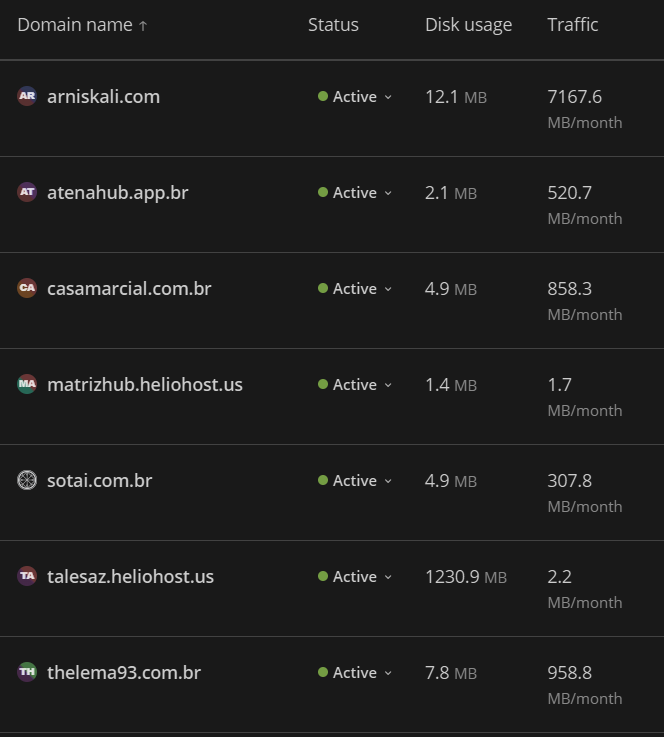
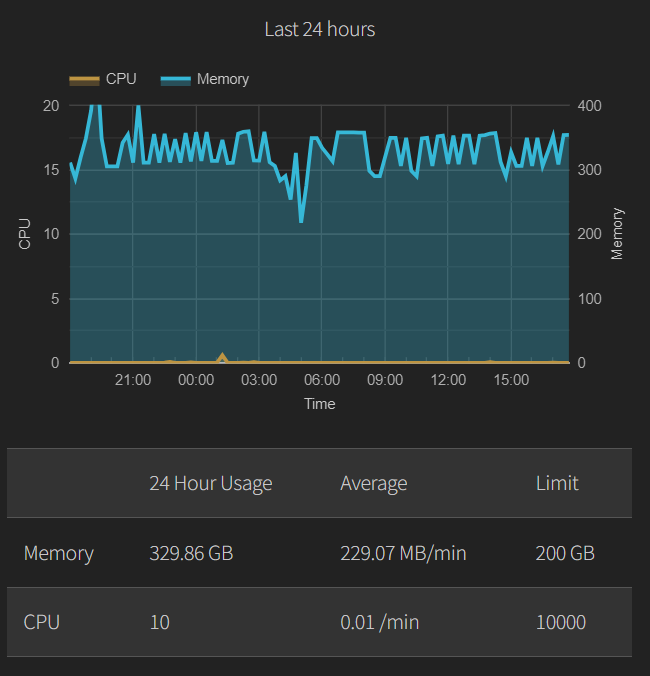
You can see the bandwidth in Plesk by going to 1. Login at https://heliohost.org/login/ 2. Continue to Plesk 3. Click Websites & Domains in the left navigation. You can see your overall memory and CPU usage by going to 1. Login at https://heliohost.org/dashboard/load/ It isn't possible to list the memory and CPU per domain, but I can say that 99% of your memory usage comes from having WSGI restart access enabled on atenahub.app.br.



.thumb.jpg.dbd19582043fe61e7a68ea2d2d70dad5.jpg)