New Topics
Showing topics posted in for the last 365 days.
- Past hour
-
Looks good! You could also just use the nameservers if you wanted to, that way if the server IPs ever change, you don't need to change your DNS to the new IPs. The server IPs do not change often, I've only seen this done to mitigate a sudden DDOS attack. It can take 24-48 hours for DNS to propagate (although personally, mine has never taken that long), but when I check your new domain with dnschecker, it looks to have propagated already! For others who may find this post, we have info on how to check that DNS is properly configured in our Wiki here: https://wiki.helionet.org/Namecheap_DNS_Records#Wait_24_-_48_hours_for_DNS_Propagation
- Today
-
I’ll upload the files we kept later this afternoon for you when I get to my PC. Once I do so, you’ll see them sitting in your home folder.
-

Alias / Parked Domain Setup for quartosconforto.pt
Krydos replied to afonsofreitas's topic in Escalated Requests
If someone goes to quartosconforto.helioho.st do you want them to get redirected so quartosconforto.pt shows in the browser URL bar? -

Domain not pointing to HelioHost after nameserver update
KazVee replied to afonsofreitas's topic in Customer Service
Looks like the user determined they wanted an alias, and raised the alias request (which is now escalated for the root admins to action) here: https://helionet.org/index/topic/67281-alias-parked-domain-setup-for-quartosconfortopt/ -
Closing due to inactivity since there has been no response in this thread for over a week. If you're still having this issue or need help with something else please open a new ticket.
- Yesterday
-

I would like my account unsuspended
wolstech replied to luybenbrandon35's topic in Suspended and Queued Accounts
You've been resuspended for failing to make one of the changes above. Please let us know if you have any questions. -
I've added those domains to your account for you. Please note that it may take up to 2 hours for the domain changes to take effect, and they will not work until you set up your DNS with your domain registrar. To configure your DNS, please see the steps provided on our Wiki to either set NS records pointed at the HelioHost nameservers, or create A/AAAA records and point them to your server's IPv4/IPv6 address: https://wiki.helionet.org/Addon_Domains#Custom_Addon_Domains If after a full 2 hours they don't work on your side, please make sure you clear your web browser cache: https://wiki.helionet.org/Clear_Your_Cache
- 1 reply
-
- 1
-

-
Hi, Newbie here, but how do I add an AAAA record to my DNS, is there an option for IPv6 hosting available here? I checked an online DNS Lookup tool and the IPv6 DNS entry lists a different owner for the same domain that I am hosting on your servers. **Updated : The lookup was faulty, my apologies, cross-checked from another source and I am ok now.
-
I've added that domain to your account for you. Please note that it may take up to 2 hours for the domain change to take effect. If after a full 2 hours it doesn't work on your side, please make sure you clear your web browser cache: https://wiki.helionet.org/Clear_Your_Cache
- Last week
-
connectivity issues (ssh / sftp, and http)
Krydos replied to ajaxStardust's topic in Escalated Requests
0 MB free swap and 1920 MB swap in use. Like I said the last time this came up, you will want to continue increasing your memory until there is only 0 MB to 50 MB swapped. The other option is to use software that uses less memory. It's not a connectivity issue, it's your VPS is grinding to halt because you're trying to fit too much software into too small of a box. Try to imagine a 30 pound cat trying to fit into a 4 inch box. That's what you're doing to this VPS. If you want to increase the memory as a free trial for a few days to test it out we can do that.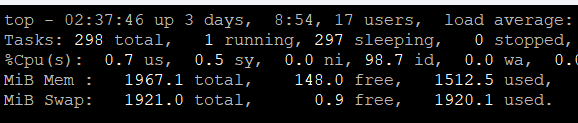
-
 Sounds like you need your own VSP if you need shell access: https://wiki.helionet.org/FAQ#Can_I_use_SSH? Here is what Perplexity said about your situation: Short answer: no, not in the way you’re hoping. Gunicorn is a long-running WSGI server process, and Flask’s docs describe it as something you run as a production server instead of the built-in development server. If HelioHost gives you no shell and no way to start a persistent process, you usually can’t launch Gunicorn yourself from shared hosting alone. What “pure Python” can do Gunicorn does have a Python entry point, so technically you can start it from Python code with something like from gunicorn.app.wsgiapp import run and then calling run() after setting sys.argv. That still does not remove the core requirement: something must execute that Python file and keep the server process alive. So “pure Python” is only a different launch mechanism, not a replacement for shell/process management. Why this is a hosting problem Flask’s deployment docs distinguish between the application and the WSGI server, and Gunicorn’s own docs show it as a server you install and run as a process. HelioHost’s Python docs emphasize CGI as the easy shared-hosting path, which is a very different execution model from Gunicorn’s always-on worker model. In other words, if your account can only run scripts on demand, Gunicorn is the wrong fit unless HelioHost exposes a WSGI startup hook or some equivalent service manager. Practical options Use HelioHost’s supported Python method, which appears to be CGI for shared hosting. If HelioHost provides a WSGI interface or app startup configuration, point it at your Flask app rather than trying to type gunicorn main:app yourself. Move the app to an environment where you control process startup, such as a VPS, container host, or a platform that supports a process command. Direct answer to your question You can write a small Python launcher for Gunicorn, but that only helps if HelioHost lets you execute that launcher as the service entrypoint. Without shell access or some admin-defined startup command, you generally cannot use Gunicorn on shared hosting in the normal way.
 -

[Solved] Request to Unsuspend My Account
santaninha replied to santaninha's topic in Suspended and Queued Accounts
Ok, I'm sorry for my mess, it won't repeat ever. Thanks for the support!! -
Subdomain added. I also went ahead and changed the main domain for you. Both can take up to 2 hours to start working. You can also download a backup before the change at https://heliohost.org/backup
-
Looks good. I canceled your broken subscription, and linked the new subscription to your VPS. You should have received an invoice for the payment, and your expiration date is now 2026-09-18. Stripe should try to automatically bill for another $41.85 on that date. If it fails for some reason we'll email you. Thanks!
-
Subdomain added. It can take up to 2 hours to start working.
-
Users cannot yet add domains on their own, but staff can add domains for you. Please let us know the full domain name you want added, including the top-level domain (TLD). If you're using HelioHost's domains, let us know if you want the helioho.st or heliohost.us ending. If you've purchased a custom domain, make sure you let us know the domain including if it's a .com, .net, etc. You can read more about addon domains here: https://wiki.helionet.org/Addon_Domains
-
See https://helionet.org/index/topic/67256-account-unsuspension/?do=getNewComment
-
[Solved] Account Unsuspension
wolstech replied to rushi1819's topic in Suspended and Queued Accounts
Account rushi1819 has been unsuspended. It may take a few minutes before you can login again, the domains can take up to two hours to start working. -
Yeah I can login now, thanks for your help!
-
Python Support and Package Installation Request
Krydos replied to diegoanc280's topic in Escalated Requests
What is the reason you can't use psycopg2 version 2.9.9, which is already installed? -
I've reset your account as requested. You should receive an email shortly so you can take the next steps to recreate it. I made a backup before the reset, so if you discover you need any of your old files, you can download the backup here: https://heliohost.org/backup If you're not sure how to extract the backup files, please follow our how-to guide here: https://wiki.helionet.org/Account_Backups
- 1 reply
-
- 1
-

-
That domain is your main domain. What domain would you like to have as your new main domain? Please note, if you intend to make one of your existing addon domains your new main domain, an account reset will be required. This is because, in every case when users have switched their main domain with an addon domain, the rapid adding and deleting of DNS records ends up breaking their account in some irreparable way, causing an account reset to be necessary to fix it anyway. You can read more about that in the Wiki here: https://wiki.helionet.org/Changing_Your_Main_Domain#Account_Reset_is_Required_to_Swap_Main_and_Addon_Domain Please let us know how you want to proceed.
-

[Solved] Need to add new domain panchkosha.coreconnectyoga.com
MoneyBroz replied to imhemu's topic in Customer Service
Domain added. It can take up to 2 hours to start working. -
Thank you very much for your quick reply, I really appreciate it
-
Domain added. It can take up to 2 hours to start working.
- 1 reply
-
- 1
-