All Activity
- Today
-
Domain's all set up. Thanks for the support!
-
Account unsuspended, it'll resume working within the next two hours. You were suspended for using 10005.80 CPU. I'm unsure exactly of what the cause was, but an administrator might provide some extra insight.
-
I have a high load suspension. Not sure what is taking up so much load. If anyone can tell me, I would be glad to disable it to get my account back. Thank you. Account: poppabuzz Server: johnny
-
Your account was suspended for High Server Load: 10140.80 CPU. I've reset your account as requested. You should receive an email shortly so you can take the next steps to recreate it. I made a backup before the reset, so if you discover you need any of your old files, you can download the backup here: https://heliohost.org/backup If you're not sure how to extract the backup files, please follow our how-to guide here: https://wiki.helionet.org/Account_Backups
-
My account is suspended I think is an issue with node stuff taking to much data can u reset my account again sunamong is my user name
- Yesterday
-
 aguxone joined the community
 -

[Inactive] Help me to remove my account suspension
Krydos replied to trycatchtales's topic in Escalated Requests
Closing due to inactivity since there has been no response in this thread for over a week. If you're still having this issue or need help with something else please open a new ticket. -
 akel joined the community
 -
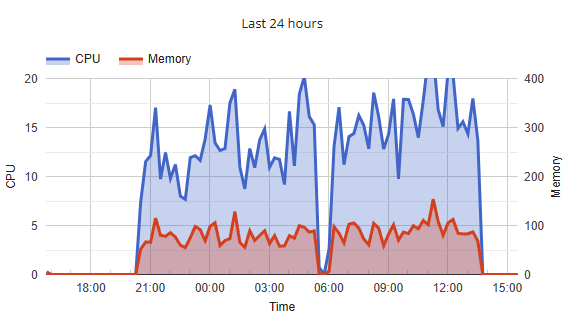
Whatever was running was using way too much CPU. CPU limit is 10000 units/day, RAM is 200GB/day. Are you ready to fix the issue? If so, let us know and we'll unsuspend you.
-

[Solved] Outgoing connection to Aiven PostgreSQL is refused
khanin replied to khanin's topic in Escalated Requests
Yes, thank you. I got it, will reach out to them regarding a static IP. -
It is goensch, and sorry for the hassle. Take your time.
-
Hi my account was suspendet for too much laut load. e and last time I check the Load was below 20 per of limit. Can you tell me whether it was CPU or memory?
-
I've added that domain to your account for you. Please note that it may take up to 2 hours for the domain change to take effect. If you've already set up your DNS with your domain registrar then you don't need to do anything further. If after a full 2 hours it doesn't work on your side, please make sure you clear your web browser cache: https://wiki.helionet.org/Clear_Your_Cache
-
You would create the record on your domain registrar's dashboard, using the IP addresses found in Plesk. Please see this page for more info on setting up your DNS: https://wiki.helionet.org/Addon_Domains#DNS_Records
-
 mayodytechnolog joined the community
 -
Hi Admin, Please add the following domain to my account (seabirdr): Domain: k.appinn.me A and AAAA records have been pointed. Thank you.
-

[Solved] Request for Additional Domain
kirkhezir123 replied to kirkhezir123's topic in Customer Service
how to create an A/AAAA record to Johnny's IP? -

[Solved] Request for Additional Domain
Unknown025 replied to kirkhezir123's topic in Customer Service
Domain added, it'll take effect in about an hour and a half. You'll need to either switch to HelioHost's nameservers or create an A/AAAA record to Johnny's IP for it to work. -
[Solved] Request for Additional Domain
kirkhezir123 replied to kirkhezir123's topic in Customer Service
a different TLD specifically singburiadventistcenter.org -
[Solved] Request for Additional Domain
Unknown025 replied to kirkhezir123's topic in Customer Service
Is that a subdomain for .heliohost.us/.helioho.st, or a different TLD? -
Hello, good day. I would like to request additional domain. My username is: kirkhezir123 Domain needed: singburiadventistcenter Thank you.
-
Thanks for letting us know. I've canceled the pending suspension for your Tommy account.
-
I got a perfect 10/10!

-
Hello, Thank you for your message and for bringing this to my attention. I would like to clarify the situation honestly. I currently have two accounts: Sipir17 – a paid (donor) account Sipir87 – a free account I now understand that having more than one account requires prior permission, and I apologize for overlooking this requirement in the Terms of Service. I would like to keep the Sipir17 paid account and I am completely fine with closing the Sipir87 free account if needed. Please let me know if you require any confirmation from my side to proceed. Thank you for your understanding and for the service you provide as a non-profit organization. I appreciate your support and guidance. Kind regards, Sipir17
-
Rebooted, however due to insufficient memory to restart cleanly it had to be hard reset which can damage the filesystem over time the more it is done, we recommend either upgrading, resolving the underlying issue, or doing a rebuild.
-
I have started the reset. You will receive an email in a few minutes with a link. Click the link in that email to continue to reset process. Let us know if you need help with anything else.
-
yeah, you can do it. Hopefully it will be easy to bring it back to life, as I was using it.
-
please reboot my vps thanks