All Activity
- Past hour
-
 dariogr changed their profile photo
 -
 bogdanduduia joined the community
 -
I didn't do anything, I just logged in today because a user reported that the website was like that.
-
Did you remove the httpdocs folder?
- Today
-
Thanks @wolstech. And Yes! I'm getting ready a dev bed in my local so I can develop without pushing changes constantly via FPT. I need access again to upload a code to unhook the bot so Telegram stops sending request, and redirect that to my local. After development I'm going to eventually deploy the new bot to the server, if that starts causing issues again, I'm ready to completely remove it, leave the old bot that was working fine all these years and rethink what to do youthout abussing the system.
-
I don't know why my website suddenly lost all the files Website: retroverze.my.id
-
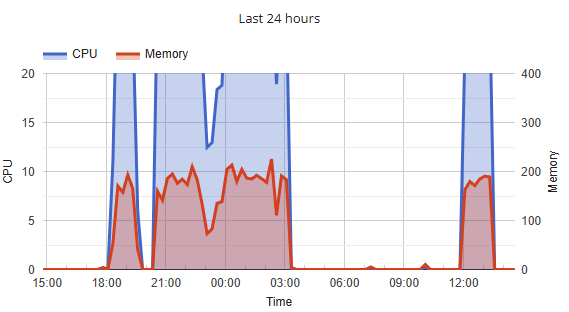
It's for excessive CPU coming from systemd. Yes leaving FTP connections open continuously will cause it, as can having cron jobs set to run too frequently. This was your load chart over the past 24 hours. Are you ready to fix the issue?
-
Oh! I was using 2 FPT connections to sync in the background, can that be the issue?
-
Ok, I have the reason now: If you guys can provide some logs, I can get into it to see what happened.
-
Hi! Long time user here. I have the server for some time now (8 years I think?), running a small Telegram bot for a community. Usually very low traffic. Yesterday and today I was testing a new version and suddendly the account got suspended. Not sure if was because of the high traffic (I was testing and developing the new code), or because a security issue, but want to know what I did wrong so I can correct it. Thanks in advance, an sorry if I caused any trouble. HelioHost username: dariogr Server: the account was moved, I think I was on Morty but I'm not sure Domain: somnio.heliohost.org
-
 tiagomnt joined the community
 -
 yohannesfufa70 joined the community
 -
 devfree64 joined the community
 -
 mmmarco joined the community
 -
This support request is being escalated to our root admins.
-
I'd like my forum account deleted.
-

[Solved] pip install yemot-api and pydantic and tzdata
Krydos replied to a0795683865's topic in Escalated Requests
Installed. You can see the current list of installed modules for Johnny's Python 3.12 at https://krydos2.heliohost.org/pyinfo/info3.12.py -
I've added that domain to your account for you. Please note that it may take up to 2 hours for the domain change to take effect, and it will not work until you set up your DNS with your domain registrar. To configure your DNS, please see the steps provided on our Wiki to either set NS records pointed at the HelioHost nameservers, or create A/AAAA records and point them to your server's IPv4/IPv6 address: https://wiki.helionet.org/Addon_Domains#Custom_Addon_Domains If after a full 2 hours it doesn't work on your side, please make sure you clear your web browser cache: https://wiki.helionet.org/Clear_Your_Cache
-
Domain added. it can take up to 2 hours to start working.
-
Hello Support Team, I would like to request to add a new domain: "cipher.enigmamarketing.pk" Server: "ahmed92.heliohost.us" Thank you
-
 mr.robot joined the community
 -
Hello HelioHost Team, I would like to request for a new domain: myspace.pk Server: osamamansoor.helioho.st Thank you for your help.
-
 ahmed92 joined the community
 -
 inadidi44 joined the community
 - Yesterday
-

[Solved] pip install yemot-api and pydantic and tzdata
MoneyBroz replied to a0795683865's topic in Escalated Requests
Krydos can do this for you -
 moonclud joined the community
 -
 username:A0795683865 py version: 3.12 server johnny modules requested: yemot-api and pydantic and tzdata
 -
 Problem: After pointing the domain example.com to Johnny (HelioHost), the site was redirecting to helionet.org instead of loading the Laravel application. At first this looked like a DNS or .htaccess misconfiguration. However, the real cause was inside Laravel’s environment file (.env): APP_URL=https://johnny.heliohost.org/ ASSET_URL=https://example.helioho.st/public Because APP_URL was set to the server’s default domain (johnny.heliohost.org), Laravel generated all links and redirects to that domain. This made the site appear as if it was stuck on helionet.org. Solution: Update the .env file so Laravel knows the correct production domain: APP_URL=https://example.com ASSET_URL=https://example.com Then clear Laravel’s cached configuration: php artisan config:clear php artisan cache:clear Now all redirects, assets, and generated URLs point to example.com correctly. Explanation: - DNS records were already correct, pointing example.com to Johnny’s IP. - Apache/.htaccess was fine, routing requests into Laravel’s public folder. - The problem was application-level misrouting: Laravel used APP_URL to decide what domain to generate links for. - Since APP_URL was set to johnny.heliohost.org, every redirect and asset URL pointed to the wrong domain. By fixing APP_URL and ASSET_URL, Laravel now generates URLs for the right domain (example.com), resolving the misrouting.
 -

[Solved] Request to Replace Subdomain with Main Domain
wolstech replied to ibra's topic in Customer Service
No it should not affect the ability to log into Plesk. If you cannot sign in through https://heliohost.org/login/ , my next suggestion would be to try resetting the password. -
 giks joined the community
 -
[Solved] Request to Replace Subdomain with Main Domain
ibra replied to ibra's topic in Customer Service
Could this change be affecting the login process? At the moment, I’m experiencing login rejection -
[Solved] Request to Replace Subdomain with Main Domain
ibra replied to ibra's topic in Customer Service
I understand the effect of the change and thank you for your support. -
[Solved] Request to Replace Subdomain with Main Domain
wolstech replied to ibra's topic in Customer Service
Domain changed. It can take 2 hours or more before it works. -
 deser changed their profile photo
 -
Domains added, they'll take effect in about 30-40 minutes.
-
hello i would like to add these domains to my account (neonstudio) lombank.heliohost.us secure-lombank.heliohost.us