All Activity
- Past hour
-
It has nothing to do with multiple accounts. This time around you're suspended for high load because you left an SFTP session open for several hours and used up your CPU quota. SFTP consumes CPU usage just sitting there idle, even if you're not actively transferring files. You need to be disconnecting your sessions as soon as you're done using them. Do you know why this happened?
-
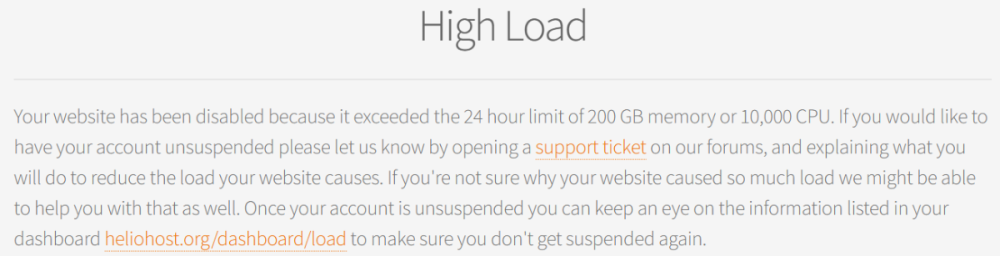
We do not suspend accounts for "no reason". When you visit your website, please let us know if you do not see the message below, so we can investigate why it is not visible to you:
-
I was given permission to have multiple accounts by a staff member, and then I moved my first account to Morty. This account stays on Tommy. But this account was suspended for no reason.
- Today
-
Yeah, you're not blocked in the firewall. https://tommy.heliohost.org is working fine for me, and no one else is having issues with it. Try using a different internet connection. For instance, if you're on WIFI try disconnecting from WIFI and try connecting via a cell phone internet instead.
-
When the Johnny server crashed we decided to give out free Morty trials to any affected users who wanted to get their website back online as soon as possible, since it would take a few weeks to get Johnny running again. We gave those free trials with no credit card required, no commitment, and without even a concrete end date for the trial, etc. Just HelioHost being generous, and trying to help people out like we always do. We gave out about 50 trials with no expectations that anyone would pay to stay on Morty, and honestly we thought 100% of the free trials would just happily move back to Johnny without a single upgrade. We were completely shocked and overjoyed to see that we received nearly $100 of upgrades from the free trials for Johnny people. The next round of free trials has begun, and this time around we're intentionally targeting businesses who are running their website on Tommy or Johnny. We've noticed that a lot of start-up entrepreneurs test out their website on our free hosting, with the intention of moving to AWS, or some other ridiculously expensive hosting option once they start to do some actual business. We figured it would be a good idea to show people that they don't have to leave HelioHost if they want blazing fast speeds and amazing uptime for their business. Once again, no credit card is required, there is no commitment, and we don't even really have a concrete end date for the trial but we expect it to last a month or so for people to get a chance to test Morty out thoroughly. Honestly, most free trials are basically "if you forget to cancel we'll automatically bill you some ridiculously high price" which is just evil corporations trying to prey on forgetful people, so it's understandable that we've had a few skeptical people get upset about receiving a free trial. I refuse to accept any free trials like that because it's not worth the risk of forgetting to cancel and getting billed. This isn't one of those scams. If you forget about the trial, we'll just move you back to the plan you were on before without getting billed anything. No big deal. If you're running a small business on Tommy or Johnny please contact us to let us know so we can get you a free trial as well, and make sure your business is being hosted on the plan that it needs to be on.
-
I've changed the main domain on your account for you. Please note that it may take up to 2 hours for your new domain to fully work. If after a full 2 hours it doesn't work on your side, please make sure you clear your web browser cache: https://wiki.helionet.org/Clear_Your_Cache Please note there is a risk of data loss when main domains are changed, so I made a full backup for you before I made the changes, in case you need any files from the old domain. You can download the backup here: https://heliohost.org/backup If you're not sure how to extract the backup files, please follow our how-to guide here: https://wiki.helionet.org/Account_Backups
-
Thank you very much!!
-
Hello, Please rename midly.helioho.st to sledjicraft.helioho.st . Account name: game00 Thank you
-
 yourdoctorrasel joined the community
 -
Something is blocking your connection to the server. More than likely, it's going to be something like your ISP blocking it or antivirus flagging it as malicious, since it does not appear to be on our end. I'll also have Krydos take a look to make sure it's not something wrong with the firewall that I can't see in the admin tools.
-
I have been using tommy.heliohost.org for a long time without any issues. I cannot understand why I am now getting a message that says hmm cannot reach this page
-
 reyreyrey7 joined the community
 - Yesterday
-
Done. Please don't move my account back until the end of the day. Thank you.

-
Completely understood.
-
 freddurss joined the community
 -
No it's not. Custom inbound ports are not supported on the shared hosting Plesk plans. If you want to open inbound custom ports, you'll need to buy a VPS instead.
-
thank you for help , also is it possible to open custom ports for flask like server:5050 ? and get the server to work like that instead of default redirection to http(s) ports ?
-
He deleted the entire httpdocs folder and turned off Apache on top... It looks like you broke your account by deleting httpdocs (and cgi-bin, which was inside). Apache was also turned off. The httpdocs folder is your document root (Plesk does not use or honor public_html), and CGI runs through Apache on Plesk, so turning that off also prevents Python from running. I've renamed your public_html to httpdocs, fixed its permissions, recreated cgi-bin, and turned Apache back on. Please give it 2 hours for everything to take effect. Once everything has updated and Apache has restarted, this link should work for you: https://flab.heliohost.us/cgi-bin/test.py
-
Also your account isn't suspended so don't Python support requests in the suspended accounts section.
-
Is the file in the cgi-bin folder?
-
i followed the docs for flask and normal python test script , literally code by code but still couldnt get any code to excute , when ever i try to /test.py in browser it downloads the file , i did everything as in docs
-
The IP address is not blocked, so it's not a firewall issue on our side. Are you able to try a different Internet connection (perhaps a cell phone data plan?)
-
It supports python, but it has an older version of python than Johnny and Morty. Note that there is no user interface for Python. https://wiki.helionet.org/Python_Tutorial
-
 bcrebiblioteca joined the community
 -
tommy.heliohost doesnt support python projects ?
-
When I try to load plesk I get an error message saying tommy.heliohost.org is not available.
-
84.64.217.208
-
Yep, any Plesk employee who visits that site is going to assume it's a commercial business unless you take that stuff off the website or at least put a big "This site is just a demo" or something. We don't want to risk losing our discounted licenses so we're trying to be careful.
-
 Sure, there you go https://gradosretail.helioho.st/