All Activity
- Past hour
-
Port test successful! Your IP: 66.85.85.6
-
What do you see when you run this command? curl http://portquiz.net:3306
-
Error Details: Error: Connection timed out I also set the time to timeout to longer and it still times out.
-

Add main domain, aliases and subdomains
Krydos replied to centralmacatuba's topic in Escalated Requests
Do you want both of these domains to show the same content as centralmacatuba.eu.org? - Today
-
What is the error message?
-
It works on the HelioHosted file, but still fails on the other ones.
-
 gjccreativedes joined the community
 -
 hrb2019 joined the community
 - Yesterday
-

Add main domain, aliases and subdomains
MoneyBroz replied to centralmacatuba's topic in Escalated Requests
Main domain changed and subdomains added. it can take up to 2 hours for them to start working. a root admin can assist with adding the aliases. -
Glad you got it working. Let us know if you need help with anything else.
-
Instead of host=johnny.heliohost.org try host=64.62.151.106
-
Domain added. please be sure to configure DNS with either our name servers (ns1.heliohost.org and ns2.heliohost.org) or by using A and AAAA records pointed to the IPs shown in Plesk. The domain can take up to 2 hours to function.
-
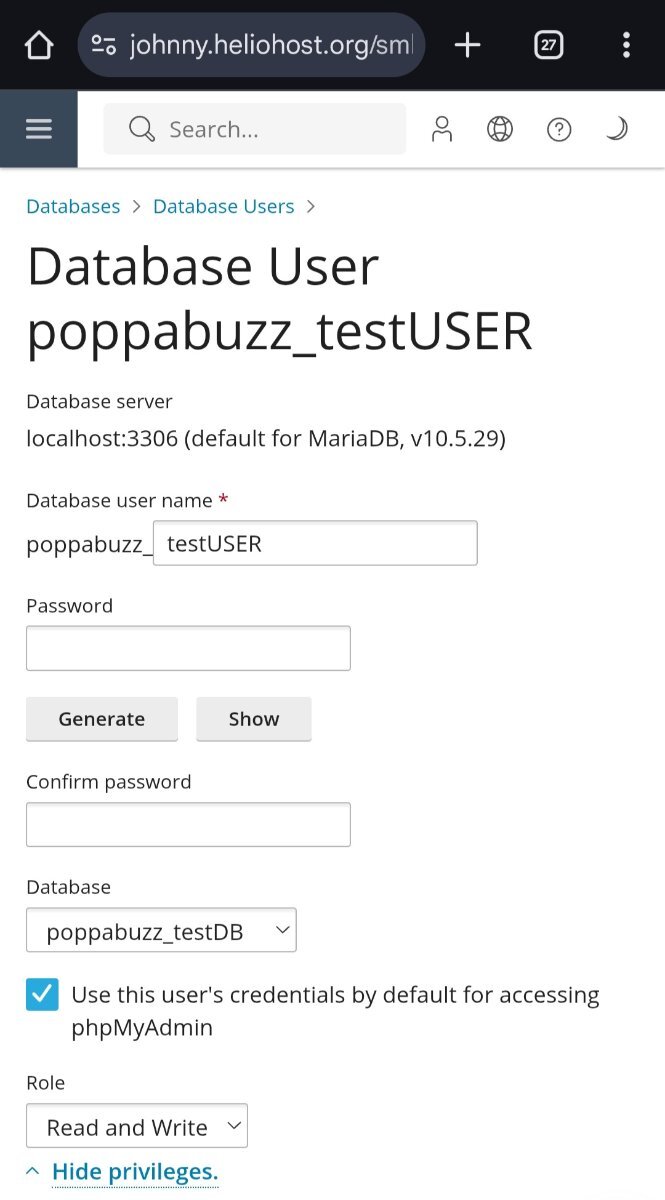
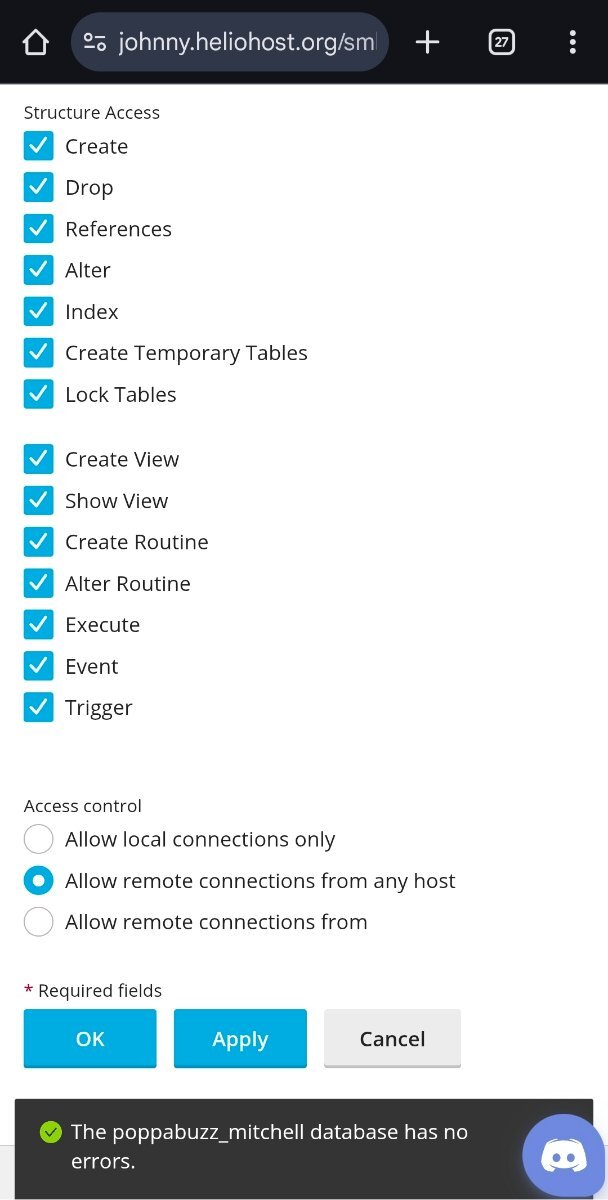
Here are screenshots of the settings.
-
Hello, I would like to add an additional domain: Ajira.org.uk Thanks
-

Add main domain, aliases and subdomains
centralmacatuba replied to centralmacatuba's topic in Escalated Requests
I will be using Cloudflare as my DNS provider. All domains and subdomains will point to HelioHost via A and AAAA records, not via nameservers. Wildcard subdomains will be handled at DNS level and internally by the application -
Add main domain, aliases and subdomains
centralmacatuba replied to centralmacatuba's topic in Escalated Requests
Hello, I would like to clarify how I intend to use domains and subdomains to respect the limit imposed by the service. On HelioHost, I intend to add only: Main domain: `centralmacatuba.eu.org` Main domain aliases: `centralmacatuba.qzz.io` `centralmacatuba.dpdns.org` In addition, only the following subdomains will be created directly in the panel, as they require their own directories: `mcp.centralmacatuba.eu.org` `cdn.centralmacatuba.eu.org` `teste.centralmacatuba.eu.org` All other subdomains (such as `jornal`, `mapa`, `tempo`, `informacoes`, `sos`, `servicos`, `cursos.servicos`, `docs.servicos`, `jogos.servicos`, `streaming.servicos`, `wiki.servicos`, `cm` and `*.jogos.servicos`) will not be added to the panel. They will be resolved externally via Cloudflare using CNAME records, pointing to the main domain, and handled internally by the application (via `.htaccess` / PHP), sharing the same files. Therefore: I don't exceed the domain/subdomain limit. I only use one physical website on the server. Subdomains function only as alternative routes. I would like to confirm if this approach is correct and in accordance with the service rules. Thank you in advance for your attention. -
centralmacatuba changed their profile photo
-
Weird. Not blocked. I'm not sure why this doesn't work considering you said you already enabled remote access. Let's have Krydos take a look.
-
 Account reset request received via email here: https://helionet.org/index/topic/66727-hh868594-hello-i-want-to-remove-the-agropeonycom-domain-from-my-hosting-and-keep-only-rvannet-i-want-to-rebuild-the-hosting-from-scratch-meaning-i-want-to-restore-all-files-and-everything-on-the-hosting-to-be-clean-thank-you/#comment-297745 I'll mark this thread as [Solved].
 -
Add main domain, aliases and subdomains
centralmacatuba replied to centralmacatuba's topic in Escalated Requests
Olá, Gostaria de esclarecer como pretendo utilizar os domínios e subdomínios para respeitar o limite imposto pelo serviço. No HelioHost, pretendo adicionar apenas: Domínio principal: `centralmacatuba.eu.org` Aliases do domínio principal: `centralmacatuba.qzz.io` `centralmacatuba.dpdns.org` Além disso, apenas os seguintes subdomínios serão criados diretamente no painel, pois precisam de diretórios próprios: `mcp.centralmacatuba.eu.org` `cdn.centralmacatuba.eu.org` `teste.centralmacatuba.eu.org` Todos os demais subdomínios (como `jornal`, `mapa`, `tempo`, `informacoes`, `sos`, `servicos`, `cursos.servicos`, `docs.servicos`, `jogos.servicos`, `streaming.servicos`, `wiki.servicos`, `cm` e `*.jogos.servicos`) não serão adicionados no painel. Eles serão resolvidos externamente via Cloudflare usando registros CNAME, apontando para o domínio principal, e tratados internamente pela aplicação (via `.htaccess` / PHP), compartilhando os mesmos arquivos. Dessa forma: Não ultrapasso o limite de domínios/subdomínios Utilizo apenas um site físico no servidor Os subdomínios funcionam apenas como rotas alternativas Gostaria de confirmar se essa abordagem está correta e de acordo com as regras do serviço. Obrigado desde já pela atenção. -
 shvlmr joined the community
 -
 grandmaenterpris joined the community
 -

[Solved] Request for access to FFMPEG
nihonjin98 replied to nihonjin98's topic in Escalated Requests
Nevermind I have managed to get it working. Thanks. -
This is the one I really care about: 104.21.50.86. This is the one I created just for testing purposes: 185.176.43.110.
-
It can take up to 2 hours for Node.js to start working after you enable it. You can read the documentation at https://wiki.helionet.org/Node.js Correct. Application root = / and document root = /httpdocs
-
 babyalexrecords changed their profile photo
 -
babyalexrecords joined the community
-
 archives free joined the community
 -
[Solved] Request for access to FFMPEG
nihonjin98 replied to nihonjin98's topic in Escalated Requests
I am trying to enable node.js but id doesnt seem to let me is this something you need to do? I also want to change the document root to a subfolder but i get permission denied. thanks -
Add main domain, aliases and subdomains
MoneyBroz replied to centralmacatuba's topic in Escalated Requests
These domains/subdomains far exceed the 10 domain limit we have. let us know which 10 domains would you like added. -
[Solved] Request for access to FFMPEG
nihonjin98 replied to nihonjin98's topic in Escalated Requests
Hi, To answer your question: I am using Node.js as my scripting language. Regarding my previous request for FFmpeg installation. I would like to cancel that request. I realized that my application uses WebAssembly (Client-Side FFmpeg), so the processing happens in the user's browser, not on your server. All I need is for my Node.js application (server.js) to run so it can serve the static files with the correct Cross-Origin security headers. I will handle uploading the necessary FFmpeg WASM files (in my /lib folder) myself. Thank you -
Which scripting language are you using?
-
[Solved] Request for access to FFMPEG
nihonjin98 replied to nihonjin98's topic in Escalated Requests
I appreciate your concerns but as mentioned my intention is not to do any video conversion whatsoever and happy to have my account suspended if I was to do otherwise and overload the server. My scan literally takes a few seconds and is not cpu intensive at all.