
Leaderboard



Popular Content
Showing content with the highest reputation on 04/21/25 in Posts
-
HelioHost has released a new YouTube video on how to install Nginx on a VPS. Check it out and subscribe at https://youtu.be/zHwWs7Tt2zc We are going to try to continue releasing new videos every 2 weeks, because some users find it much easier to follow a video guide rather than reading the text guides we have at https://wiki.helionet.org Please let us know if there is a specific topic that you think would be good for our next video. Also if you don't mind subscribing to our YouTube channel that would be a great way to get some free advertising. We are a small non-profit funded by donations so we don't have a huge budget to afford paid advertising, so the more word of mouth recommendations, the more social media likes, and the more subscribes we can get goes a long ways towards finding more users and continuing to grow. Even if you can't donate, this is a great way to help us for free. Thanks!1 point
-
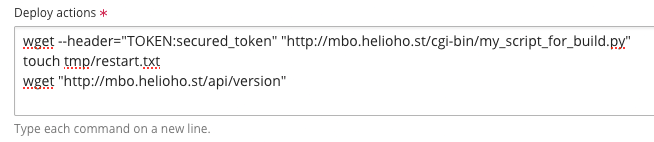
Here is the final final solution Here is the detail 1. wget --header="TOKEN:secured_token" "http://mbo.helioho.st/cgi-bin/my_script_for_build.py" : this cgi script contains the commands that run "npm install" + "npm run build" 2. touch tmp/restart.txt : after "npm run build" I need to restart the Node JS application, according to Plesk documentation it can be done by creating a file named "restart.txt" in folder "tmp" 3. wget "http://mbo.helioho.st/api/version" : when creating the file "tmp/restart.txt" the server will restart after the next request, that's why I immediately send a request to my application in order it to restart immediately after my new build
 1 point