


devashraf
-
Posts
43 -
Joined
-
Last visited
Posts posted by devashraf
-
-
Thank you very much.. the conenction was cloesed, but may be the constant FTP uploading/ downloadling was the problem. It was very small in size, but affected CPU usage.
I didn`t have this screen.. I got connection failure screen instead.
I`ll keep an eye on usage statistics.
Thanks again!
Ashraf -
Hello, I had difficulties reaching the server from yersterday, even from FTP.
I thought it was server outage, but when I logged into my account, I got an account termination notice.
I have no idea why this happened. -
Hello,
I'm writing to propose a new payment method for HelioHost that would work in countries where direct PayPal and traditional card payments via PayPal are restricted.
I have found that in my country, it is possible to purchase a PayPal balance card using a Visa or Mastercard. The recipient can then use this card to top up their PayPal balance.
This method requires the recipient's PayPal account number or the email address associated with the account.
I suggest that HelioHost accept this as a new payment method. Here is how it would work:
-
A customer would be able to see HelioHost's PayPal account email or ID on a visible page.
-
The customer would then purchase a PayPal balance card for the desired amount and provide it to HelioHost.
-
HelioHost would then use the card to top up its PayPal account.
-
Upon successful top-up, HelioHost would confirm payment completion.
I believe this method would be a valuable option for customers in regions with payment limitations.
Thank you for your consideration.
-
-
Please create this domain for me:
award-sci.helioho.st
Regards,Ashraf
-
FTP works now.
Very strange..Thank you very much.
Solved.
-
Thank you. It works now (However, it is slow as you mentioned"
I posted the details above.
I`ll try FTP again. -
Outgoing port tester
This server listens on all TCP ports, allowing you to test any outbound TCP port.
You have reached this page on port 1373 (from http host header).
Your network allows you to use this port. (Assuming that your network is not doing advanced traffic filtering.)
Network service: unknown
Your outgoing IP: 156.208.161.112Test a port using a command
$ telnet portquiz.net 1373
Trying ...
Connected to portquiz.net.
Escape character is '^]'.
$ nc -v portquiz.net 1373
Connection to portquiz.net 1373 port [tcp/daytime] succeeded!
$ curl portquiz.net:1373
Port test successful!
Your IP: 156.208.161.112
$ wget -qO- portquiz.net:1373
Port test successful!
Your IP: 156.208.161.112
# For Windows PowerShell users
PS C:\> Test-NetConnection -InformationLevel detailed -ComputerName portquiz.net -Port 1373
Test a port using your browser
In your browser address bar: http://portquiz.net:XXXX
Examples:
http://portquiz.net:8080
http://portquiz.net:8
http://portquiz.net:666Your browser can block network ports normally used for purposes other than Web browsing. In this case you should use the telnet or netcat commands to test the port.
Please also note that this server uses some port for real services (22, 25), so testing with your browser on those ports will not work.
Rate limiting
05/06/2020 : I had to set up Rate limiting on new connections by IP, otherwise the charge was too high for the small portquiz VM. Sorry for that.
Contact/feedback:
http://portquiz.net:1373/portquizm.pngSee also:
- Blog post on this topic and How it works
- Firebind, a commercial tester. javascript test
- outPorts, a tiny program to test a range of ports using portquiz
-
portquiz.net refused the connection - ERR_CONENCTION_REFUSED.
The same in home and at work. -
Sadly, no. A different problem appears now.
QuoteStatus: Connecting to johnny.heliohost.org:1373...
Response: fzSftp started, protocol_version=11
Command: open "devashraf@johnny.heliohost.org" 1373
Error: Connection timed out after 20 seconds of inactivity
Error: Could not connect to server
Status: Waiting to retry...
Status: Connecting to johnny.heliohost.org:1373...
Response: fzSftp started, protocol_version=11
Command: open "devashraf@johnny.heliohost.org" 1373
Error: Connection timed out after 20 seconds of inactivity
Error: Could not connect to server -
Hello,
I restored my account, and everything works fine.
However, FTP has a problem.
It logs in successfully, but once I click the folder to access it, it fails for a "permission error" (Directory /devashraf: permission denied).
I checked the settings, and set the password again, checked the setting being correct as per this page.
I use FileZilla.
Just to confirm, the problem happened after restoring the account. -
6 hours ago, wolstech said:
Apologies for our moderator's mistake. What domains do you need put back on the account?
I see you already recreated the account itself.
Thank you. I already requested the domains in anoter thread and they were successfully processed.
-
Hello,
Please create these sites under my "dev.ashraf" account:lpl.helioho.st
waken.helioho.st
waken-eg.helioho.st
pg.helipho.st
award-edu.helioho.stThank you.
-
I meant the specific site under the account.. not the full account.
I`m recreating the account now. Then, I`ll restore the backup into it. -
Hello,
I have this under my "dev.ashraf" account. (prize.radio alias for award-radio.helioho.st)
I want to delete the site, its files, its domain and its domain alias as well.
Thank you,Ashraf
-
Hello,
Please rename award.helioho.st to lpl.helioho.st .
Account name: dev.ashrafThank you.
-
Sorry for the delay. The bank was too slow processing some work.
I managed to move to Morty, however, the Egyptian authoriities block your payment processor (PayPal), so, the payment failed.
I used the card payment option, but it didn`t work. The bank confirmed to me that paypal payment gateway is banned as well, not just "paypal.com".
The solution is HelioHost adding an additional payment gateway, or the Egyptioan authorities allowing Paypal (if one of these ever happen in the future).
I request an admin deleting all files under "https://award-sci.helioho.st/mag/" and the asscoiated database "devashraf_wp603", so that the current suspension caused by the space which exceeded its limit gets fixed. I`ll have to use HelioHost services within the limit until something changes.
* I`m not willing to use the virtual cards such as DixiPay etc... I can`t use them either.
In addition, I have bad expericens with scammy paypal brokers etc.. -
Thank you.
I`ll do the move, without removing any files.
The card shall be ready for internet payment on 1st January. So, I`ll wait till this date.
-
Thank you for your replies. I`ll move to Morty and give it a try.
I found that my account is suspended for disk space. I`ll have to move to Tommy first, a bigger disk space plan, then to Morty.. am I right?
ٍShall I be able to move back to Tommy if wordpress problem persists?
-
I`ll see.. I may order a 1 month of VPS to try it.
Softaculous is a must-have in the control panel that shall be available there. Is it available?
I considered a light wordpress fork at Softaculous, but it doesn`t support most addons.
If it is for me, I can setup a database-less blog, But The Prize Scientific Society has to use specific scripts to comply with industry standards. (Wordpress, Open Journal System, etc...) instead of their alternatives. So, we have to stick with Wordpress, as its fork doesn`t support required addons..I was an RHCE, but now I am a tensorflow developer, I may be able to remember the commands etc, if I have to use the VPS.
-
Quote
mod_fcgid: read data timeout in 45 seconds, referer:
Seems that max_execution_time and FastCGI timeout need resetting to 120.
The settings are read-only in Plesk.
In addition, I can`t locate .htaccess, php.ini or .user.ini in the file manager.
Quote3417883#0: *230480 upstream timed out (110: Connection timed out) while connecting to upstream
In addition, proxy_read_timeout needs setting to 3600.
The settings are read-only in Plesk. In addition, I can`t locate the files.
QuoteEnd of script output before headers: index.php, referer: https://johnny.heliohost.org/
I don`t think I`ll inject CGI code into a WP page.
In addition, the main "index.php" is created by SiteJet builder. I will not edit it either.
.......................................................................................................................................As all (or most) of the above-mentioedn problems are caused by Apache, is is better disabling Apache (by disabling proxy mode under NGINX settings) ?
-
2024-12-27 13:17:15 Error 156.208.155.84 500 GET /mag/wp-admin/ HTTP/1.0 

1.22 K Apache SSL/TLS access 2024-12-27 13:18:00 Warning 156.208.155.84 mod_fcgid: read data timeout in 45 seconds, referer: https://johnny.heliohost.org/ Apache error 2024-12-27 13:18:00 Error 156.208.155.84 End of script output before headers: index.php, referer: https://johnny.heliohost.org/ Apache error 2024-12-27 13:18:02 Error 156.208.155.84 404 GET /favicon.ico HTTP/1.0
910 Apache SSL/TLS access 2024-12-27 13:28:57 Error 156.208.155.84 3417883#0: *230480 upstream timed out (110: Connection timed out) while connecting to upstream nginx error 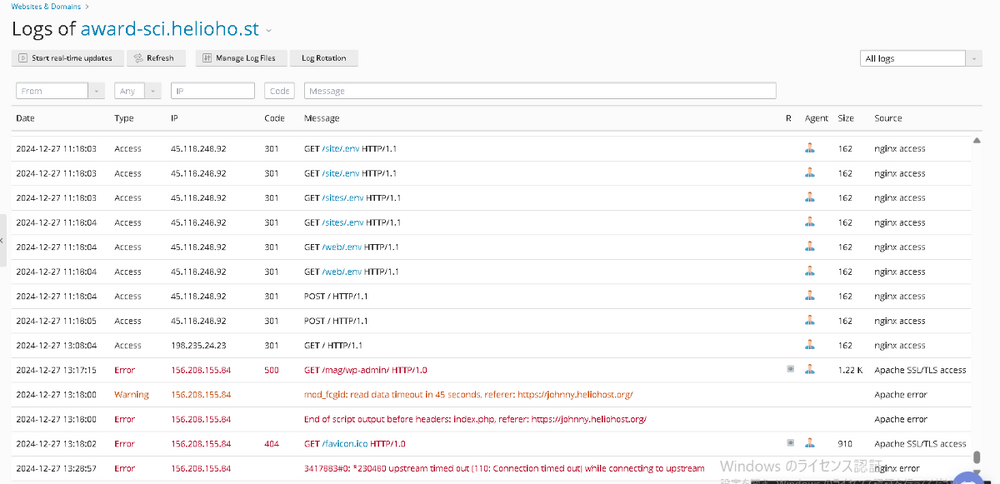
-
Hello,
I imported a wordpress installation.
Proscedures I did:
1- Uploading directory using FTP. The directory is "/award-sci.helioho.st/mag".
2- Noting database credentials in "wp-config.php".
3- Importing the database using PHPMyAdmin.
A. Created "devashraf_wp603".
B. Applied the same credentials, but I was forced to change only the second part (Exp. "prizesci.org_wp603" to "devashraf_wp603").
C. Applied the new namings back to "wp-config.php".
D. Checked localhost (mariadb). I`m not sure if this is the case, though. (MariDB or Postgre).
E. Imported the dump, checked "re-creare the database".
F. Changed the URLs to the new ones, manually, one by one in each record.
4- After that I did a sucessful softaculous import.
However, when I visit this url "https://award-sci.helioho.st/mag/wp-admin/" I get a "500 Internal server error".Any help shall be very much appreciated.
-
Hello,
I have 2 questions:
The first:
I can`t upgrade to Tommy 6GB plan unless I`m signed off.
If I upgrade from my account there`s only one choice, a 1USD upgrade.
Kindly guide me to the correct upgrade method. I`ll pay using a credit card.The second:
If I understand correctly, I`ll start with Tommy for the space, then shall move later to Moty for the additional resources (when needed).. as Morty plans have no details concerning web space amount.. Please confirm or correct me.
Regards,
-
16 hours ago, wolstech said:
This isn't actually something we can fix. It's how Plesk and Softaculous are designed.
Your home folder is always named after your main domain (though with the document root at httpdocs). Addon domains always appear as a folder at /home/<main domain>/<addon domain>. Softaculous doesn't understand the concept of addon domains very well, so it always treats /home/<main domain>/ as the root, resulting in data folders and the like ending up in the wrong place if you're installing software for an addon domain and don't change them.
Space calculations are equally weird on Plesk because of this. Everything in your home folder is counted as space used by your main domain unless it's inside an addon domain's folder, in which case it shows under the addon domain. The total is still 1000MB for the entire account though, it's just a difference in which domain it shows under in Plesk. I believe databases credit to the main domain unless you associate them with the addon domain. Keep in mind that disk space is only recalculated periodically, so you won't see a change instantly in the numbers shown in Plesk when you add/edit files.
Thank you for the clarification.
Seems to be Plesk`s problem with Softaculous. Previously, I used CPanel with no problems.

[Solved] Why was my account suspended? (devashraf)
in Suspended and Queued Accounts
Posted
I'm here to inform you that I had a bug in FileZilla Portable, where the conenction was not always closed after session end, and I have to manually simply press CTRL+D to close the connection.
This was caused the abnormal FTP activity flag.
Thank you.