
Leaderboard


Popular Content
Showing content with the highest reputation on 01/03/25 in Posts
-
Glad to see you got it working For others reading, mbo posted the full solution for running git deploy actions in his other topic on this issue: https://helionet.org/index/topic/63231-run-npm-script-in-git-deploy-actions/#comment-285227 Please let us know if you need anything else1 point
-
Glad to hear you got it working and thanks for posting the solution! The information posted will be helpful to others if they ever want to do the same thing. Please let us know if you need anything else.1 point
-
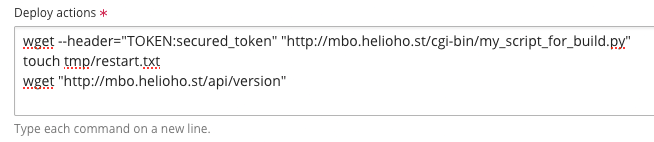
Here is the final final solution Here is the detail 1. wget --header="TOKEN:secured_token" "http://mbo.helioho.st/cgi-bin/my_script_for_build.py" : this cgi script contains the commands that run "npm install" + "npm run build" 2. touch tmp/restart.txt : after "npm run build" I need to restart the Node JS application, according to Plesk documentation it can be done by creating a file named "restart.txt" in folder "tmp" 3. wget "http://mbo.helioho.st/api/version" : when creating the file "tmp/restart.txt" the server will restart after the next request, that's why I immediately send a request to my application in order it to restart immediately after my new build
 1 point
 -
Hi @wolstech thank you for the fix, it solves my issue. Before creating the post I tried to disable Plesk SSL redirect, I didn't know I had to wait 2 hours so it didn't work, but now everything is fine. Concerning your remark concerning the mime type, I pretty sure that it is not related to my problem because I had the issue for a cgi script that returns a response with text/plain mime type.1 point